• About Me Card

Max Hemingway

~ Musings as I work through life, career and everything.

Max Hemingway

Category Archives: Uncategorized

I lost my Job to a Robot

21 Tuesday Aug 2018

Posted by Max Hemingway in Uncategorized

≈ 6 Comments

Robot ReplacementMonday morning, I arrived at the office to start the working week. I carried out my morning ritual of turning on my laptop and whilst waiting for it to run it boot up process and load all of its resident security and authorisation software, I grabbed my morning coffee. Upon returning to my desk and logging on, a message popped up for me to go and see my manager.

Knocking on her door, she invited me in, morning pleasantries and what did you do at the weekend conversation, she proceeded to tell me some bad news.

“I`m sorry but we are going to have to let you go. Your employment with the company is being terminated with immediate effect.”

There followed what felt like a long pause as this news sank in.

She continued “As you may know we have been working on a programme of automation within the business and there is now an automated process doing your job.”

I felt the ground open up beneath me and the huge sinking feeling cover my whole body.

I’d been replaced by a robot. Not a shinny looking Sci-Fi robot but a series of robotic processes had replaced me.

I was left asking myself a number of questions….. Why me? Where had I gone wrong? what could I have done? What should I do now?

Okay the above is a story (I haven’t lost my job not as far as I know), but it’s a conversation that people fear may happen with the innovation in todays world.

The world of computing, robots, robotic process automation machine learning and artificial intelligence is progressing at a rate where it could enhance jobs (Cobots) and maybe in the future replace some jobs altogether.

So what can you do to stop this happening in the future?  The key to this question lies with you. You have to have the right mindset and look at continuous learning and reinvention at a personal level.

Standing still in a job is no longer a safe place. The old utopia of a job for life as definitely expired (there may be one or two exceptions to this rule) but in the main its true.

Where ever you are in your career, you need to keep your skills up to date. The younger generations get this concept as they are growing up with it and its enforced from leaving school. The middle and older generations did do this but for the majority a level of complacency kicks in and you reach a plateau where you feel that learning anything new isn’t for you. Why should you spend your own personal time and money investing in your future.

Personal investment in time and some cost might seem like an invasion into your own “Personal Time”, but workplaces are changing/have changed to expect this as others are already doing this.

Access to information, training/courses has changed dramatically over the years with the internet and the growth in free online courses. There are lots of places you can gain skills and knowledge without spending much money or none at all. The ability to buy a full set of AWS or Microsoft course for £10.00 which would have been a lot more in the past (and have to be done in a classroom) is driving an explosion of certified individuals coming on to the market from leaving school, college, university. Experience does play a part in this, however this can be gained online these days. Its not the same for all industries though as some do require apprenticeships to gather the rights skills, but do you know the latest methods and skills to keep up?

Is the investment in time and money really worth it. Would you rather spend that £10.00 on something else and your time doing something else. Yes most probably, but what is the long term investment? For me it’s being employable and keeping the rest of my salary coming in.

Next time your sat on your couch watching TV, think could I invest this time more productively, then watch TV later as a reward for doing that bit of learning?

So you have been investing in your skillset and learning new things. How could that initial conversation have changed.

Monday morning, I arrived at the office to start the working week. I carried out my morning ritual of turning on my laptop and whilst waiting for it to run it boot up process and load all of its resident security and authorisation software, I grabbed my morning coffee. Upon returning to my desk and logging on, a message popped up from my Cobot/Automated Process for me to check some things that it couldn’t understand. I will enter the correct parameters this morning so the ML/AI engine can solve these issues in the future.. Also my manager wants to see me.

Knocking on her door, she invited me in, morning pleasantries and what did you do at the weekend conversation, I proceeded to explain my next idea for automating one of the existing processes and how I could reinvest my time in looking at additional process automation in the business, also doing some R&D into a new product that could help the business increase sales.

“That’s great news. When can you have the details ready by? Congratulations on your latest qualification, we could use your new skills on the Advent project. Would you like to do some work on that project?”

I go back to my desk and start to drink my now warm coffee, with the new tasks in hand and set my skills on changing the ML/AI engine to assist me further to allow some time to further my training on a new course that I want to do.

Related Blog Posts

A-Z of Digital – T is for Twenty First Century Digital

Digital Mindset

The Nature and Cycle of CPD

Recording your CPD

How much CPD/Training should you be doing?

Digital Fit in 2018: Balancing the Noise

A-Z of Digital – K is for Knowledge

A-Z of Digital – S is for Social


Share this:

  • Click to share on Facebook (Opens in new window) Facebook
  • Click to share on LinkedIn (Opens in new window) LinkedIn
  • Click to email a link to a friend (Opens in new window) Email
  • Click to share on Pinterest (Opens in new window) Pinterest
  • Click to share on Reddit (Opens in new window) Reddit
  • Click to share on X (Opens in new window) X
  • Click to share on Tumblr (Opens in new window) Tumblr
  • Click to share on Pocket (Opens in new window) Pocket
  • Click to share on Telegram (Opens in new window) Telegram
  • Click to share on Threads (Opens in new window) Threads
  • Click to share on WhatsApp (Opens in new window) WhatsApp
  • Click to share on Mastodon (Opens in new window) Mastodon
  • Click to share on Bluesky (Opens in new window) Bluesky
  • Click to share on Nextdoor (Opens in new window) Nextdoor
Like Loading...

xR (VR/AR/MR) Medical Conditions

17 Friday Aug 2018

Posted by Max Hemingway in Uncategorized, xR

≈ Leave a comment

Tags

Augmented Reality, Mixed Reality, Virtual Reality, xR

Need Coffee even in Virtual RealityI had an interesting question the other day – “Are there any known health/ medical complications from using VR and headsets”. This is one I had to research so thought I would put up some of my findings.

This is by no means a full investigation and mainly reference other articles, but makes for an interesting topic so I’ll use the TL;DR title as there is a lot of info here.

TL;DR

Firstly a definition – xR  refers to the various types of Reality available

  • Virtual Reality
  • Augmented Reality
  • Mixed Reality

Secondly – Everyone is different and xR may affect a person different ways if at all

Thirdly – I’m not trying to put anyone off using or trying an xR platform in any way.

Important note though – some if not all makers of xR equipment don’t recommend anyone with epileptic conditions or special sensitivities use headsets. You should check that vendors product details for further information on this.

If you Google (other search engines are available Virtual Reality Medical Complications then a fair few hits come back, but a lot less for Augmented and Mixed if any.

In Augmented and true Mixed Reality, you can see the real world and overlay virtual things on it. As the body can still see the real world it knows the effects are much less than putting a headset on and being immersed in a completely virtual world.

Everyone is different whilst some will feel no effect, some may.  A Business Insider article on the subject list the possible side effects as:

  • Loss of Spatial Awareness
  • Dizziness and Disorientation
  • Seizures (don’t use if you have an epileptic condition or special sensitivities)
  • Nausea
  • Eye Soreness and Trouble Focussing

For me these will depend on :

  • Type of headset used
  • Duration  of session
  • How person adapts to using the device

Eyesight

Will depend on a persons eyesight and prescriptions if any for lenses.  It will depend on the headset used as to if it adjusts automatically for the users eyes or glasses are needed inside the headset. Some headsets you can get prescription lenses for.

VR Sickness

There are stories and articles around the internet about VR Sickness and it does have its own Wikipedia page (https://en.wikipedia.org/wiki/Virtual_reality_sickness)

Recent article on Medium.com  https://medium.com/s/greatescape/when-working-in-virtual-reality-makes-you-sick-795a61f5e5dc

Motion sickness can be a factor – http://www.bbc.com/future/story/20150814-the-search-for-an-effective-cure-for-motion-sickness

Interesting discovery:

“Last year, a team led by Bethann Hromatka, a biomedical scientist at genetics company 23andMe looked across the entire human genome to see which genetic changes might increase a person’s likelihood of becoming motion sick. The research, published in Human Molecular Genetics, found links between motion sickness and genes involved with balance, eye, ear, and cranial development. In other words: motion sickness seems to be very much hereditary.”

http://www.bbc.com/future/story/20150814-the-search-for-an-effective-cure-for-motion-sickness

The longest video game marathon in Virtual Reality at this time is held by Jack McNee in Australia who on the 2nd April 2017 played for 36 Hours, 2 Minutes and 16 Seconds. (don’t try this one at home!).

Although I’ve yet to see the results of a full medical study into the effects of Virtual, Augmented and Mixed Reality to form an opinion.

When using xR you should check:

  • Does anyone have any epileptic condition or special sensitivities
  • First time you put the headset on if you feel strange  take it off.  Try again in a few mins.
  • Take regular breaks


Share this:

  • Click to share on Facebook (Opens in new window) Facebook
  • Click to share on LinkedIn (Opens in new window) LinkedIn
  • Click to email a link to a friend (Opens in new window) Email
  • Click to share on Pinterest (Opens in new window) Pinterest
  • Click to share on Reddit (Opens in new window) Reddit
  • Click to share on X (Opens in new window) X
  • Click to share on Tumblr (Opens in new window) Tumblr
  • Click to share on Pocket (Opens in new window) Pocket
  • Click to share on Telegram (Opens in new window) Telegram
  • Click to share on Threads (Opens in new window) Threads
  • Click to share on WhatsApp (Opens in new window) WhatsApp
  • Click to share on Mastodon (Opens in new window) Mastodon
  • Click to share on Bluesky (Opens in new window) Bluesky
  • Click to share on Nextdoor (Opens in new window) Nextdoor
Like Loading...

Journey to 21C Human – Getting your head space sorted

11 Wednesday Jul 2018

Posted by Max Hemingway in 21st Century Human, Productivity, Uncategorized

≈ 3 Comments

Tags

21st Century Human, Productivity

MeditationFollowing on from Episode 4 of Technologist Couch Podcast with Lewis Richards I have started the 10 for 10 that we discussed using Headspace.

However the service has had an upgrade and the Basic Level now includes 3 Basic sections so I’m going to spend the next month doing 30 for 30 instead.

The Headspace website describes these packs as:

  • Basics
    • Train your mind for a happier, healthier life by learning the fundamentals of meditation and mindfulness.
  • Basics 2
    • Discover more about your mind and start to deepen your practice.
  • Basics 3
    • Overcome some of the more common obstacles in meditation and learn how to apply mindfulness to your everyday life.

You can set these for 5 or 10 minute long sessions. 5 seems too short so I’m going for the 10 minute sessions and see what happens.

Andy Puddicombe, the man behind Headspace has a good 10 min Ted Talk as to why you should take 10 mins out a day.

Have you managed to clear 15 minutes in your busy schedule lately?

To confirm, I am no way associated or getting any funding/promotions from Headspace.

Share this:

  • Click to share on Facebook (Opens in new window) Facebook
  • Click to share on LinkedIn (Opens in new window) LinkedIn
  • Click to email a link to a friend (Opens in new window) Email
  • Click to share on Pinterest (Opens in new window) Pinterest
  • Click to share on Reddit (Opens in new window) Reddit
  • Click to share on X (Opens in new window) X
  • Click to share on Tumblr (Opens in new window) Tumblr
  • Click to share on Pocket (Opens in new window) Pocket
  • Click to share on Telegram (Opens in new window) Telegram
  • Click to share on Threads (Opens in new window) Threads
  • Click to share on WhatsApp (Opens in new window) WhatsApp
  • Click to share on Mastodon (Opens in new window) Mastodon
  • Click to share on Bluesky (Opens in new window) Bluesky
  • Click to share on Nextdoor (Opens in new window) Nextdoor
Like Loading...

Digital Fit in 2018: Build on your skills

23 Wednesday May 2018

Posted by Max Hemingway in Uncategorized

≈ 3 Comments

Skills.jpgKeeping your skills up to date is a key part of being Digitally Fit. There is no definitive list of training that should be undertaken to become “Digital”, it depends upon your role requirements, however there are some topic areas that should be considered as a base set of skills to expand on.

These topic areas have come from my post on having the right Digital Mindset.

  • Business
    • Change/Ambiguity
    • Agile Business Practices
    • Business Strategy and Investment
    • Customer Experience
  • Technology
    • Modern Architectures
    • Coding/Development
    • Agile Development
    • Cyber
  • Social
    • Social Media
  •  Personal
    • 21st Century Human
    • Human Dynamics
    • Design Thinking

The main this is to keep up a pattern of continuous learning and invest time into your learning to bring your skills up to the latest developments. This can be typically around 40-50 hours a year.

Recording your learning to show your advancement is a good way of keeping track of the topics and things you have learn’t along with the number of hours you have spent learning.

I use a CPD Cycle to remind me to reflect on what I have learnt and how I will apply it. Also what I need to relearn or expand on in future training.

CPD Cycle


What do you think at the key Digital Subjects and how do you record your learning?

Further Reading:

Digital Mindset

The Nature and Cycle of CPD

Recording your CPD

How much CPD/Training should you be doing?

Digital Fit in 2018: Balancing the Noise

Digital Fit in 2018: Start Blogging

Digital Fit in 2018: Get Social

Digital Fit in 2018: Build up a Readership

A-Z of Digital – K is for Knowledge

A-Z of Digital – S is for Social


Share this:

  • Click to share on Facebook (Opens in new window) Facebook
  • Click to share on LinkedIn (Opens in new window) LinkedIn
  • Click to email a link to a friend (Opens in new window) Email
  • Click to share on Pinterest (Opens in new window) Pinterest
  • Click to share on Reddit (Opens in new window) Reddit
  • Click to share on X (Opens in new window) X
  • Click to share on Tumblr (Opens in new window) Tumblr
  • Click to share on Pocket (Opens in new window) Pocket
  • Click to share on Telegram (Opens in new window) Telegram
  • Click to share on Threads (Opens in new window) Threads
  • Click to share on WhatsApp (Opens in new window) WhatsApp
  • Click to share on Mastodon (Opens in new window) Mastodon
  • Click to share on Bluesky (Opens in new window) Bluesky
  • Click to share on Nextdoor (Opens in new window) Nextdoor
Like Loading...

Digital Fit in 2018: Balancing the Noise

13 Tuesday Feb 2018

Posted by Max Hemingway in Digital, DigitalFit, Social Media, Uncategorized

≈ 5 Comments

Tags

Digital, DigitalFit, Social Media

Sound DeskListening is one of the key skills in life and it is also the same across the various information streams, however you can get flooded with “noise” that you need to filter out to get to the messages and content that you want to hear about.

I have written in the past about a Personal Knowledge Management System that can be used to help filter out noise and focus on the streams and information that is relevant to yourself.

We have many forms of information streams that can be tapped into such as email and social media platforms. It can take time to keep looking at each stream in turn and scrolling through the history. Many of the streams change at a very fast rate – for example how many people you follow on twitter and who you follow can make a difference. If your following a bot that basically picks up other tweets about a subject and re-tweets them you will be picking up a lot of traffic from many accounts.  This can be to coin and old phrase “drinking from the firehose”. You are only able to take in so much information.

Top 4 tips for Balancing the Noise:

  • Manage who you follow. If they get too noisy about things that you don’t want to know about you can unfollow them (and re follow them later)
  • Be wary of following too many bots as they can fill your streams quickly.
  • Think about using tools such as feedly to bring some streams together for viewing in a list.
  • Set up your own Personal Knowledge Management System

Further Reading:

Digital Mindset

Digital Fit in 2018: Start Blogging

Digital Fit in 2018: Get Social

Digital Fit in 2018: Build up a Readership

A-Z of Digital – K is for Knowledge

A-Z of Digital – S is for Social


Share this:

  • Click to share on Facebook (Opens in new window) Facebook
  • Click to share on LinkedIn (Opens in new window) LinkedIn
  • Click to email a link to a friend (Opens in new window) Email
  • Click to share on Pinterest (Opens in new window) Pinterest
  • Click to share on Reddit (Opens in new window) Reddit
  • Click to share on X (Opens in new window) X
  • Click to share on Tumblr (Opens in new window) Tumblr
  • Click to share on Pocket (Opens in new window) Pocket
  • Click to share on Telegram (Opens in new window) Telegram
  • Click to share on Threads (Opens in new window) Threads
  • Click to share on WhatsApp (Opens in new window) WhatsApp
  • Click to share on Mastodon (Opens in new window) Mastodon
  • Click to share on Bluesky (Opens in new window) Bluesky
  • Click to share on Nextdoor (Opens in new window) Nextdoor
Like Loading...

A-Z of Digital – H is for Hearable

20 Thursday Jul 2017

Posted by Max Hemingway in Uncategorized

≈ 1 Comment

microphone-1209816_1280Following on from my blog post outlining an A-Z of Digital, here is “H is for Hearable”.

A Hearable is a device that enhances or adapts our hearing. The most common developments in this area is the hearing aids to help with hearing and the headphones.

Hearing aids have come a long way from being a large unit sometimes carried on straps around the body to small devices that fit around the back of the ear. There have also been developments which implants have been used to enhance these devices helping the user to hear sounds. Headphones have also used these developments with Bluetooth earpieces that allow the user to listen and talk as an extension to a mobile phone.

Bone Conducting devices allow a device to be placed next to the ear and allow sound to be heard by sending sound from transducers to the inner ear through the skull. This technology allows the user to hear a conversation or sounds through the transducers whilst still being able to hear the surrounding environment. Popular with runners as they can hear the traffic for crossing the road whilst listening to a podcast or music.

Devices are being developed to provide Layering to the sounds to allow the filtering out of some sounds and allowing others. You can purchase noise cancelling headphones today that filter out all of the background noise, however some of this we may still need to hear. Going the other way, Personal Sound Amplifier’s are also available on the market for boosting sounds. Working in a similar way to a hearing aid, a search and rescue team use them for listening for small faint sounds of someone trapped under rubble in a building collapse. shrinking these devices and placing one in every teams ears increases the chances of someone being found in this scenario.

Language translation is another growing area in hearables. The Babel Fish first introduced in the Hitchhikers Guide to the Galaxy by Douglas Adams has spurred a range of companies to design a 21st century digital version in the form of hearable that can translate languages.

“The Babel fish is small, yellow, leech-like, and probably the oddest thing in the Universe. It feeds on brainwave energy received not from its own carrier, but from those around it. It absorbs all unconscious mental frequencies from this brainwave energy to nourish itself with. It then excretes into the mind of its carrier a telepathic matrix formed by combining the conscious thought frequencies with nerve signals picked up from the speech centres of the brain which has supplied them. The practical upshot of all this is that if you stick a Babel fish in your ear you can instantly understand anything said to you in any form of language. The speech patterns you actually hear decode the brainwave matrix which has been fed into your mind by your Babel fish”

Source: http://hitchhikers.wikia.com/wiki/Babel_Fish

We are not walking round with small, yellow, leech-like fish in our ears, however we are using the next best thing – the Earbud. Language translators and headphones are being modeled around this concept, providing a compact device that can fit inside your ear with enough charge to keep it running for a few hours and  recharging when placed back into its carry case.

The next level of hearables will probably take the form of thin tattoo electronics that could be placed on the skin around the ear and provide bone conduction through small. Hand Phone anyone?  (Total Recall 2012) Just place it against a solid surface…”


Share this:

  • Click to share on Facebook (Opens in new window) Facebook
  • Click to share on LinkedIn (Opens in new window) LinkedIn
  • Click to email a link to a friend (Opens in new window) Email
  • Click to share on Pinterest (Opens in new window) Pinterest
  • Click to share on Reddit (Opens in new window) Reddit
  • Click to share on X (Opens in new window) X
  • Click to share on Tumblr (Opens in new window) Tumblr
  • Click to share on Pocket (Opens in new window) Pocket
  • Click to share on Telegram (Opens in new window) Telegram
  • Click to share on Threads (Opens in new window) Threads
  • Click to share on WhatsApp (Opens in new window) WhatsApp
  • Click to share on Mastodon (Opens in new window) Mastodon
  • Click to share on Bluesky (Opens in new window) Bluesky
  • Click to share on Nextdoor (Opens in new window) Nextdoor
Like Loading...

A-Z of Digital – G is for Geolocation

12 Wednesday Jul 2017

Posted by Max Hemingway in Uncategorized

≈ 1 Comment

earth-2254769_640Following on from my blog post outlining an A-Z of Digital, here is “G is for Geolocation”.
The ability to track items and devices is a common technology these days with the prime example being a mobile phone. From being able to pin point a device using triangulation of cell towers being developed into onboard GPS passing location details into applications.

Geolocation provides one of the backbone services of Digital and IoT (Internet of Things) being able to track item or triggering things to happen at certain locations (Automating leaving a geolocation area).

An example of an application using Geolocation is Google. Having Google maps installed on your mobile device and being sigend in allows your location to be tracked. This has the advantages of providing related services:

  • Traffic Reports
  • Weather Reports
  • Location reviews
  • Local Photos
  • Events in the location

A new Location Sharing tool allows family members to share their locations with each other. There is also the ability to upload photos of locations based on the GPS tagged information that can be added to the photo when taken.

Location based events can also be triggered using beacons (such as Estimote Beacons) set in locations that can be triggered using applications such as Google or Physical Web. An example of this is beacons placed in a shopping mall by shops providing offers and discounts to those with the applications running, or using the beacons to track shoppers around the shop to identify browsing and buying patterns.

Leisure based activities and gaming are making use of geolocation with the ability to find things such as Geocaches, which has been around since 30 May 2000.  Geocaching has evolved to using additional beacons (such as Chirp) and GPS location tools to provide a popular game with over 2.5 million caches and 10 million registered users located around the world.

Games such as Pokemon Go use location and mapping to show Pokemon, Pokestops and Gyms in your area.

As with all services there are opt out options in the applications not to be tracked or give out location, however as we move to a more social and digital society does opting out mean your missing out on services and information.

Share this:

  • Click to share on Facebook (Opens in new window) Facebook
  • Click to share on LinkedIn (Opens in new window) LinkedIn
  • Click to email a link to a friend (Opens in new window) Email
  • Click to share on Pinterest (Opens in new window) Pinterest
  • Click to share on Reddit (Opens in new window) Reddit
  • Click to share on X (Opens in new window) X
  • Click to share on Tumblr (Opens in new window) Tumblr
  • Click to share on Pocket (Opens in new window) Pocket
  • Click to share on Telegram (Opens in new window) Telegram
  • Click to share on Threads (Opens in new window) Threads
  • Click to share on WhatsApp (Opens in new window) WhatsApp
  • Click to share on Mastodon (Opens in new window) Mastodon
  • Click to share on Bluesky (Opens in new window) Bluesky
  • Click to share on Nextdoor (Opens in new window) Nextdoor
Like Loading...

A-Z of Digital – F is for Fitness Trackers

11 Tuesday Jul 2017

Posted by Max Hemingway in Uncategorized

≈ 1 Comment

Fitness TrackerFollowing on from my blog post outlining an A-Z of Digital, here is “F is for Fitness Trackers”.

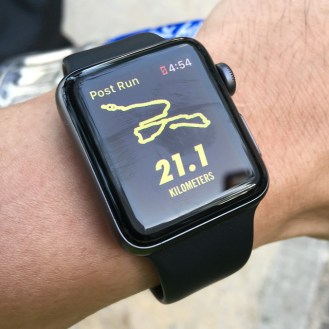
Fitness Trackers are one of the most popular wearables available today. They can take many forms with the most recognisable being ones worn on the wrist, others using capablities on mobile phones or devices worn on the chest or embeded into clothing.

The number of devices being sold in 2017 is estimated by Gartner to be around 176 million, taking the categories that have fitness tracking capabilities.

From a basic pedometer function to recording additional statistics such as Heart Rate, Location, Altitude etc. these devices are collecting and generating a huge amount of data. Mainly used on a personal basis, industries are now tapping into this information bank such as Health Care looking at monitoring the health of patients and Insurance companies looking at how an adaptive health insurance policy can be influenced by our fitness.

The power of this data can be seen in the data collected through a popular application called Strava which connects people together to record and share their activities. in 2016 350 million Strava activies were collected and the data is availble to view via Strava Labs which has clustered the information together over a map of the world. At a high level there doesnt look to be a lot of data highlighted however zooming in shows a lot of data in different areas around the world.

Businesses are starting to utilise these devices to benefit the business and employees by collecting data to monitor and analyse areas such as:

  • Employee Health – working in areas of concern
  • Monitoring for lone workers

The devices are also adapting and evolving to meeting this growing demand.

The trackers are only one part of a solution for collecting the information as shown in the Strava example an integrated analaytical back end is needed to gain useful meaning to the data.


Share this:

  • Click to share on Facebook (Opens in new window) Facebook
  • Click to share on LinkedIn (Opens in new window) LinkedIn
  • Click to email a link to a friend (Opens in new window) Email
  • Click to share on Pinterest (Opens in new window) Pinterest
  • Click to share on Reddit (Opens in new window) Reddit
  • Click to share on X (Opens in new window) X
  • Click to share on Tumblr (Opens in new window) Tumblr
  • Click to share on Pocket (Opens in new window) Pocket
  • Click to share on Telegram (Opens in new window) Telegram
  • Click to share on Threads (Opens in new window) Threads
  • Click to share on WhatsApp (Opens in new window) WhatsApp
  • Click to share on Mastodon (Opens in new window) Mastodon
  • Click to share on Bluesky (Opens in new window) Bluesky
  • Click to share on Nextdoor (Opens in new window) Nextdoor
Like Loading...

A-Z of Digital – E is for Evolution

06 Thursday Jul 2017

Posted by Max Hemingway in Uncategorized

≈ Leave a comment

earth-2254769_640Following on from my blog post outlining an A-Z of Digital, here is “E is for Evolution”.

Evolution covers the advancements and new technologies that are shaping the Journey to Digital.

The most impacting area that is shaping the conceptions around Digital is that of the end user devices. End user devices such as Tablets, Mobiles, Watches, Smart Glasses, Augmented Reality, Virtual Reality, 3D Printing, 360 Degree Cameras, Voice Activated Home Interfaces and Fitness Trackers are probably the most reported on items shaping how we consume and use services and data.

A good way to look at evolution is to recall the number of mobile phones you have had and how they have changed over the years from being large and heavy with the ability to just make a call to being a smartphone capable of providing information and take pictures as well as make a call.

The Evolution of the Mobile Phone in Pictures provides a brief history of these devices and how they have evolved.

From this evolution, the mobile phone is becoming the central hub of the connected person allowing connectivity of the devices that we wear and use and send data to and from the various related services.

Other areas of technology sees competition between vendors driving new developments as they become the first to patent and develop new technologies. Games consoles providing Virtual Reality capability with some vendors now developing Mixed Reality for future releases.

There are also lots of new ideas and products coming out of sites such as crowdfunding and crowd-sourcing sites, some work however some do fail or not enough funding is reached. These sites are worth tracking to see what developments are coming around the corner. (Sites such as https://www.kickstarter.com and https://www.indiegogo.com can provide a glimpse into what is being developed).

However there is as much innovation and development happening in the back end such as  Virtualisation, Cloud Computing, Containers, Micro-Services, API’s and Automation. These form an important part of the Digital Evolution as they help deliver the applications and delivery to the end user devices.

Examples of technologies proving containers and enabling micro-services would be a service running on Amazon Cloud, using Docker and Ansible to script automated deployments of servers and solutions with the ability to grow or shrink as need by a business or service.

It is important to understand what is available and feasible by taking advantage of today’s technologies as a step on the Journey to Digital, whilst also keeping a view on the future to help shape a roadmap for your business.


Share this:

  • Click to share on Facebook (Opens in new window) Facebook
  • Click to share on LinkedIn (Opens in new window) LinkedIn
  • Click to email a link to a friend (Opens in new window) Email
  • Click to share on Pinterest (Opens in new window) Pinterest
  • Click to share on Reddit (Opens in new window) Reddit
  • Click to share on X (Opens in new window) X
  • Click to share on Tumblr (Opens in new window) Tumblr
  • Click to share on Pocket (Opens in new window) Pocket
  • Click to share on Telegram (Opens in new window) Telegram
  • Click to share on Threads (Opens in new window) Threads
  • Click to share on WhatsApp (Opens in new window) WhatsApp
  • Click to share on Mastodon (Opens in new window) Mastodon
  • Click to share on Bluesky (Opens in new window) Bluesky
  • Click to share on Nextdoor (Opens in new window) Nextdoor
Like Loading...

A-Z of Digital – C is for Cobots

28 Wednesday Jun 2017

Posted by Max Hemingway in Uncategorized

≈ 2 Comments

CobotFollowing on from my blog post outlining an A-Z of Digital, here is “A is for Automation”.

Cobots are collaborative robots that work and interact with humans.

Wikipedia defines Cobots as:

A cobot or co-robot (from collaborative robot) is a robot intended to physically interact with humans in a shared workspace. This is in contrast with other robots, designed to operate autonomously or with limited guidance, which is what most industrial robots were up until the decade of the 2010s.

https://en.wikipedia.org/wiki/Cobot

Robots have been around for sometime within industries and work places mainly in manufacturing verticals. These are now moving towards being cobots with many research and development programs now underway within companies and academia to produce the next generation of cobots. From ones that help carry loads and work along side military personnel, assisting a production line assembling items alongside a skilled worker to cobots helping a medical technician with clinical research.

Robots have often been seen as a replacement for humans in many roles. Cobots, however are not, they instead work and interact with humans in various tasks and levels. Cobots have been around for the past few years, mainly in industrial workplaces such as manufacturing, automotive and supply chains. Their evolution is now bringing cobots into many other workplaces and use cases.

Source: Say ‘hello’ to your new colleague, the Cobot

Cobots will not replace jobs, but allow a different way of working to be experienced, helping to remove repetitive and tedious tasks allowing the more complex tasks and ones that need more time to be undertaken by the worker. As cobots are introduced into the workplace the adoption of new working practices will help to reduce stresses and improve the workplace.


Share this:

  • Click to share on Facebook (Opens in new window) Facebook
  • Click to share on LinkedIn (Opens in new window) LinkedIn
  • Click to email a link to a friend (Opens in new window) Email
  • Click to share on Pinterest (Opens in new window) Pinterest
  • Click to share on Reddit (Opens in new window) Reddit
  • Click to share on X (Opens in new window) X
  • Click to share on Tumblr (Opens in new window) Tumblr
  • Click to share on Pocket (Opens in new window) Pocket
  • Click to share on Telegram (Opens in new window) Telegram
  • Click to share on Threads (Opens in new window) Threads
  • Click to share on WhatsApp (Opens in new window) WhatsApp
  • Click to share on Mastodon (Opens in new window) Mastodon
  • Click to share on Bluesky (Opens in new window) Bluesky
  • Click to share on Nextdoor (Opens in new window) Nextdoor
Like Loading...
← Older posts
Newer posts →

Follow Me on LinkedIn

www.linkedin.com – Click to Follow 

RSS Feed

RSS Feed RSS - Posts

Other Publications I contribute to

https://sparrowhawkbushcraft.com/

Recent Posts

  • Graceful Speech & Timeless Tales: Breathing
  • The Quotient Revolution: Building the Well-Rounded Person
  • Ditch Resolutions: Embrace Habit-Building for Success
  • Pen based Productivity Tools: The Chronodex 2026
  • Understanding ETSI TS 104 223 and ISO/IEC 42006

Categories

  • 21st Century Human
  • 3D Printing
  • AI
  • Applications
  • ArchiMate
  • Architecture
  • Arduino
  • Automation
  • BCS
  • Big Data
  • Certification
  • Climate Change
  • Cloud
  • Cobotics
  • Connected Home
  • Data
  • Data Fellowship
  • Data Science
  • Development
  • DevOps/OpsDev
  • Digital
  • DigitalFit
  • Drone
  • Enterprise Architecture
  • F-TAG
  • Governance
  • Health
  • Innovation
  • IoT
  • Machine Learning
  • Metaverse
  • Micro:Bit
  • Mindset
  • Mobiles
  • Networks
  • Open Source
  • Podcasts
  • Productivity
  • Programming
  • Quantum
  • Raspberry Pi
  • Robotics
  • Scouting
  • Scouts
  • Security
  • Smart Home
  • Social Media
  • Space
  • STEM
  • Story Telling
  • Technologists Toolkit
  • Tools
  • Uncategorized
  • Wearable Tech
  • Windows
  • xR

Archives

Reading Shelf

Archives

Recent Posts

  • Graceful Speech & Timeless Tales: Breathing
  • The Quotient Revolution: Building the Well-Rounded Person
  • Ditch Resolutions: Embrace Habit-Building for Success
  • Pen based Productivity Tools: The Chronodex 2026
  • Understanding ETSI TS 104 223 and ISO/IEC 42006

Top Posts & Pages

  • Graceful Speech & Timeless Tales: Breathing
  • The Quotient Revolution: Building the Well-Rounded Person
  • Understanding ETSI TS 104 223 and ISO/IEC 42006
  • Ditch Resolutions: Embrace Habit-Building for Success
  • Pen based Productivity Tools: The Chronodex 2026
  • Transforming Ideas into Reality: The Human Spark in Tech
  • Lessons from my Grandmother’s Notebook: Rediscovering the Art of Speaking
  • Using the best of the Q Continuum
  • Graceful Speech & Timeless Tales: The Art of Articulation
  • The Role of Enterprise Architecture in Fostering Innovation

Category Cloud

21st Century Human Architecture Automation Big Data Cloud Data Data Science Development DevOps/OpsDev Digital DigitalFit Enterprise Architecture Innovation IoT Machine Learning Mindset Open Source Podcasts Productivity Programming Raspberry Pi Robotics Security Social Media STEM Story Telling Technologists Toolkit Tools Uncategorized Wearable Tech

Tags

3D Printing 21st Century Human AI Applications Architecture artificial-intelligence Automation BCS Big Data Blockchain business Certification Cloud Cobot Cobotics Coding Communication Connected Home CPD creativity cybersecurity Data Data Fellowship Data Science Delivery Development DevOps Digital DigitalFit Digital Human Drone Email Enterprise Architecture GTD Infographic Information Theory Innovation IoT Journal Knowledge learning Machine Learning Metaverse MicroLearning Mindset Mixed Reality Networks Open Source OpsDev PKMS Podcasts Productivity Programming Proving It Quantum R RaspberryPI Robot Robotics Scouts Security Smart Home Social Media STEM Story Telling Technologists Toolkit technology Technology Couch Podcast Thinking Tools Training Visualisation Voice Wearable Tech xR

License

Creative Commons Licence
This work is licensed under a Creative Commons Attribution-NonCommercial-ShareAlike 4.0 International License.

Meta

  • Create account
  • Log in
  • Entries feed
  • Comments feed
  • WordPress.com

Blog at WordPress.com.

  • Subscribe Subscribed
    • Max Hemingway
    • Join 82 other subscribers
    • Already have a WordPress.com account? Log in now.
    • Max Hemingway
    • Subscribe Subscribed
    • Sign up
    • Log in
    • Report this content
    • View site in Reader
    • Manage subscriptions
    • Collapse this bar
 

Loading Comments...
 

    %d