• About Me Card

Max Hemingway

~ Musings as I work through life, career and everything.

Max Hemingway

Category Archives: Tools

Digital Scouting

25 Monday Jan 2016

Posted by Max Hemingway in Development, Innovation, Programming, Tools

≈ 3 Comments

Tags

Development, Innovation, learning, Programming

digitalThere have been a series of new badges introduced by the Scouting movement. Two of these replace the traditional IT Staged Badge with a Digital Citizen and Digital Maker staged badge. These are aimed at giving young people skills in the digital age and help with STEM education.

These badges also teach young people to follow the Scouts digital manifesto:

The Scouts’ Digital Manifesto

  1. Use digital to learn and embrace new skills
  2. Share your adventures digitally and inspire others
  3. Know when to switch off, balancing screen time with outdoor activities
  4. Use digital skills to support your family and community
  5. Use digital to be creative
  6. Stay safe online and know the risks

Each of the badges provides 4/5 stages and builds on each stage. The badges can be earn’t from Beavers, through Cubs, Scouts and Explorers (ages 6 up to 18) so start with the basics, then build into writing apps.

These are a set of badges that I am looking forward to helping the local Scout Group out with. All I need to find for my local Scout Group is some spare Laptops or some Raspberry Pi’s…….Any offers welcome.

Perhaps there is a Scout group near you where you can help volunteer your skills with these badges.

Badge requirements

(Source: https://members.scouts.org.uk/supportresources/4282/digital-citizen-staged-activity-badge)

Digital Citizen – stage 1

How to earn your badge
Complete every task to achieve Stage 1, showing that you have thought about the potential risks and how to stay safe for each activity.

  1. Show that you can:
    • turn on and log into a computer
    • use a piece of software, for example email or a game
    • name the main parts of a computer system
    • connect a peripheral (for example a scanner or printer) to your computer and use it.
  2. Create a piece of digital media. It could be artwork, a photograph, music or animation.
  3. Use the internet for research:
    • decide on an area of interest
    • find three websites with content that matches your area of interest
    • collect relevant information by printing or saving as files.

Digital Citizen – stage 2

How to earn your badge
Complete every task to achieve Stage 2, showing that you have thought about the potential risks and how to stay safe for each activity.

  1. Plan and then create a piece of digital media. It could be artwork
    or a photograph that you alter using creative tools, music, animation, CAD (Computer Aided Design) or a 3D sculpture.
  2. Show that you can:
    • send or reply to someone with a short email and include an attachment
    • download photos or other media from a camera or smart card
    • open and save a document then share it using a cloud service (like Google Docs or Microsoft Sharepoint) or a USB stick
    • create a document that includes media that you’ve downloaded or copied from another source.
  3. Use the internet for research:
    • decide on an area of interest
    • use two different search engines to find three websites you think are reliable
    • collect information by printing the pages or saving  as PDF documents
    • select relevant information by copying text or an image and pasting into a document
    • display your findings as a poster or a short report.

Digital Citizen – stage 3

How to earn your badge
Complete every task to achieve Stage 3, showing that you have thought about the potential risks and how to stay safe for each activity.

  1. Plan, make, edit and share a piece of digital media. It could be
    artwork or a photograph that you alter using creative tools, music, animation, CAD (Computer Aided Design) or a 3D sculpture.
  2. Explore social networking sites that are appropriate for your age, then create an example of a good social network profile. Show that you know how to:
    • use anti-virus software
    • set up or adjust settings for accessibility
    • recover from a frozen programme or screen.
  3. Use the internet for research:
    • decide on a specific area of interest
    • use at least two different search engines, using operators like AND, NOT and OR in the search box
    • collect information by using bookmarks or favourites. Save URLs or use a social bookmarking tool like Diigo, Reddit, StumbleUpon, del.icio.us or digg.
    • select specific, reliable information relevant to your area of research
    • create a structured display of the information you have gathered. You could do this in a document, on a website or using a social tool such as Pinterest.
    • share your research with other people, for example by email, on the web, by MMS or social media.

Digital Citizen – stage 4

How to earn your badge
Complete every task to achieve Stage 4, showing that you have thought about the potential risks and how to stay safe for each activity.

  1. Create a portfolio of digital media. It might include artwork or a
    photograph that you alter using creative tools, music, animation, CAD (Computer Aided Design) or 3D sculpture.
  2. Create a film, video, stop-motion animation or podcast and share it using a suitable media sharing tool.
  3. Create a social network profile for your section, a band, local interest group or something similar. Alternatively you could make a small
    website that can host content, like the film you made in step 2, photos, poetry or information about your local area.
  4. Use the internet for research:
    • Choose a local, national, community or Scouting issue, or something from the news or current affairs.
    • Collect information from different sources, such as spreadsheets, databases, online news services and ‘open access’ data sources.
    • Put your information together in a structured way, for example grouping similar information. Make sure you know where each
      piece of information comes from.
    • Select the information you think is most appropriate and reliable.
    • Create a multi-page website with your information and make it public. Present your information in a variety of ways – you could
      use infographics, images or graphs.
    • Share your website with a wide audience.
    • Explain your sources of information and why you picked out what you did.
    • Get some feedback on what you have done and make changes to
      improve your website based on that feedback.

(Source: https://members.scouts.org.uk/supportresources/4283/digital-maker-staged-activity-badge)

Digital Maker – stage 1

How to earn your badge

  1. Connect computer peripherals or accessories, such as a screen and
    keyboard, and explain what job they do.
  2. Design a game:
    • Use role play to act out how your digital game would work. Play the game with a group of friends and change the rules.
    • Using paper, prototype a game and explain to someone how it works. You could video your explanation.
    • Evaluate and share your idea.
  3. Edit an existing website. You could change the design using a paper printout or software.
  4. Play a game with a friend where one of you acts the part of a robot and the other sends the robot commands. Record on paper what sort of commands worked best and which were hard for the ‘robot’ to follow.

Digital Maker – stage 2

How to earn your badge

  1. Connect two devices and exchange data between them using WiFi,
    Bluetooth or a cable.
  2. Show that you can use two different platforms or operating systems. They could be systems that run different devices such as computers,  tablets, phones or games consoles.
  3. Design a game:
    • Make a cartoon, animation or video of a game using a video camera or other equipment.
    • Create some pseudo code to explain how some parts of your game will work. Pseudo code is an instruction for the computer to follow, but is not written in a specific language.
    • Design a sequence of a game, like a whole level or an in-game puzzle.
  4. Design a single page website. You can use a design tool but writing HTML code would be fine too.
  5. Create a set of instructions for a programmable Robot, turtle or toy to
    follow. Games like Minecraft can help you do this.

Digital Maker – stage 3

How to earn your badge

  1. Show how to troubleshoot problems with computing equipment, such as hardware  devices and software updates.
  2. Make a prototype of a game using a suitable tool. It must include:
    • event conditions (when your game reacts to something that happens)
    • user movement controls
    • iteration (when your code or instructions are repeated)
    • variables (for scoring, health or counting things within the game).
  3. Build, design and publish a multipage website with working hyperlinks for navigation between the pages.
  4. Make a robot using prebuilt components.

Digital Maker – stage 4

How to earn your badge

  1. Set up a home network and connect it to the internet.
  2. Install or run an alternative operating system on a computer. Alternatively,  use a ‘Live DVD’ or USB stick.
  3. Design a game:
    • Build a game that includes progression and is fun and interesting to play.
    • Get someone else to play and evaluate it.
  4. Create a fully functioning website including linking to a database.
  5. Make a robot using a kit with components that respond to sensor input (for example, a robot that backs away from an object in its path).

Digital Maker – stage 5

How to earn your badge

  1. Install the software to run a web server and host a webpage on a  computer or other device. Tools like LAMP, WAMP or Google’s Webserver project for the Raspberry  Pi could help you. You can find these for free online.
  2. Make a game or app that serves a purpose. It should:
    • have a clear objective
    • be challenging for the user
    • have a clear sense of progression
    • keep a score
    • offer a reward to the user for playing (for example the score could unlock levels or icons).
  3. Make a website that serves a purpose, provides a good experience for the user and meets any legal requirements.
  4. Use off-the-shelf components to make your own robot that responds to the environment (for example a robot that reacts to light, its proximity to other objects or sound).


Share this:

  • Share on Facebook (Opens in new window) Facebook
  • Share on LinkedIn (Opens in new window) LinkedIn
  • Email a link to a friend (Opens in new window) Email
  • Share on Pinterest (Opens in new window) Pinterest
  • Share on Reddit (Opens in new window) Reddit
  • Share on X (Opens in new window) X
  • Share on Tumblr (Opens in new window) Tumblr
  • Share on Pocket (Opens in new window) Pocket
  • Share on Telegram (Opens in new window) Telegram
  • Share on Threads (Opens in new window) Threads
  • Share on WhatsApp (Opens in new window) WhatsApp
  • Share on Mastodon (Opens in new window) Mastodon
  • Share on Bluesky (Opens in new window) Bluesky
  • Share on Nextdoor (Opens in new window) Nextdoor
Like Loading...

Manual tasks of today should be the Automated tasks of tomorrow

11 Monday Jan 2016

Posted by Max Hemingway in Architecture, Development, DevOps/OpsDev, Innovation, Open Source, Productivity, Programming, Tools

≈ 10 Comments

Tags

Architecture, Development, DevOps, Open Source, Productivity, Tools

“Manual tasks of today should be the Automated tasks of tomorrow”.

CogsThere are lots of Automation tools available to people and businesses today to automate tasks that are carried out in a manual way. The pace at which this is happening is varying based on Habits and Patterns that we use on a daily basis. Also because change is involved which sometimes causes its own set of anxieties and issues.

Back in 2012 Bruno Oliveir published a graph on G+ on Geeks and repetitive tasks, which, shows a view of time vs task and how as geek vs non geek might approach automation.

geeks-vs-nongeeks-repetitive-tasks

An alternative view was published by Jon Udell in 2012 – Another way to think about geeks and repetitive tasks which shows an alternative view adding in more steps to show repetition.

alternate-view-of-automation

xkcd has an interesting view on the subject that does ring true in some cases where something does not exist and needs to be created in order to Automate.

automation

You need to be careful that in spending lots of time in trying to automate a task, that you don’t may spend more time in developing automation than could have been spent actually doing the task.

To get over this an element that is missing from these graphs is reuse and blueprints/patterns. The chances are that someone else has had a go at doing what your about to automate so there may be something to reuse rather than developing something yourself.

There are lots of tools and code repositories available today with more being developed. It will depend upon what you are automating as what to use.

Some of the tools available include;

  • Chef
  • Docker
  • Github
  • Jenkins
  • Jira
  • Powershell
  • Puppet

There are too many to list – lots of others available.

Using an Agile approach as well may reduce the length of the task size line on the graph as you do not need to boil the ocean to automate. Break up tasks into their components and you may find it easier to automate.

These tools are also bringing the geek and non geek lines together as Application’s and API’s make it easier for automation to be implemented. The plot of the graph changes into a repeatable process and in effect becomes a loop for both the geeks and non geeks.

Automate

So what will you automate today?


Share this:

  • Share on Facebook (Opens in new window) Facebook
  • Share on LinkedIn (Opens in new window) LinkedIn
  • Email a link to a friend (Opens in new window) Email
  • Share on Pinterest (Opens in new window) Pinterest
  • Share on Reddit (Opens in new window) Reddit
  • Share on X (Opens in new window) X
  • Share on Tumblr (Opens in new window) Tumblr
  • Share on Pocket (Opens in new window) Pocket
  • Share on Telegram (Opens in new window) Telegram
  • Share on Threads (Opens in new window) Threads
  • Share on WhatsApp (Opens in new window) WhatsApp
  • Share on Mastodon (Opens in new window) Mastodon
  • Share on Bluesky (Opens in new window) Bluesky
  • Share on Nextdoor (Opens in new window) Nextdoor
Like Loading...

An A-Z Guide to being an Architect

07 Thursday Jan 2016

Posted by Max Hemingway in Architecture, Big Data, Cloud, Development, DevOps/OpsDev, Enterprise Architecture, Governance, Innovation, IoT, Open Source, Productivity, Programming, Security, Social Media, Tools

≈ Leave a comment

Tags

Architecture, Cloud, CPD, Data, Development, DevOps, Innovation, IoT, Knowledge, learning, Open Source, OpsDev, Productivity, Programming, Social Media

Back in 2008 Microsoft published An A-Z Guide to ABCBeing an Architect in their Architecture Journals.

Here is my take on an updated A to Z Guide to being an Architect. A couple of these may be similar.

A – Architect

Having the right level of skills as an Architect or engaging an Architect with the right level of skills will depend on the work needing to be undertaken. There are several types of Architect with some specialising in certain areas and others being multi domain skilled. The list below covers some of the different types of Architect- this is not an exhaustive list:

  • Enterprise Architect
  • Information Architect
  • Solutions Architect
  • Software Architect
  • Systems Architect

B – Blueprints

Following Blueprints and Patterns either published by vendors (such as the Microsoft Blueprints) or developed internally around your products and services will ensure repeat-ability and cost control around the design process.

Some examples showing different pattern types can be found at Architecture Patterns

C – Contextual Web Era

The up and coming 4th Platform area is the Contextual Web Era

  • 1st Platform – Mainframe Era
  • 2nd Platform – Client Server Era
  • 3rd Platform – Cloud Era
  • 4th Platform – Contextual Web Era

This is an up and coming era with lots of new innovation and developments. Keeping up with developments is key going forward for any architect to understand designs/solutions, art of the possible now and future, innovation and for developing roadmaps for solutions.

D – DevOps

To quote Wikipedia – “DevOps (a clipped compound of “development” and “operations”) is a culture, movement or practice that emphasizes the collaboration and communication of both software developers and other information-technology (IT) professionals while automating the process of software delivery and infrastructure changes”. Having knowledge of DevOps, OpsDev and Agile assist with Architecting a solution for a business understanding their practices and modes of interacting with technology to meet business requirements. A Good book on the subject of DevOps is “The Phoenix Project” by Gene Kim.

E – Enterprise Architecture

EA (Enterprise Architecture) is a blueprint that defines how a business can meet its objectives and strategy. This is achieved by conducting analysis, design, planning, recommendations and implementations through an Enterprise Architecture Framework

Enterprise Architecture Wikibook

F – Four Two Zero One Zero

42010 is the ISO Standard that most frameworks adhere to. Working to a Framework brings structure to your designs and life cycles.

There are a number of frame works available such as:

  • DoDAF
  • MoDAF
  • TOGAF
  • Zachman
  • Other Frameworks are available

Enterprise Architecture Wikipedia Book

G – Governance

Governance is an important part of architecture as it

  • Ensures Conformance
  • Controls Variance
  • Maintains Vitality
  • Enables Communication
  • Sets Direction
  • Issue Resolution
  • Provides Guidance and Prioritisation
  • Promotes Best Practise
  • Minimises Risk
  • Protects IT environments from tactical IT changes, project solutions, and strategic proposals that are not in an organisations global best interest
  • Controlling Technical Diversity, Over-Engineering and Unnecessary Complexity
  • Ensures projects can proceed quickly & efficiently
  • Control over IT spend
  • Quality Standards
  • Efficient and optimal use of resources and increase the effectiveness of IT processes

H – Hands On

It is important to be current and understand the technologies you are architecting. There are lots of options available to get your hands dirty using technology from using Cloud Servers to virtual machines on your compute device. There are other computing devices such as the Raspberry PI that provide a cheap alternative to standing up small farms to learn on.

I – IoT

IoT (Internet of Things) is where physical things are connected by the internet using embedded sensors, software, networks and electronics. This allows the items to be managed, controlled and reported on. My blog posts on IoT Device Security Considerations and Security Layers goes into more detail on this subject.

J – Juxtaposition

Juxtaposition is something an architect should be doing to compare things/items/artefacts etc.
noun;
1. an act or instance of placing close together or side by side, especially for comparison or contrast.
2.the state of being close together or side by side.

Source:http://dictionary.reference.com/browse/juxtaposition

K – Knowledge

I would class Skills with Knowledge. It is important as an Architect to ensure that your skills/knowledge are up to date and where you are unsure of a technology, you have a plan to address and skill up. Build a good CPD (Continuing Professional Development) plan and work towards completing it.

L – Language

With the move to cloud it is important to ensure your scripting skills are up to date as most cloud platforms use scripting to assist with the deployment of environments. This is also true of other DevOps/OpsDev applications. If you are unsure on what to learn this guide may help you – Learn a Programming Language – But which one?

M -Micro Segmentation

Micro Segmentation allows a business to use Networks, Compute and Storage to automate and deliver complex solutions by carving up and using the infrastructure. This segments part of the infrastructures to specific functions/tasks. It can also be used in a security context to segment networks, firewalls, compute and storage to increase security and reduce cyber attacks.  VMware have produced a book “Micro Segmentation for Dummies” that can be downloaded from here.

N – Next Generation

Next Generation refers to the next stage or development to something such as a new release of hardware or software. Next Generation is becoming a common term now to define products and artefacts, an example being Next Generation Firewalls.

O – Open Source

Open Source has been available for a long time with software such a Linux, however there is a bigger shift towards using Open Source and acceptance by businesses. Some examples of Open Source that is now mainstream within business include;

  • Ansible
  • Chef
  • Docker
  • Puppet

P – Performance

Performance can cover people as well as solutions / systems. Performance metrics should be set out at the inception of an engagement then monitored and reported on. This will be a factor in driving Continuous Improvement going forward as well as forecasting / planning for future upgrades and expansion.

Q – Quality

Quality is a huge subject and has a lot if standards governing it and how it affects all aspects of business and architecture. Knowing which standards and how they affect a solution will assist in the whole architecture lifecycle. There are also a number of tools available to help you;

  • Architecture Frameworks
  • ITIL
  • Six Sigma

There is also a level of pride and satisfaction in producing a quality solution and system achieving the objectives and requirements set out by the business.

R- Roadmap

Any architecture/solution should have a roadmap to set out its future. Roadmaps should include items such as:

  • Current state
  • Future state
  • Innovation
  • Upgrades / Releases
  • New Features / Functions
  • End of Life / Replacement

S – SMAC

SMAC stands for Social, Mobile, Analytics, Cloud. SMAC is an acronym that covers the areas and concepts when these four technologies are brought together to drive innovation in business. A good description of SMAC written by a colleague can be found here Acronyms SMAC.

T – Transformation

The majority, if not all systems will undergo a form of transformation. This may be in the form of a simple upgrade or to a complex redesign and migration to something else.

U – UX

UX (User eXperience) affects how people interact with your architecture / design and how they feel about it (emotions and attitudes). With the boom in apps and the nearing Contextual Web Era, UX is one of the most important factors to getting an architecture used. If your users don’t like the system they may find something else to use that they like.

V – Vision

Understanding the vision of your customer and their business is the driving factor for any architecture.

On working with your customer you should look to become a Trusted Advisor and also with your colleagues. A great book on the subject is The Trusted Advisor by David Maister. The book covers 3 main areas which discusses perspectives on trust, the structure of trust building and putting trust to work.

W – WWW

The internet is a key delivery mechanism for systems. Knowing how this works and key components to the internet should be understood such as:

  • IPV4 – IPV6
  • DNS
  • Routing
  • Connectivity
  • Security

X – X86

X86 – is a standard that every knows as its one of the most common platform types available.

Y – Year

Year is for the longevity of the solution you are designing. How many years are your expecting it to last What are the Business Requirements, statutory obligations, depreciation etc that need to be planned in. Consider things like End of Life, Maintenance and Upgrades on hardware and software from a solution point of view.

Z – Zero Defects

The best solution is the one with zero defects, but reaching this goal can be a challenge and can also consume a lot of expense. The best way to ensure Zero Defects is to use:

  • Best Practice
  • Reference Architectures
  • Blueprints/Patterns
  • Checklists
  • Reuse
  • Lessons Learnt

This is my current A to Z and some of the entries may be different in your version so “What is in your A to Z of being an Architect?”

I will look to write some further blog posts on the areas listed in this A to Z

Share this:

  • Share on Facebook (Opens in new window) Facebook
  • Share on LinkedIn (Opens in new window) LinkedIn
  • Email a link to a friend (Opens in new window) Email
  • Share on Pinterest (Opens in new window) Pinterest
  • Share on Reddit (Opens in new window) Reddit
  • Share on X (Opens in new window) X
  • Share on Tumblr (Opens in new window) Tumblr
  • Share on Pocket (Opens in new window) Pocket
  • Share on Telegram (Opens in new window) Telegram
  • Share on Threads (Opens in new window) Threads
  • Share on WhatsApp (Opens in new window) WhatsApp
  • Share on Mastodon (Opens in new window) Mastodon
  • Share on Bluesky (Opens in new window) Bluesky
  • Share on Nextdoor (Opens in new window) Nextdoor
Like Loading...

Personal Knowledge Management System – Revised for 2016

06 Wednesday Jan 2016

Posted by Max Hemingway in Productivity, Social Media, Tools

≈ 5 Comments

Tags

Knowledge, Productivity, Social Media, Tools

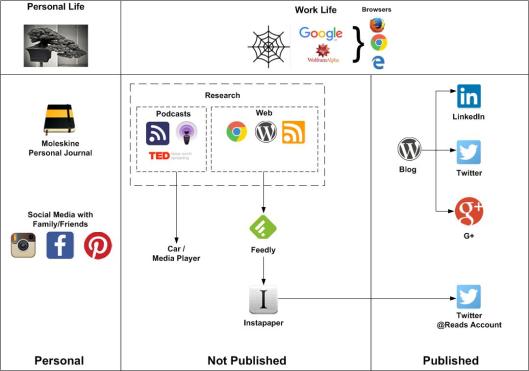
I originally blogged about my Personal Knowledge Management System back in January 2015 and as we are beginning 2016 its time to review it again. I use my Personal Knowledge Management System to collect, sort and store useful artefacts, blogs, information, inspiration, articles and bits I find on the web.

PKMS

Journal

Journalling in both a Personal and Work life is a useful tool to keep notes on your thoughts and ideas. In my personal life I opt for recording these in a Moleskine – See my blog post No batteries required for further details.

Personal Social Media

This side of life I separate from my work life using things like Instagram and Facebook.

Research

I have split this into two areas:

  • Podcasts
  • Web

Podcasts cover both Audio and Video casts that I watch/stream online or download to my Media Player to listen to on journeys.

Web I pull down into one feed to read using Feedly.

Feedly

I am using this to collect the stories from blogs and web sites I regularly ready. A good tip picked up in the office today from a colleague. This allows you to scan the articles in a few minutes on a single screen without going via multiple sites. Using a series of key strokes you can read the headlines, then move down the articles, opening each one on the screen if you so wish.

Instapaper

I am using Instapaper to store the articles that I like and want to save. This is done via a manual process at the moment.

Twitter

Apart from my normal twitter account (link at the side of the screen) I now have a twitter account to show what I am currently reading. @HemingwayReads

Publishing my Blog

I publish my blog using WordPress which then posts to Twitter, Linkedin and G+ (While its still going)

Further Inspiration from others

Some other good Personal Knowledge Management Systems from my colleagues to read are:

  • Graham Chastney – How I process information
  • Stuart Downes – My Personal Knowledge Management Systems
  • Steve Richards – My personal work style


Share this:

  • Share on Facebook (Opens in new window) Facebook
  • Share on LinkedIn (Opens in new window) LinkedIn
  • Email a link to a friend (Opens in new window) Email
  • Share on Pinterest (Opens in new window) Pinterest
  • Share on Reddit (Opens in new window) Reddit
  • Share on X (Opens in new window) X
  • Share on Tumblr (Opens in new window) Tumblr
  • Share on Pocket (Opens in new window) Pocket
  • Share on Telegram (Opens in new window) Telegram
  • Share on Threads (Opens in new window) Threads
  • Share on WhatsApp (Opens in new window) WhatsApp
  • Share on Mastodon (Opens in new window) Mastodon
  • Share on Bluesky (Opens in new window) Bluesky
  • Share on Nextdoor (Opens in new window) Nextdoor
Like Loading...

Pen Based Productivity Tools – The Chronodex 2016

15 Tuesday Dec 2015

Posted by Max Hemingway in Productivity, Tools

≈ Leave a comment

Tags

GTD, Productivity, Tools

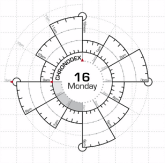
ChronodexI have blogged several times now about Pen Based Productivity Tools and a particular favourite is still the Chronodex by Patrick Ng.

Its good to see the 2016 Chronodex released for Jan to Jun 2016, but also a Chronodex Daily Scheduler and GTD To-do List option.

Link to downloads:

http://scription.typepad.com/blog/2015/12/scription-chronodex-weekly-planner-jan-jun-2016-released.html

This is primarily meant for the Midori Traveller Notebook system, but can be used without.

There is still a place for journalling using a pen rather than a blog post as discussed here No Batteries Required: My Personal Journal.  I’m now on Journal 16 as an update since that post.


Share this:

  • Share on Facebook (Opens in new window) Facebook
  • Share on LinkedIn (Opens in new window) LinkedIn
  • Email a link to a friend (Opens in new window) Email
  • Share on Pinterest (Opens in new window) Pinterest
  • Share on Reddit (Opens in new window) Reddit
  • Share on X (Opens in new window) X
  • Share on Tumblr (Opens in new window) Tumblr
  • Share on Pocket (Opens in new window) Pocket
  • Share on Telegram (Opens in new window) Telegram
  • Share on Threads (Opens in new window) Threads
  • Share on WhatsApp (Opens in new window) WhatsApp
  • Share on Mastodon (Opens in new window) Mastodon
  • Share on Bluesky (Opens in new window) Bluesky
  • Share on Nextdoor (Opens in new window) Nextdoor
Like Loading...

Pen based Productivity Tools – Chronodex Daily Scheduler and GTD

28 Monday Sep 2015

Posted by Max Hemingway in Productivity, Tools

≈ 2 Comments

Tags

GTD, Productivity, Tools

ChronodexI have blogged about the Chronodex a couple of times now as a Pen based Productivity Tool.

  • Pen based Productivity Tools – The Chronodex
  • Pen based Productivity Tools – The Chronodex – Part 2

This tool has now been enhanced and developed further into a Daily Scheduler and GTD (Get Things Done) Pen based tool.

Chronodex Daily Scheduler and GTD To-do List.pdf

Whilst nothing new in realms of GTD Tools, this is for the Midori Travellers Notebook for those who prefer a paper based “thing” opposed to an electronic “thing” and sets out an easy to use daily page. It can be used in a standalone version if a Midori is not owned.

Source :http://scription.typepad.com/

Share this:

  • Share on Facebook (Opens in new window) Facebook
  • Share on LinkedIn (Opens in new window) LinkedIn
  • Email a link to a friend (Opens in new window) Email
  • Share on Pinterest (Opens in new window) Pinterest
  • Share on Reddit (Opens in new window) Reddit
  • Share on X (Opens in new window) X
  • Share on Tumblr (Opens in new window) Tumblr
  • Share on Pocket (Opens in new window) Pocket
  • Share on Telegram (Opens in new window) Telegram
  • Share on Threads (Opens in new window) Threads
  • Share on WhatsApp (Opens in new window) WhatsApp
  • Share on Mastodon (Opens in new window) Mastodon
  • Share on Bluesky (Opens in new window) Bluesky
  • Share on Nextdoor (Opens in new window) Nextdoor
Like Loading...

How to write a Short Biography for your CV and LinkedIn profile

18 Tuesday Aug 2015

Posted by Max Hemingway in Tools

≈ Leave a comment

Tags

Tools

QuillI have been asked a few times on how I have compiled my biography on my LinkedIn Profile so have written this post to help. There are many ways to do this and different formats.

A biography or simply bio is a detailed description or account of a person’s life

Bibliography

(n.d.). Biography. Retrieved from Wikipedia: http://en.wikipedia.org/wiki/Biography

The aim of a Biography on your CV or LinkedIn Profile is to provide a short paragraph about yourself.  This ideally should be a single paragraph that is to the point and informs the reader of your background, expertise and skills. It can also be used to enhance your CV.

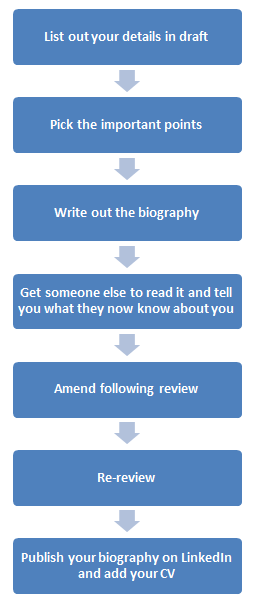
When forming your Biography I have found the best way is to follow this framework (Click picture for a bigger version).

Bio1

Listing your details

Your details for the Short Biography may seem hard to bring to mind, so this page is aimed to help categorise the information. Having an up to date CV and using this as a source of information also helps compile your biography. This list is by no means exhaustive, although remember – this is a short biography.

Getting the information into a logical order brings the story to the biography and the table below is based around one possible layout of the information (Click pictures for a bigger version).

Bio2

Bio3

Picking the right points

This will in the main be down to the information you have recorded. When doing this stage, think about the reader and what they would like to know about you in the 2 minutes they will spend reading your biography. You only need to pick the top 1 or 2 in each area. Highlight or mark these to use in the next stage.

Writing the Biography

The key to writing a Short Biography is to be factual, to the point, structured and start with the most important facts to draw the reader in.

Write out the points into a series of short sentences that follow the logical order to make a short history of your working life. Below is an earlier version of my biography as an example of how this could work.

I am a highly experienced Architect with 27 years working in the IT Industry.  I have extensive knowledge in the design and deployment of platform, systems and network architectures to support both web and traditionally based business applications and services. Proven track record acquired through continual client engagement and delivery of leading edge infrastructures, all of which have delivered positive results for end-clients, including IT cost reduction, expansion of service capability and increased revenues. I am a Fellow of the British Computer Society, Chartered IT Professional.

Review

Getting your biography reviewed before you publish is a good test to check what you have written and that you have got your key messages in the biography.  This could be a colleague, friend, mentor or someone you dont know. Ask the reviewer to feed back to you what they have learnt about you.

Share this:

  • Share on Facebook (Opens in new window) Facebook
  • Share on LinkedIn (Opens in new window) LinkedIn
  • Email a link to a friend (Opens in new window) Email
  • Share on Pinterest (Opens in new window) Pinterest
  • Share on Reddit (Opens in new window) Reddit
  • Share on X (Opens in new window) X
  • Share on Tumblr (Opens in new window) Tumblr
  • Share on Pocket (Opens in new window) Pocket
  • Share on Telegram (Opens in new window) Telegram
  • Share on Threads (Opens in new window) Threads
  • Share on WhatsApp (Opens in new window) WhatsApp
  • Share on Mastodon (Opens in new window) Mastodon
  • Share on Bluesky (Opens in new window) Bluesky
  • Share on Nextdoor (Opens in new window) Nextdoor
Like Loading...

Is Upgrading to Windows 10 Plain Sailing?

11 Tuesday Aug 2015

Posted by Max Hemingway in Tools, Windows

≈ 1 Comment

Tags

Tools, Windows

I decided to take the plunge and join the other 14 million Windows users who have downloadmouseed and upgraded to Windows 10.

Expecting a good experience and easy upgrade I was soon put right on my expectations.

After backing up my data, I followed the Windows Update method of upgrade. My PC downloaded the Windows 10 upgrade and after a while it started to install. Unfortunately my device hung. The only way out was a reboot, so reluctantly the power was recycled.

My PC rebooted back into Windows 8.1 and then started to download the upgrade again! – Same issue occured.

This time I downloaded the ISO image to a DVD and got similar results.

After several times of being stuck in this loop and concluding that my current Windows 8.1 build was corrupt in some way I decided that the only way this upgrade was going to get done was to clean my PC back to its original build and then upgrade.

A reboot straight from the Windows 10 image was fruitless as Windows did not pick up the fact that my device has its Windows Key held in the BIOS at manufacturing time.

Luckily my PC has its build disks on a separate partition so an ALT + F10 was all that was needed to wipe and rebuild back to Windows 8.

With the PC booted up and Windows 10 DVD in, I was able to finally upgrade, remembering to lock down a number of the security settings enroute through the screens.

Build done I then put Office back onto the PC. This was followed by a number of Updates to both Office and Windows 10.

Great back and working. A couple of days later and another Windows 10 Update received I found another issue. Outlook would no longer send emails. Receiving emails still worked.

I carried out some research and it appears that somewhere between Windows 10 and Office some of the config files were out of place and it prevented emails working.

This issue seems to be common for some specific configurations although the actual cause isn’t clear at this point. It can happen with any version of Outlook.

http://www.msoutlook.info/question/cannot-send-after-windows-10-upgrade

I followed this sites instructions and ran the  “sfc /scannow” command in a command prompt with admin privileges. This command sorts out the critical Office files and places them back where they need to be after an upgrade to Windows 10.

So far everything seems to be back in working order, but the upgrade was not an easy thing to carry out. I had similar issues on a different machine with the email not sending. Perhaps a further patch is needed to sort this issue out properly.

Anyone else had issues with their upgrades?

Share this:

  • Share on Facebook (Opens in new window) Facebook
  • Share on LinkedIn (Opens in new window) LinkedIn
  • Email a link to a friend (Opens in new window) Email
  • Share on Pinterest (Opens in new window) Pinterest
  • Share on Reddit (Opens in new window) Reddit
  • Share on X (Opens in new window) X
  • Share on Tumblr (Opens in new window) Tumblr
  • Share on Pocket (Opens in new window) Pocket
  • Share on Telegram (Opens in new window) Telegram
  • Share on Threads (Opens in new window) Threads
  • Share on WhatsApp (Opens in new window) WhatsApp
  • Share on Mastodon (Opens in new window) Mastodon
  • Share on Bluesky (Opens in new window) Bluesky
  • Share on Nextdoor (Opens in new window) Nextdoor
Like Loading...

Reference Architectures for DevOps and Continuous Delivery

10 Monday Aug 2015

Posted by Max Hemingway in DevOps/OpsDev, Tools

≈ 1 Comment

Tags

Continuous Delivery, DevOps, OpsDev

There are a lot of different Reference Architectures available for DevOps and Continuous Delivery. Derek E Weeks has brought together some of the most common ones into two presentations:

  •  DevOps and Continuous Delivery Reference Architectures – Volume 1
  •  DevOps and Continuous Delivery Reference Architectures – Volume 2

A useful reference source.

Share this:

  • Share on Facebook (Opens in new window) Facebook
  • Share on LinkedIn (Opens in new window) LinkedIn
  • Email a link to a friend (Opens in new window) Email
  • Share on Pinterest (Opens in new window) Pinterest
  • Share on Reddit (Opens in new window) Reddit
  • Share on X (Opens in new window) X
  • Share on Tumblr (Opens in new window) Tumblr
  • Share on Pocket (Opens in new window) Pocket
  • Share on Telegram (Opens in new window) Telegram
  • Share on Threads (Opens in new window) Threads
  • Share on WhatsApp (Opens in new window) WhatsApp
  • Share on Mastodon (Opens in new window) Mastodon
  • Share on Bluesky (Opens in new window) Bluesky
  • Share on Nextdoor (Opens in new window) Nextdoor
Like Loading...

Habits and Patterns

27 Monday Jul 2015

Posted by Max Hemingway in Architecture, Tools

≈ 1 Comment

Tags

Architecture, Tools

During my recent vacation I was staying along the “Dinosaur Coast” in the UK and took my son fossil hunting along the coastline.  Along the way were several other fossil hunters ranging from Amateurs to Semi Professionals.fossil

The thing I noticed observing the other hunters was their habits and methods used in searching the rock faces and surrounding areas in finding fossils.

These ranged from random searches and tapping on rocks with a hammer to careful methodical searching and testing of the rock.

Much in the same was I have observed in my time as an Architect and in business of peoples habits and patterns, however it was more noticeable as I was not in my normal bubble of work/life.

We tend to apply a pattern based on our own skills, knowledge and behaviours that we are comfortable with. Perhaps we should challenge our own habits and look at where efficiencies and benefits can be brought in.

A habit (or wont) is a routine of behaviour that is repeated regularly and tends to occur unconsciously.

– Wikidpedia

A good reference on habit is “The Power of Habit” by Charles Duhigg. Duhigg explains why habits exist and how they can be changed.

With patterns we can create, change or learn based on our needs. Patterns provide that repeatability that is needed for some tasks and solutions.

A pattern, apart from the term’s use to mean “Template”, is a discernible regularity in the world or in a manmade design. As such, the elements of a pattern repeat in a predictable manner.

– Wikipedia

A good reference for patterns is by Christopher Alexander

Each Patterns describes a problem which occurs over and over again in our environment, and then describes the core of the solution to that problem, in such a way that you can use this solution a million times over, without ever doing it the same way twice.

– Christopher Alexander

Alexander defines a ‘pattern’ as a three part construct.

  • First comes the ‘context’; under what conditions does this pattern hold
  • Second is a ‘system of forces’. In many ways it is natural to think of this as the ‘problem’ or ‘goal’.
  • Third is the ‘solution’; a configuration that balances the system of forces or solves the problems presented.

By observing the other fossil hunters and their habits and patterns, we successfully found a couple of good Annomite and Belemnite fossils by Learning from others.

My lesson learnt on this vacation is to “Challenge the habits and create/follow a pattern where possible”.

Share this:

  • Share on Facebook (Opens in new window) Facebook
  • Share on LinkedIn (Opens in new window) LinkedIn
  • Email a link to a friend (Opens in new window) Email
  • Share on Pinterest (Opens in new window) Pinterest
  • Share on Reddit (Opens in new window) Reddit
  • Share on X (Opens in new window) X
  • Share on Tumblr (Opens in new window) Tumblr
  • Share on Pocket (Opens in new window) Pocket
  • Share on Telegram (Opens in new window) Telegram
  • Share on Threads (Opens in new window) Threads
  • Share on WhatsApp (Opens in new window) WhatsApp
  • Share on Mastodon (Opens in new window) Mastodon
  • Share on Bluesky (Opens in new window) Bluesky
  • Share on Nextdoor (Opens in new window) Nextdoor
Like Loading...
← Older posts
Newer posts →

Follow Me on LinkedIn

www.linkedin.com – Click to Follow 

RSS Feed

RSS Feed RSS - Posts

Other Publications I contribute to

https://sparrowhawkbushcraft.com/

Recent Posts

  • 35 Informative Tech Websites for 2026: Enhance Your PKMS
  • Unlocking the Benefits of Journaling
  • Mastering Engaging Presentations: Tips for Captivating Your Audience
  • The Business Value of Enterprise Architecture Explored
  • Celebrating 150+ Hours of STEM Impact

Categories

  • 21st Century Human
  • 3D Printing
  • AI
  • Applications
  • ArchiMate
  • Architecture
  • Arduino
  • Automation
  • BCS
  • Big Data
  • Certification
  • Climate Change
  • Cloud
  • Cobotics
  • Connected Home
  • Data
  • Data Fellowship
  • Data Science
  • Development
  • DevOps/OpsDev
  • Digital
  • DigitalFit
  • Drone
  • Enterprise Architecture
  • F-TAG
  • Governance
  • Health
  • Innovation
  • IoT
  • IT Strategy
  • Machine Learning
  • Metaverse
  • Micro:Bit
  • Mindset
  • Mobiles
  • Networks
  • Open Source
  • Podcasts
  • Productivity
  • Programming
  • Quantum
  • Raspberry Pi
  • Robotics
  • Scouting
  • Scouts
  • Security
  • Smart Home
  • Social Media
  • Space
  • STEM
  • Story Telling
  • Technologists Toolkit
  • Tools
  • Uncategorized
  • Wearable Tech
  • Windows
  • xR

Archives

Reading Shelf

Archives

Recent Posts

  • 35 Informative Tech Websites for 2026: Enhance Your PKMS
  • Unlocking the Benefits of Journaling
  • Mastering Engaging Presentations: Tips for Captivating Your Audience
  • The Business Value of Enterprise Architecture Explored
  • Celebrating 150+ Hours of STEM Impact

Top Posts & Pages

  • 35 Informative Tech Websites for 2026: Enhance Your PKMS
  • Unlocking the Benefits of Journaling
  • My Virtual Selfie - Avatars and Identity Security
  • Mastering Performance Under Pressure: The Importance of Training
  • A-Z of Digital – Z is for Zabeta
  • The Importance of ArchiMate and UML in Modern Organisations
  • Technology Couch Podcast – Episode 3
  • Stay Ahead of the Curve: Essential Strategies for Technologists to Stay Informed
  • 2026 PKMS Updates: Boost Productivity and Knowledge Retention
  • Lunch? No I've got a meeting!

Category Cloud

21st Century Human Architecture Big Data Cloud Data Data Science Development DevOps/OpsDev Digital DigitalFit Enterprise Architecture Governance Innovation IoT Machine Learning Mindset Open Source Podcasts Productivity Programming Raspberry Pi Robotics Security Social Media STEM Story Telling Technologists Toolkit Tools Uncategorized Wearable Tech

Tags

3D Printing 21st Century Human AI Applications ArchiMate Architecture Automation BCS Big Data Blockchain business Certification Cloud Cobot Cobotics Coding Communication Connected Home CPD cybersecurity Data Data Fellowship Data Science Delivery Development DevOps Digital DigitalFit Digital Human Drone Email Enterprise Architecture Governance GTD Infographic Information Theory Innovation IoT Journal Knowledge learning Machine Learning Metaverse MicroLearning Mindset Mixed Reality Networks Open Source OpsDev PKMS Podcasts Productivity Programming Proving It Quantum quantum-computing R RaspberryPI Robot Robotics Scouts Security Smart Home Social Media STEM Story Telling Technologists Toolkit technology Technology Couch Podcast Thinking Tools Visualisation Voice Wearable Tech xR

License

Creative Commons Licence
This work is licensed under a Creative Commons Attribution-NonCommercial-ShareAlike 4.0 International License.

Meta

  • Create account
  • Log in
  • Entries feed
  • Comments feed
  • WordPress.com

Blog at WordPress.com.

  • Subscribe Subscribed
    • Max Hemingway
    • Join 82 other subscribers
    • Already have a WordPress.com account? Log in now.
    • Max Hemingway
    • Subscribe Subscribed
    • Sign up
    • Log in
    • Report this content
    • View site in Reader
    • Manage subscriptions
    • Collapse this bar
 

Loading Comments...
 

    %d