• About Me Card

Max Hemingway

~ Musings as I work through life, career and everything.

Max Hemingway

Category Archives: Programming

Taking your coding to the next level – Scratch to Python

15 Saturday Apr 2017

Posted by Max Hemingway in Programming, STEM

≈ 2 Comments

Tags

Programming, STEM

code2Following on from my last blog post “How you can begin to Code“, by now you should have been getting to grips with a good level of basic coding using games to help you learn to code.

So where do you go from here? Most of the initial links I listed used a scratch type of game to help you learn, but how can you transition over to another language such as Python.

At a STEM event I met up with the author of a programme called “edublocks” and got chatting to their team. I was impressed by this application and its capabilities that allow you to move from Scratch to Python easily using a block method similar to scratch.  This helps with the Python Syntax by presenting it as a set of drag and drop blocks.

edublocks can be found at edublocks.org and allaboutcode.co.uk

This makes the transition from Scratch to Python easier to understand and opens up the opportunity to start coding in Python quicker than using the standard Python language. This is achieved by dragging blocks from the Toolbar to the workspace to create the code. You can look at the code behind the blocks to see what the real Python code is and then run the code to see the project you have created.

You can follow the latest developments on the edublocks/allaboutcode twitter feeds:

  • https://twitter.com/all_about_code
  • https://twitter.com/edu_blocks

If you want to continue to learn using the gaming method then CodeCombat will present you with a next set of challenges, coding you way through various levels of dungeons using Python, JavaScript, CoffeeScript or Lua (Game Scripting Language). Choosing a hero and coding them through various scenarios and engaging with several monsters on the way.

Learning to code doesn’t have to be entirely game based. You can work through various online courses and videos that also have the benefit of forums an tutor help. Coursera run several courses from basic Python to using Python for Data Science:

https://www.coursera.org/courses?languages=en&query=python

The main thing to remember is that your not alone in trying to learn a language. There are lots of great places for help and reference available. If your stuck then there is always your favorite search engine. Entering in an error code or syntax question, should point you to an answer through the online manuals, or someone having that issue or requirement before.

One good source of information to book mark is “Stack Overflow” which is a site where programmers ask questions and help each other out. It contains a great search engine, so always remember to search a question before you ask one.

Keep practicing and coding. Set yourself simple challenges to code and then move to more complex challenges. The more you code, the more you learn.


Share this:

  • Click to share on Facebook (Opens in new window) Facebook
  • Click to share on LinkedIn (Opens in new window) LinkedIn
  • Click to email a link to a friend (Opens in new window) Email
  • Click to share on Pinterest (Opens in new window) Pinterest
  • Click to share on Reddit (Opens in new window) Reddit
  • Click to share on X (Opens in new window) X
  • Click to share on Tumblr (Opens in new window) Tumblr
  • Click to share on Pocket (Opens in new window) Pocket
  • Click to share on Telegram (Opens in new window) Telegram
  • Click to share on Threads (Opens in new window) Threads
  • Click to share on WhatsApp (Opens in new window) WhatsApp
  • Click to share on Mastodon (Opens in new window) Mastodon
  • Click to share on Bluesky (Opens in new window) Bluesky
  • Click to share on Nextdoor (Opens in new window) Nextdoor
Like Loading...

Building a Quadruped

07 Friday Apr 2017

Posted by Max Hemingway in Arduino, Open Source, Programming, Robotics, STEM

≈ 4 Comments

Tags

Arduino, learning, Open Source, Programming, Robot, Robotics, STEM

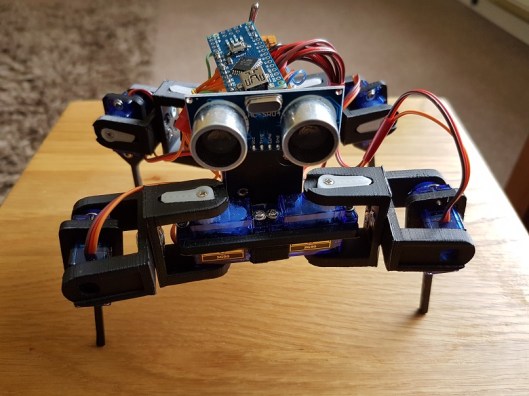
Robot3I decided to have a go at building a robot for a STEM session last weekend, to show the power of code and how it can be used to control something.  A moving robot is a great visualisation to demonstrate this.
After some searching I settled on a quadruped shown on thingverse (a 3d printing site). This is a build based on a robot called Chopstick Junior by Lumi.

Parts being printed, I set about thinking about the controls and motors. The parts are compatible with an SG90 servo. I needed 8 of these, for the knee and hip joints of the quadruped.

The assembly of the parts was a bit of a challenge as in the instructions it said you needed 3mm x 6mm screw/nuts to connect the shoulders together. You really need 3mm x 8mm screw/nuts as I have to countersink the holes a bit more to get the nuts to attach to the 6mm screw length.

Inserting the servos into the holes in the hips and legs required the unscrewing of the 4 small screws in each servo and temporarily removing the gear top. Once inserted this can be replaced and screwed down.

Once the servos were in place I centered the servos the best I could to allow backwards and forwards movement in each joint. I knew that later adjustment may be needed! This can easily be achieved removing the servo arm and hip/leg, then re-positioning and attaching the arm again.

The power is provided by 4 x AA batteries in a square battery holder. This was glued down onto the frame and fitted well into the build.

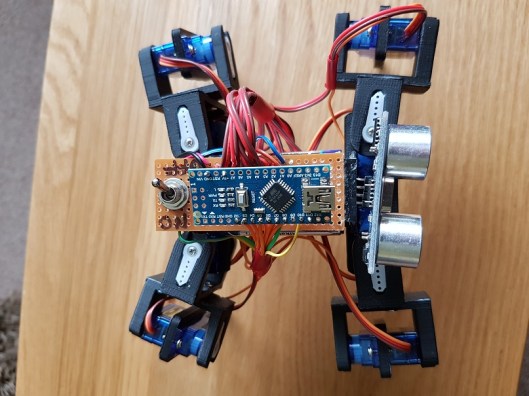
The power bus is provided by a small piece of circuit board. I used two lines for -v and +v. Each servo was then wired into the lines and the control wire to an Arduino Nano which is used as the brains of the robot.

The following pins were used on the Digital I/O on the Arduino Nano:

  • D2 – Hip 1
  • D3 – Knee1
  • D4 – Hip 2
  • D5 – Knee 2
  • D6 – Hip 3
  • D7 – Knee 3
  • D8 – Hip 4
  • D9 – Knee 4

I also wired in a sensor on the front of the robot to D10 and D11.

Wiring is grouped together to allow movement, but cut to a length that reduces excess that could get in the way of the legs.

A toggle switch provides an on/off for the power fixed to the rear of the robot. Remember to break the lines on the circuit board so it does not join any of the lines.

Once assembled I then got round to coding. I decided to use the opensource code for the Chopstick Junior as a base and make alterations. The quadruped responded well to the code and several physical servo adjustments were needed. Its now in a reasonable state, however balance is an issue in terms of walking steadily, so need to work more on this.  I have not yet coded movement to respond to the sensors yet, this will be done later.

The code is available via my Github:  https://github.com/Cloudmage/Robots

The robot went down well at the STEM session. Now to tweek that code……

Top view

Robot2

Side View

Robot3

Front View

Robot1

Share this:

  • Click to share on Facebook (Opens in new window) Facebook
  • Click to share on LinkedIn (Opens in new window) LinkedIn
  • Click to email a link to a friend (Opens in new window) Email
  • Click to share on Pinterest (Opens in new window) Pinterest
  • Click to share on Reddit (Opens in new window) Reddit
  • Click to share on X (Opens in new window) X
  • Click to share on Tumblr (Opens in new window) Tumblr
  • Click to share on Pocket (Opens in new window) Pocket
  • Click to share on Telegram (Opens in new window) Telegram
  • Click to share on Threads (Opens in new window) Threads
  • Click to share on WhatsApp (Opens in new window) WhatsApp
  • Click to share on Mastodon (Opens in new window) Mastodon
  • Click to share on Bluesky (Opens in new window) Bluesky
  • Click to share on Nextdoor (Opens in new window) Nextdoor
Like Loading...

How you can begin to Code

06 Thursday Apr 2017

Posted by Max Hemingway in Programming, STEM, Tools

≈ 7 Comments

Tags

Coding, learning, Programming, STEM

code1With all the recent STEM activities I have been involved with and blogged about, I have been asked to write some posts around how someone can start learning to code.

The school curriculum covers an element of coding with some subjects and pupils may be lucky to get a BBC Micro:bit or Raspberry Pi, however you don’t have to wait until school before learning any coding.

You don’t have to be young to start coding either. Using the same methods and tools anyone can learn to code.

The phrase “Learning to code” may strike fear and thoughts of hundreds of lines text and numbers, but it doesn’t need to. There are lots of websites available to help people start to code and present a fresh way of learning to code.

So where to start…….. If your reading this blog then you have access to a computing device. All you need to get started is a computing device with a web browser and access to the internet.

At this stage, its not worth getting hung up on the choices of the many different languages out there such as Python, Java, C etc, but concentrating on some fundamentals of coding.

Depending if you like Minecraft, Star Wars, Dr Who or Frozen, you can learn basic commands through gaming and interaction. These games teach you some basics of coding and commands by getting you to move a character on a screen to complete a number of tasks. Each of the games work in a similar way, using someones favorite characters to help them learn. These also help keep focus and attention.

The first code that you will learn is through blocks.

Minecraft – https://code.org/minecraft

Dr Who – http://www.bbc.co.uk/cbbc/games/doctor-who-game

Frozen – https://studio.code.org/s/frozen/stage/1/puzzle/1

Star Wars – https://code.org/starwars

Moana – http://partners.disney.com/hour-of-code

Once you have completed the tasks in blocks, you could then also try using a different language with some of the games such as Java if you wish. Its a great way of experiencing some of the differences in the languages.


The main program behind blocks is Scratch. To see more on the block programming method have a look at Scratch itself.

https://scratch.mit.edu/

At the scratch site there are learning tools and lessons to help you learn as well as access to the full programming language. The Scratch site also hosts a lot of other peoples programs which you can run/play and look at how they have constructed their code.

Scratch is a free visual programming language developed by the MIT(Massachusetts Institute of Technology) Media Lab.[1] Scratch is used by students, scholars, teachers,and parents to easily create animations, games, etc. It provides a stepping stone to the more advanced world of computer programming. It can also be used for a range of educational and entertainment constructionist purposes from math and science projects, including simulations and visualizations of experiments, recording lectures with animated presentations, to social sciences animated stories, and interactive art and music.[2] Viewing the existing projects available on the Scratch website, or modifying and testing any modification without saving it requires no online registration.

Source:https://en.wikipedia.org/wiki/Scratch_(programming_language)

Scratch allows users to use event-driven programming with multiple active objects called sprites.[1] Sprites can be drawn, as vector or bitmap graphics, from scratch in a simple editor that is part of Scratch, or can be imported from external sources, including webcams.

Source:https://en.wikipedia.org/wiki/Scratch_(programming_language)

All you need now is to dedicate some time each week to learn to code.

Share this:

  • Click to share on Facebook (Opens in new window) Facebook
  • Click to share on LinkedIn (Opens in new window) LinkedIn
  • Click to email a link to a friend (Opens in new window) Email
  • Click to share on Pinterest (Opens in new window) Pinterest
  • Click to share on Reddit (Opens in new window) Reddit
  • Click to share on X (Opens in new window) X
  • Click to share on Tumblr (Opens in new window) Tumblr
  • Click to share on Pocket (Opens in new window) Pocket
  • Click to share on Telegram (Opens in new window) Telegram
  • Click to share on Threads (Opens in new window) Threads
  • Click to share on WhatsApp (Opens in new window) WhatsApp
  • Click to share on Mastodon (Opens in new window) Mastodon
  • Click to share on Bluesky (Opens in new window) Bluesky
  • Click to share on Nextdoor (Opens in new window) Nextdoor
Like Loading...

Site Reliability Engineering by Google

03 Friday Feb 2017

Posted by Max Hemingway in Digital, Productivity, Programming, Tools

≈ Leave a comment

Tags

Coding, Digital, Productivity, Programming

learnHaving read this book previously its good to see that it is now available from Google on-line for reading/reference. The book itself is a collection of articles and essays on how Google run and maintain their computing systems by their Site Reliability Engineers.

The book can be accessed at  https://landing.google.com/sre/book/

List of the Table of Contents showing the articles and essays in the book.

Table of Contents
Foreword
Preface
Part I – Introduction
Chapter 1 – Introduction
Chapter 2 – The Production Environment at Google, from the Viewpoint of an SRE
Part II – Principles
Chapter 3 – Embracing Risk
Chapter 4 – Service Level Objectives
Chapter 5 – Eliminating Toil
Chapter 6 – Monitoring Distributed Systems
Chapter 7 – The Evolution of Automation at Google
Chapter 8 – Release Engineering
Chapter 9 – Simplicity
Part III – Practices
Chapter 10 – Practical Alerting
Chapter 11 – Being On-Call
Chapter 12 – Effective Troubleshooting
Chapter 13 – Emergency Response
Chapter 14 – Managing Incidents
Chapter 15 – Postmortem Culture: Learning from Failure
Chapter 16 – Tracking Outages
Chapter 17 – Testing for Reliability
Chapter 18 – Software Engineering in SRE
Chapter 19 – Load Balancing at the Frontend
Chapter 20 – Load Balancing in the Datacenter
Chapter 21 – Handling Overload
Chapter 22 – Addressing Cascading Failures
Chapter 23 – Managing Critical State: Distributed Consensus for Reliability
Chapter 24 – Distributed Periodic Scheduling with Cron
Chapter 25 – Data Processing Pipelines
Chapter 26 – Data Integrity: What You Read Is What You Wrote
Chapter 27 – Reliable Product Launches at Scale
Part IV – Management
Chapter 28 – Accelerating SREs to On-Call and Beyond
Chapter 29 – Dealing with Interrupts
Chapter 30 – Embedding an SRE to Recover from Operational Overload
Chapter 31 – Communication and Collaboration in SRE
Chapter 32 – The Evolving SRE Engagement Model
Part V – Conclusions
Chapter 33 – Lessons Learned from Other Industries
Chapter 34 – Conclusion
Appendix A – Availability Table
Appendix B – A Collection of Best Practices for Production Services
Appendix C – Example Incident State Document
Appendix D – Example Postmortem
Appendix E – Launch Coordination Checklist
Appendix F – Bibliography

Share this:

  • Click to share on Facebook (Opens in new window) Facebook
  • Click to share on LinkedIn (Opens in new window) LinkedIn
  • Click to email a link to a friend (Opens in new window) Email
  • Click to share on Pinterest (Opens in new window) Pinterest
  • Click to share on Reddit (Opens in new window) Reddit
  • Click to share on X (Opens in new window) X
  • Click to share on Tumblr (Opens in new window) Tumblr
  • Click to share on Pocket (Opens in new window) Pocket
  • Click to share on Telegram (Opens in new window) Telegram
  • Click to share on Threads (Opens in new window) Threads
  • Click to share on WhatsApp (Opens in new window) WhatsApp
  • Click to share on Mastodon (Opens in new window) Mastodon
  • Click to share on Bluesky (Opens in new window) Bluesky
  • Click to share on Nextdoor (Opens in new window) Nextdoor
Like Loading...

Tiny computing – VoCore2

06 Sunday Nov 2016

Posted by Max Hemingway in Development, IoT, Open Source, Programming

≈ Leave a comment

Tags

Development, IoT, Open Source, Programming

split1.pngSearching round on the crowdfunding sites for things that are coming, I found the VoCore2 on iniegogo.
https://www.indiegogo.com/projects/vocore2-4-coin-sized-linux-computer-with-wifi#/

VoCore has already had an v1 early release and is now heading for a v2 release in January 2017. The cost of this board is $4, although as you start to add the additional boards the cost can go up to around $50.

VoCore2 is a open source linux computer and a full functional wireless router but its size is smaller than a coin. It can perform as a VPN gateway to secure your network, an airplay station to play loseless music, a private cloud to store your photo, video and code. Benefit for its small size and low power consume, it can be easily mounted in wall, help you boost wireless signal in every room or setup house based mesh network.

What I do like about this design is that its small and compact and can be used for a lot of different purposes:

  • VPN Router
  • IoT/Appliance Control
  • Music Player/Streaming
  • Wifi

Its ability to be added to an existing ethernet socket and add heaps of functionality to the socket and its open source makes this device interesting for me, as well as its ability to then act as a wifi extender from that socket.

I would like to look at what could be done with it to provide additional IoT Security to a device plugged in/connected to a network utilising this board. So looks like another board on the wish list to have a go on.

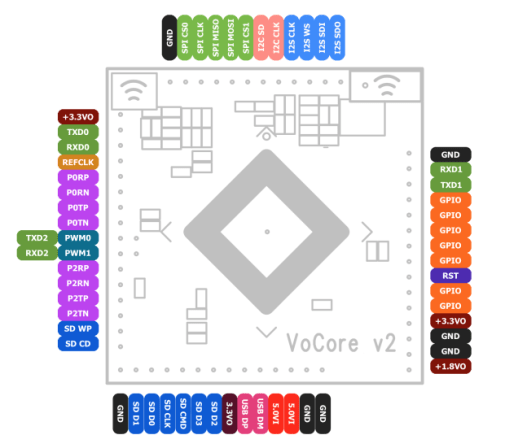
Pin Outs for the board:

vocore

Source/Pics: https://www.indiegogo.com/projects/vocore2-4-coin-sized-linux-computer-with-wifi#/


Share this:

  • Click to share on Facebook (Opens in new window) Facebook
  • Click to share on LinkedIn (Opens in new window) LinkedIn
  • Click to email a link to a friend (Opens in new window) Email
  • Click to share on Pinterest (Opens in new window) Pinterest
  • Click to share on Reddit (Opens in new window) Reddit
  • Click to share on X (Opens in new window) X
  • Click to share on Tumblr (Opens in new window) Tumblr
  • Click to share on Pocket (Opens in new window) Pocket
  • Click to share on Telegram (Opens in new window) Telegram
  • Click to share on Threads (Opens in new window) Threads
  • Click to share on WhatsApp (Opens in new window) WhatsApp
  • Click to share on Mastodon (Opens in new window) Mastodon
  • Click to share on Bluesky (Opens in new window) Bluesky
  • Click to share on Nextdoor (Opens in new window) Nextdoor
Like Loading...

Boiling Frogs

30 Friday Sep 2016

Posted by Max Hemingway in Development, DevOps/OpsDev, Programming

≈ Leave a comment

Tags

Development, DevOps, OpsDev, Programming

GrowIf you haven’t read “Boiling Frogs” by the GCHQ, its is well worth a read. The paper has been made available on GitHub – this is their research paper on software development and organisational change in the face of disruption.

To quote the Exec Summary:

This paper identifies and examines critical business characteristics that promote business and technical agility describing how organisations need “less of” some characteristics and “more of” others. Rather than changing one of these characteristics in isolation, we believe that organisations need to improve holistically, not in terms of a binary step change, but in terms of force-multiplying cohesive change. For each characteristic, we propose a direction of change covering:
• Operating Model (including structure and interaction styles)
• Organisational cultures
• Use of accommodation
• Approach to measurement
• Skills management
• Use of commercial suppliers
• Leveraging Big Data
• Approach to architecture
• Use of processes and techniques
• Approach to Security
• Approach to HR
Finally, this paper includes some of the background reasoning collated from internal blogs related to organisational structuring, types of jobs and the effects of Conway’s Law on business change.

Source: GCHQ Boiling Frog

Conways law states:

organizations which design systems … are constrained to produce designs which are copies of the communication structures of these

The law is based on the reasoning that in order for a software module to function, multiple authors must communicate frequently with each other. Therefore, the software interfaces structure of a system will reflect the social boundaries of the organization(s) that produced it, across which communication is more difficult. Conway’s law was intended as a valid sociological observation, although sometimes it’s taken in a humorous context.

Source: Wikipedia

The paper can be found at https://github.com/gchq/BoilingFrogs

Share this:

  • Click to share on Facebook (Opens in new window) Facebook
  • Click to share on LinkedIn (Opens in new window) LinkedIn
  • Click to email a link to a friend (Opens in new window) Email
  • Click to share on Pinterest (Opens in new window) Pinterest
  • Click to share on Reddit (Opens in new window) Reddit
  • Click to share on X (Opens in new window) X
  • Click to share on Tumblr (Opens in new window) Tumblr
  • Click to share on Pocket (Opens in new window) Pocket
  • Click to share on Telegram (Opens in new window) Telegram
  • Click to share on Threads (Opens in new window) Threads
  • Click to share on WhatsApp (Opens in new window) WhatsApp
  • Click to share on Mastodon (Opens in new window) Mastodon
  • Click to share on Bluesky (Opens in new window) Bluesky
  • Click to share on Nextdoor (Opens in new window) Nextdoor
Like Loading...

Raspberry Pi and New Starter Kit

14 Wednesday Sep 2016

Posted by Max Hemingway in Development, IoT, Programming, Raspberry Pi

≈ Leave a comment

Tags

Development, IoT, Programming, RaspberryPI

PIRaspberry Pi has reached a staggering 10 Million Pi devices.

It’s a long way from the reports back in May 2012 that 20,000 units had been shipped.

Moving from their bare bone boards and then buying a starter kit from 3rd parties to get you going on a Pi Adventure. Raspberry Pi are now producing  their own Starter Kit which includes the following:

  • A Raspberry Pi 3 Model B
  • An 8GB NOOBS SD card
  • An official case
  • An official 2.5A multi-region power supply
  • An official 1m HDMI cable
  • An optical mouse and a keyboard with high-quality scissor-switch action
  • A copy of Adventures in Raspberry Pi Foundation Edition

For me the best project that I have undertaken yet is the Amazon Alexa on the Pi3. However there are some others that I want to get round to such as

Jarvis Home Automation

https://hackaday.io/project/1214-project-jarvis-ai-home-automation-assistant

Multi Room Music Player

http://www.instructables.com/id/Raspberry-Pi-Multi-Room-Music-Player/

Gamer Coffee Table

http://www.instructables.com/id/Coffee-Table-Pi/

If your stuck for project ideas with your Pi, here is a link to 682 projects from Hackerday

https://hackaday.io/projects/tag/raspberry%20pi

Share this:

  • Click to share on Facebook (Opens in new window) Facebook
  • Click to share on LinkedIn (Opens in new window) LinkedIn
  • Click to email a link to a friend (Opens in new window) Email
  • Click to share on Pinterest (Opens in new window) Pinterest
  • Click to share on Reddit (Opens in new window) Reddit
  • Click to share on X (Opens in new window) X
  • Click to share on Tumblr (Opens in new window) Tumblr
  • Click to share on Pocket (Opens in new window) Pocket
  • Click to share on Telegram (Opens in new window) Telegram
  • Click to share on Threads (Opens in new window) Threads
  • Click to share on WhatsApp (Opens in new window) WhatsApp
  • Click to share on Mastodon (Opens in new window) Mastodon
  • Click to share on Bluesky (Opens in new window) Bluesky
  • Click to share on Nextdoor (Opens in new window) Nextdoor
Like Loading...

BBC Micro:Bit available for the masses

29 Wednesday Jun 2016

Posted by Max Hemingway in IoT, Micro:Bit, Programming

≈ 1 Comment

Tags

Development, IoT, Micro:Bit, Programming

MicroBitIts been a while now since the launch of the BBC Micro:Bit and its mission to provide year 7’s with the platform.  It is only recently being made available to the general public in batches of 90 , however this has now shifted to being able to purchase single units and development kits are also being produced/made available for pin outs and expansions. I’ve seen several dates for availability in several online shops from end of June to end of July. Most places have the Micro:Bit on pre-order only at the moment, but peripherals are available to ship.

Coming in at around £13.00 for a board its more expensive than the Pi Zero at £5.00. I was expecting something of a similar price bracket. There are some interesting projects already appearing on the web.

(Other online outlets are available) One outlet stocking the Micro:Bit shortly https://shop.pimoroni.com/products/microbit

I have placed a pre-order for one to have a go with, so will post some more about it once received. Im looking to use the Micro:Bit and Pi Zero to help my Scout Group with their Digital Maker and Digital Citizen badges.

digital

In the meantime here is an example of use from Chris Swan programming a game of Simon on it. http://blog.thestateofme.com/2016/05/15/microbit-simon/


Share this:

  • Click to share on Facebook (Opens in new window) Facebook
  • Click to share on LinkedIn (Opens in new window) LinkedIn
  • Click to email a link to a friend (Opens in new window) Email
  • Click to share on Pinterest (Opens in new window) Pinterest
  • Click to share on Reddit (Opens in new window) Reddit
  • Click to share on X (Opens in new window) X
  • Click to share on Tumblr (Opens in new window) Tumblr
  • Click to share on Pocket (Opens in new window) Pocket
  • Click to share on Telegram (Opens in new window) Telegram
  • Click to share on Threads (Opens in new window) Threads
  • Click to share on WhatsApp (Opens in new window) WhatsApp
  • Click to share on Mastodon (Opens in new window) Mastodon
  • Click to share on Bluesky (Opens in new window) Bluesky
  • Click to share on Nextdoor (Opens in new window) Nextdoor
Like Loading...

Pi Zero gets a Camera

16 Monday May 2016

Posted by Max Hemingway in Development, IoT, Open Source, Programming, Raspberry Pi

≈ Leave a comment

Tags

Development, IoT, Programming, RaspberryPI

PIRaspberry Pi have just released another 30,000 Pi Zero Units to the marketplace. Finally I have managed to order one after having the Pi Zero on my wish list for sometime now.

The demand for the Pi Zero has meant that they do not stay on the shelves long. This has created a high cost market for them on popular auction sites and suppliers have been limiting people to 1 unit only when they order (if in stock).

The folks at RasperryPi are using a different manufacturing process to that of the Pi 1,2 & 3 to keep costs down, however it looks like they are hopefully going to be keeping up with the demand.

“There are roughly 30,000 new Zeros out there today, and we’ll be making thousands more each day until demand is met.”

Thank you RasperryPi

So whats new with this Pi Zero?

The Pi Zero has had a bit of a revamp between manufacturing batches and now contains a camera connector. source: Raspberry Pi Blog

The camera connector is about £4.00 which is the same cost as the Pi (£4.00). Then there is the cost of the Camera (approx £23.00), however it does make a low cost camera unit and opens up the possibilities of the Pi Zero.

Picture below from Raspberry Pi Blog: source: Raspberry Pi Blog

OLYMPUS DIGITAL CAMERA

Just awaiting the postman now then time to do some more development stuff.


Share this:

  • Click to share on Facebook (Opens in new window) Facebook
  • Click to share on LinkedIn (Opens in new window) LinkedIn
  • Click to email a link to a friend (Opens in new window) Email
  • Click to share on Pinterest (Opens in new window) Pinterest
  • Click to share on Reddit (Opens in new window) Reddit
  • Click to share on X (Opens in new window) X
  • Click to share on Tumblr (Opens in new window) Tumblr
  • Click to share on Pocket (Opens in new window) Pocket
  • Click to share on Telegram (Opens in new window) Telegram
  • Click to share on Threads (Opens in new window) Threads
  • Click to share on WhatsApp (Opens in new window) WhatsApp
  • Click to share on Mastodon (Opens in new window) Mastodon
  • Click to share on Bluesky (Opens in new window) Bluesky
  • Click to share on Nextdoor (Opens in new window) Nextdoor
Like Loading...

Apps – Why do you really need access to my devices camera?

20 Wednesday Apr 2016

Posted by Max Hemingway in Applications, Development, Programming

≈ 1 Comment

Tags

Applications, Development, Programming

cameraHow often do users of applications actually look at the permissions that are requested by an application during install or upgrade.

I recently received an update to an application on my android phone that asked for additional permissions with the upgrade it was about to perform. The permission it wanted was access to the Camera, however the accompanying upgrade notes did not include any commentary/notes on why and what it needs the camera for and there is nothing stated in the T’s and C’s.

The app in question here is Adobe Acrobat Reader. There are many applications available that have the same behaviours of asking for permissions to parts of the device, but not stating why.

Rechecking the Google Play Store notes for the App it mentions no need for the camera.

Adobe Acrobat Reader

Adobe Acrobat Reader is the free, trusted leader for reliably viewing, annotating and signing PDFs.

VIEW PDFs
• Quickly open PDF documents from email, the web or any app that supports “Share.”
• Search, scroll and zoom in and out.
• Choose Single Page, Continuous scroll or Reading mode.

ANNOTATE AND REVIEW PDFs
• Make comments on PDFs using sticky notes and drawing tools.
• Highlight and mark up text with annotation tools.

FILL AND SIGN FORMS
• Quickly fill out PDF forms by typing text into fields.
• Use your finger to e-sign any PDF document.

PRINT, STORE AND SHARE FILES
• Sign in to your free Adobe Document Cloud account.
• Connect your Dropbox account.
• Store and share files in the cloud.
• Print documents from your Android device.

IN-APP PURCHASE
Convert PDFs and organize pages on the go by subscribing to one of Adobe’s online services. You can get started without ever leaving your app, and subscriptions work across all your computers and devices.
ORGANIZE PAGES IN PDF FILES
• Subscribe to Acrobat Pro DC using In-App Purchase.
• Reorder, rotate and delete pages in your PDFs.

CREATE PDF FILES
• Subscribe to Adobe PDF Pack using In-App Purchase.
• Create PDF files.
• Convert Microsoft Office files and images to PDF.

EXPORT PDF FILES TO WORD OR EXCEL
• Subscribe to Adobe Export PDF using In-App Purchase.
• Save PDF documents as editable Microsoft Word or Excel files.

ALREADY A SUBSCRIBER?
If you have a subscription to Acrobat Pro, Acrobat Standard, PDF Pack or Export PDF, just sign in to convert and export PDFs on the go.

AVAILABLE LANGUAGES
English, Chinese Simplified, Chinese Traditional, Czech, Danish, Dutch, Finnish, French, German, Italian,
Japanese, Korean, Norwegian, Polish, Portuguese, Russian, Spanish, Swedish and Turkish

PRICE
Acrobat Reader for Android is free.
By downloading, you agree to the Terms of Use at http://www.adobe.com/special/misc/terms.html.

Adobe Acrobat Reader Adobe Application Permissions

This app has access to:

In-app purchases
Photos / Media / Files
  • modify or delete the contents of your USB storage
  • read the contents of your USB storage
Storage
  • modify or delete the contents of your USB storage
  • read the contents of your USB storage
Camera
  • take pictures and videos
Other
  • full network access
  • view network connections

Further digging into an adobe community blog I came across a post  states “In Adobe Acrobat for mobile we have a feature to sign PDF by selecting an image file directly on the device or clicking a picture using Camera of the device”.

However going into the “Fill and Sign” function it wanted me to download yet another app called Adobe Fill & Sign DC. This app needs access to the camera to photograph signatures for documents. At least this app had a line in the key features as to why it needs access to the camera.

Key features:

– Scan paper forms with your camera or open a file from email
– Tap to enter text or checkmarks in form fields
– Fill forms faster with reusable text from your autofill collection
– Easily create your signature with your finger or a stylus
– Apply your signature or initials to documents
– Save forms and send to others via email


No explanation as to why the base application needs access to the camera though.

For me several things need to happen with mobile apps in general:

  • Developers need to be aware of what permissions are actually needed
  • Applications need to be more transparent on what they are actually doing
  • Descriptions for applications need to really state why the permissions are needed
  • T’s & C’s need to be updated to reflect what they will do with accessing functionality of the devices
  • Users need to be more aware of applications asking for permissions

Maybe its time applications have the ability to change/block certain permissions at installation and upgrade with the trade off of reduced functionality within the application.

Of course at the end of the day its down to use choice as to which applications a user installs on their devices.

Share this:

  • Click to share on Facebook (Opens in new window) Facebook
  • Click to share on LinkedIn (Opens in new window) LinkedIn
  • Click to email a link to a friend (Opens in new window) Email
  • Click to share on Pinterest (Opens in new window) Pinterest
  • Click to share on Reddit (Opens in new window) Reddit
  • Click to share on X (Opens in new window) X
  • Click to share on Tumblr (Opens in new window) Tumblr
  • Click to share on Pocket (Opens in new window) Pocket
  • Click to share on Telegram (Opens in new window) Telegram
  • Click to share on Threads (Opens in new window) Threads
  • Click to share on WhatsApp (Opens in new window) WhatsApp
  • Click to share on Mastodon (Opens in new window) Mastodon
  • Click to share on Bluesky (Opens in new window) Bluesky
  • Click to share on Nextdoor (Opens in new window) Nextdoor
Like Loading...
← Older posts
Newer posts →

Follow Me on LinkedIn

www.linkedin.com – Click to Follow 

RSS Feed

RSS Feed RSS - Posts

Other Publications I contribute to

https://sparrowhawkbushcraft.com/

Recent Posts

  • Graceful Speech & Timeless Tales: Breathing
  • The Quotient Revolution: Building the Well-Rounded Person
  • Ditch Resolutions: Embrace Habit-Building for Success
  • Pen based Productivity Tools: The Chronodex 2026
  • Understanding ETSI TS 104 223 and ISO/IEC 42006

Categories

  • 21st Century Human
  • 3D Printing
  • AI
  • Applications
  • ArchiMate
  • Architecture
  • Arduino
  • Automation
  • BCS
  • Big Data
  • Certification
  • Climate Change
  • Cloud
  • Cobotics
  • Connected Home
  • Data
  • Data Fellowship
  • Data Science
  • Development
  • DevOps/OpsDev
  • Digital
  • DigitalFit
  • Drone
  • Enterprise Architecture
  • F-TAG
  • Governance
  • Health
  • Innovation
  • IoT
  • Machine Learning
  • Metaverse
  • Micro:Bit
  • Mindset
  • Mobiles
  • Networks
  • Open Source
  • Podcasts
  • Productivity
  • Programming
  • Quantum
  • Raspberry Pi
  • Robotics
  • Scouting
  • Scouts
  • Security
  • Smart Home
  • Social Media
  • Space
  • STEM
  • Story Telling
  • Technologists Toolkit
  • Tools
  • Uncategorized
  • Wearable Tech
  • Windows
  • xR

Archives

Reading Shelf

Archives

Recent Posts

  • Graceful Speech & Timeless Tales: Breathing
  • The Quotient Revolution: Building the Well-Rounded Person
  • Ditch Resolutions: Embrace Habit-Building for Success
  • Pen based Productivity Tools: The Chronodex 2026
  • Understanding ETSI TS 104 223 and ISO/IEC 42006

Top Posts & Pages

  • Graceful Speech & Timeless Tales: Breathing
  • The Quotient Revolution: Building the Well-Rounded Person
  • Understanding ETSI TS 104 223 and ISO/IEC 42006
  • Ditch Resolutions: Embrace Habit-Building for Success
  • Transforming Ideas into Reality: The Human Spark in Tech
  • Pen based Productivity Tools: The Chronodex 2026
  • The Role of Enterprise Architecture in Fostering Innovation
  • Embracing Excellence: The Value of Chartered IT Professionals (CITP)
  • Overcoming Mental Clutter for Improved Productivity
  • Lessons from my Grandmother’s Notebook: Rediscovering the Art of Speaking

Category Cloud

21st Century Human Architecture Automation Big Data Cloud Data Data Science Development DevOps/OpsDev Digital DigitalFit Enterprise Architecture Innovation IoT Machine Learning Mindset Open Source Podcasts Productivity Programming Raspberry Pi Robotics Security Social Media STEM Story Telling Technologists Toolkit Tools Uncategorized Wearable Tech

Tags

3D Printing 21st Century Human AI Applications Architecture artificial-intelligence Automation BCS Big Data Blockchain business Certification Cloud Cobot Cobotics Coding Communication Connected Home CPD creativity cybersecurity Data Data Fellowship Data Science Delivery Development DevOps Digital DigitalFit Digital Human Drone Email Enterprise Architecture GTD Infographic Information Theory Innovation IoT Journal Knowledge learning Machine Learning Metaverse MicroLearning Mindset Mixed Reality Networks Open Source OpsDev PKMS Podcasts Productivity Programming Proving It Quantum R RaspberryPI Robot Robotics Scouts Security Smart Home Social Media STEM Story Telling Technologists Toolkit technology Technology Couch Podcast Thinking Tools Training Visualisation Voice Wearable Tech xR

License

Creative Commons Licence
This work is licensed under a Creative Commons Attribution-NonCommercial-ShareAlike 4.0 International License.

Meta

  • Create account
  • Log in
  • Entries feed
  • Comments feed
  • WordPress.com

Blog at WordPress.com.

  • Subscribe Subscribed
    • Max Hemingway
    • Join 82 other subscribers
    • Already have a WordPress.com account? Log in now.
    • Max Hemingway
    • Subscribe Subscribed
    • Sign up
    • Log in
    • Report this content
    • View site in Reader
    • Manage subscriptions
    • Collapse this bar
 

Loading Comments...
 

    %d