• About Me Card

Max Hemingway

~ Musings as I work through life, career and everything.

Max Hemingway

Category Archives: Tools

Moving to a Smart Meter

03 Friday Nov 2017

Posted by Max Hemingway in Digital, Tools

≈ 4 Comments

SmartMeterHubI have been contacted previously about having a Smart Meter installed on my electricity and gas supplies, but have put off the switch until a recently contact by my energy provider. So I decided to go for the switch and in a way I am glad that I waited.

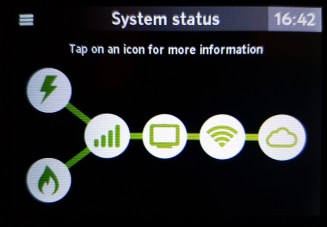
Why? Well its due to the fact that the device you get to read the meter is no longer an LCD screen running a set of data, but a hub that just connects the meters to the internet.

The image in the post shows the architecture for the setup and comes straight from my installed hub.

The installation was done in about 1hr 45 mins for both gas and electric meters and the hub set up took no time at all. I had preloaded the app on to my mobile and all I needed to sync the app was a code from the hub once installed.

With usage now done via an app on your phone, this means that the app can be updated regularly with new features rather than having an LCD replaced.

Unfortunately there is no data export option the moment so I cannot extract the map to model it or tag large spikes against certain items that consume a higher rate of power.

Also missing for me is linkage to an automation tool such as IFTTT which would also provide a capability to turn things off if the power draw reached a certain limit.

Hopefully these advancements will come along with future app release as we get nearer to the smart home.

In the mean time I will probably spend this weekend driving my family mad by checking the devices pulling energy and what is causing the biggest draws.


Share this:

  • Click to share on Facebook (Opens in new window) Facebook
  • Click to share on LinkedIn (Opens in new window) LinkedIn
  • Click to email a link to a friend (Opens in new window) Email
  • Click to share on Pinterest (Opens in new window) Pinterest
  • Click to share on Reddit (Opens in new window) Reddit
  • Click to share on Tumblr (Opens in new window) Tumblr
  • Click to share on Pocket (Opens in new window) Pocket
  • Click to share on Telegram (Opens in new window) Telegram
  • Click to share on Threads (Opens in new window) Threads
  • Click to share on WhatsApp (Opens in new window) WhatsApp
  • Click to share on Mastodon (Opens in new window) Mastodon
  • Click to share on X (Opens in new window) X
  • Click to share on Bluesky (Opens in new window) Bluesky
Like Loading...

A-Z of Digital – Y is for Yottabyte

17 Tuesday Oct 2017

Posted by Max Hemingway in Digital, Tools

≈ Leave a comment

Tags

Digital

Inside a Hard DiskFollowing on from my blog post outlining an A-Z of Digital, here is “Y for Yottabyte”.

You are probably more used to terms such as Megabyte, GigaByte of Terabyte in every day computing terms. Yottabyte is a term used to define an amount of storage that is a lot bigger than these.  The prefix yotta indicates multiplication by the eighth power of 1000 or 1024.

The below table shows the storage values and metrics:

Value Metric
1000 kB kilobyte
10002 MB megabyte
10003 GB gigabyte
10004 TB terabyte
10005 PB petabyte
10006 EB exabyte
10007 ZB zettabyte
10008 YB yottabyte

We are now living in a society that generates large amounts of data on a daily basis, with a passion to keep adding to it. The norm is to create and not delete.

With the growth of the internet, social media, mobiles, IoT, wearables and other data creating devices and systems we are each creating large amounts of data everyday which need to be stored somewhere (this can be at your home, work, cloud or a 3rd party collecting the data you create).

According to IBM: 90% of the data today has been created in the last 2 years with 2.5 quintillion bytes of data per day generated – that’s 2,500,000 Terabytes or (0.0000025 Yottabytes)

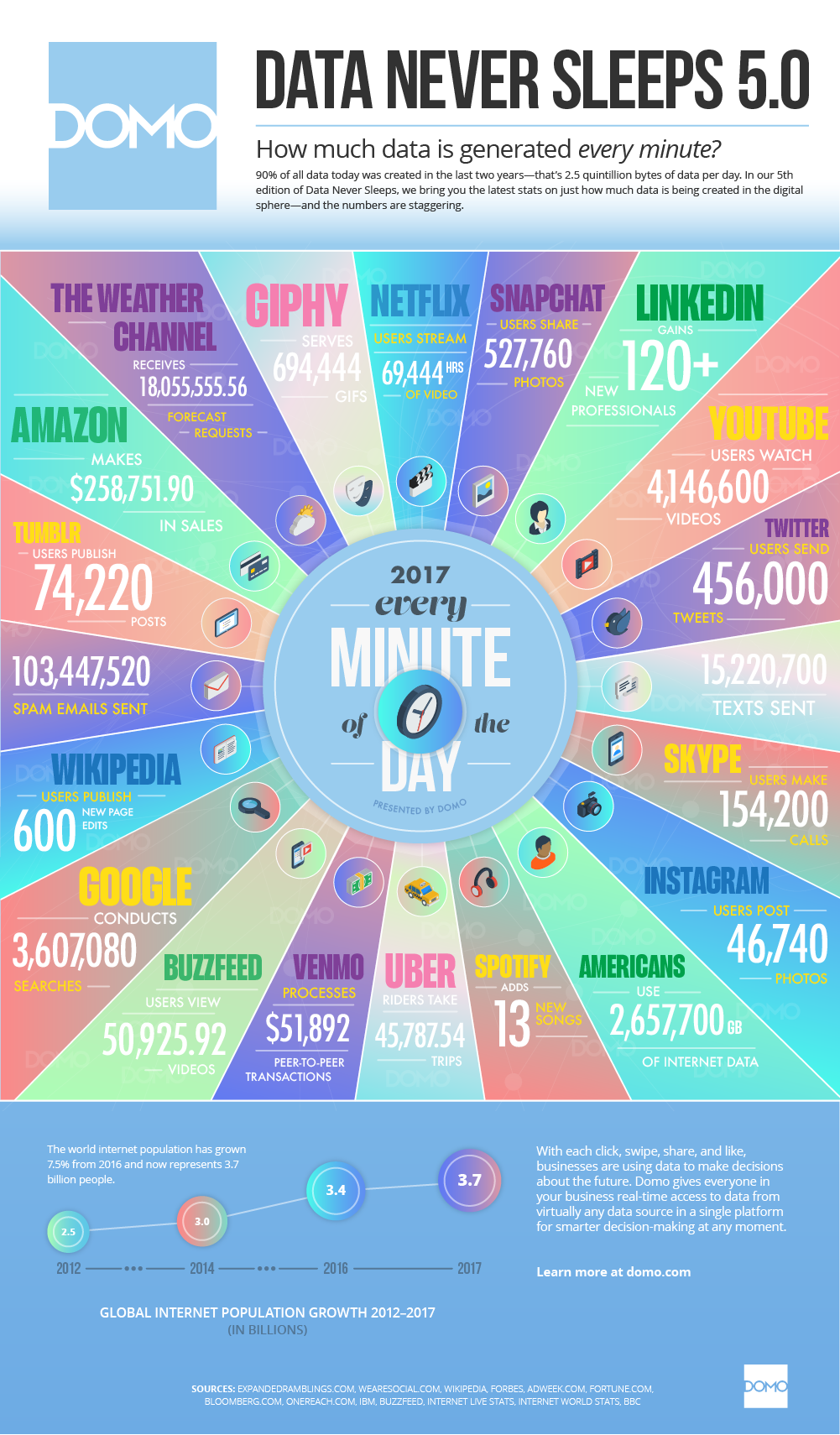
So how much data do we create every minute? Domo have produced an infographic that illustrates how this is created across multiple platforms and systems, such as 456,000 tweets and 2,657,700 GB of internet data used by Americans every minute.

A report from Hootsuite in April 2017 illustrates the growth patterns:

Another growth fact on the internet:

The Indexed Web contains at least 4.59 billion pages (Tuesday, 17 October, 2017).

http://www.worldwidewebsize.com/

The generation of data brings challenges of what to  do with it and how to mine it for useful information through big data, AI, machine learning, data science and analytics This has brought two views as to whether data the new oil or not (Data is the new Oil vs Data is not the new Oil).

The challenge of deleting and the right to be forgotten is being addressed through legislation in which companies and those storing data about others are now facing a bigger question of compliance with GDPR looming on the horizon. With the potential of big fines, GDPR is something that should not be ignored.

Failure to comply with GDPR could trigger fines of 4 percent of your annual revenue or €20 million, whichever is higher.

How much data are you generating today!

Further Reading

  • A-Z of Digital – L is for Legal
  • Whats ahead for security and cloud adoption
  • Retail data and the brexit vote
  • 2 new business processes key to GDPR compliance
  • Accelerating GDPR readiness: Now’s the time to get started
  • Getting the analytics right for GDPR compliance – and beyond
  • The impact of GDPR on the Public Sector
  • Customer Privacy in Focus Infographic:GDPR
  • IoT Device Security Considerations and Security Layers
  • DXC Labs: Using data stories to accelerate machine learning solutions
  • Customer Privacy: Going Beyond GDPR


Share this:

  • Click to share on Facebook (Opens in new window) Facebook
  • Click to share on LinkedIn (Opens in new window) LinkedIn
  • Click to email a link to a friend (Opens in new window) Email
  • Click to share on Pinterest (Opens in new window) Pinterest
  • Click to share on Reddit (Opens in new window) Reddit
  • Click to share on Tumblr (Opens in new window) Tumblr
  • Click to share on Pocket (Opens in new window) Pocket
  • Click to share on Telegram (Opens in new window) Telegram
  • Click to share on Threads (Opens in new window) Threads
  • Click to share on WhatsApp (Opens in new window) WhatsApp
  • Click to share on Mastodon (Opens in new window) Mastodon
  • Click to share on X (Opens in new window) X
  • Click to share on Bluesky (Opens in new window) Bluesky
Like Loading...

A-Z of Digital – K is for Knowledge

02 Wednesday Aug 2017

Posted by Max Hemingway in Tools

≈ 15 Comments

Tags

Digital, Journal, Knowledge, learning, Tools

books-2158737_1920Following on from my blog post outlining an A-Z of Digital, here is “K is for Knowledge”.

Understanding what is going on in your streams, market places and industries is a big task. We can be deluged with information, news and articles coming in on a daily basis through many streams/channels (as well as all the work emails you get in a day)  means that we tend to drink from the fire hose and not be able to assimilate all of the data coming in.

One way of helping is to create your own Personal Knowledge Management System, that will help navigate the sea of information and pick out what is key to your requirements and what can be dropped.

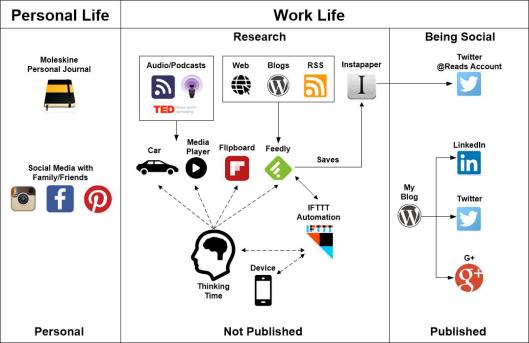
Here is my updated Personal Knowledge Management System that I use to sort and store useful artefacts, blogs, information, inspiration, articles and bits that get in a day.

Personal Knowledge Management System

Personal Life

Personal Journal

Journalling in both a Personal and Work life is a useful tool to keep notes on your thoughts and ideas. In my personal life I opt for recording these in a Moleskine – See my blog post No batteries required for further details.

Social Media

I separate from my work life from my personal life using things like Instagram and Facebook for friends and family with appropriate security settings in place. Even with those settings you still need to consider that once something is online, it could be public in the future.

Work Life

Research

This is split into several areas and these are a few of the inputs that I use to grab information, feeds, data from:

  • Podcasts
  • Audio subscriptions
  • RSS Feeds
  • Web Searches
  • Blog Posts

Podcasts cover both Audio and Video casts that I watch/stream online or download to my Media Player (Audio and Videos) to listen to on journeys (Audio)

Flipboard

Flipboard provides another stream of data that I consume bringing in news feeds from many sources around a series of topics. It does work well on a mobile device allowing you to flip the pages through the articles.

Feedly

Feedly provides an aggregation tool which I use to collect the stories from blogs and web sites I regularly pull information from.  This provides a list of stories that can be scanned tin a few minutes on a single screen without going via multiple sites. Clicking on a story will bring up a snippet from the source site and provide the link to read the source article if required. Using a series of key strokes you can read the headlines, then move down the articles at a reasonable speed, stopping and opening when needed.

Sources can be categorised to allow an all view or just whats new in a category.  There is a new noise filter to take out articles that are not relevant which I will be looking at shortly (paid for version).

Instapaper

Instapaper is one of several tools I use to store the articles I need to keep to refer back to and want to save. There is a link from Feedly to provide this (paid for version) which saves the articles. Instapaper then tweets the link out on a separate @Hemingwayreads Twitter Account when I want it to.

IFTTT

IFTTT (If This Then That) provides a level of automation to my lists from saving articles to creating alerts on topics and triggering different actions as needed to my devices.

Thinking Time

This is where view the data streams through the tools and assimilate and think about what has been reported/said.

Blogging and Being Social

From thoughts and research I will write about things through my blogs and publish these into Social Media streams such as Twitter, Linkedin and G+/

Future Tools

Future additions to my tools will probably include some machine learning and further automation to bring out more of the articles I am interested in and filter out the noise. Then bringing in a voice based capability to read out targeted articles to me when I am mobile and travelling.

Do you have a Personal Knowledge Management System or using tools not mentioned above?

Further Inspiration from others

Some other good Personal Knowledge Management Systems from colleagues:

  • Chris Swan – I read tech news so you don’t have to
  • Graham Chastney – How I process information
  • Stuart Downes – My Personal Knowledge Management Systems
  • Steve Richards – My personal work style

Share this:

  • Click to share on Facebook (Opens in new window) Facebook
  • Click to share on LinkedIn (Opens in new window) LinkedIn
  • Click to email a link to a friend (Opens in new window) Email
  • Click to share on Pinterest (Opens in new window) Pinterest
  • Click to share on Reddit (Opens in new window) Reddit
  • Click to share on Tumblr (Opens in new window) Tumblr
  • Click to share on Pocket (Opens in new window) Pocket
  • Click to share on Telegram (Opens in new window) Telegram
  • Click to share on Threads (Opens in new window) Threads
  • Click to share on WhatsApp (Opens in new window) WhatsApp
  • Click to share on Mastodon (Opens in new window) Mastodon
  • Click to share on X (Opens in new window) X
  • Click to share on Bluesky (Opens in new window) Bluesky
Like Loading...

A-Z of Digital – A is for Automation

26 Monday Jun 2017

Posted by Max Hemingway in Automation, Tools

≈ 1 Comment

Tags

API, Automation, Digital, Tools

API

Following on from my blog post outlining an A-Z of Digital, here is “A is for Automation”

Automation is nothing new and the instinct to automate things has been around for a long time. There are lots of automated things in our lives that we now take for granted that at one time were not. The level of automation today does however seem to have a different set of goals. By this I mean the ability to fully automate something so no manual intervention is needed and the automation can think for itself. The future of systems auto detecting and joining themselves together presenting a tick list of the things that can be automated automatically is not that far away.

A house heating system is a good example of this. Starting with a very manual based system of stoking up the boiler to gas powered central heating controlled to come on by means of a thermostat or mechanical clock interface, to now where you can simply control your heating from a mobile device. Systems can learn your habits and settings to ensure the environment you live in stays at the right temperature for your needs.

Automation is available in many forms and tools that we can either purchase a solution to add, complement or replace an existing one, or create our own. As the world moves towards the “World as Code”- the manual tasks of today should be the automated tasks of tomorrow, achieved using tools that interface with systems using API’s and commands that join them together to carry out tasks, with the ability to control everything by means of code. We have more control over what we can automate, starting with the repetitive tasks before moving onto more complex tasks.

The LEF’s Lewis Richards has discusses “How Will Automation Change Us and Businesses?” in one of his latest videos and using tools such as IFTTT or Zapier to start your journey to automation. IFTTT has over 430 service API’s that you can link into.

Using these tools you can create simple automation linking services together with API’s and a user interface to set certain conditions, such as “Automating leaving a geolocation area“. API’s are a growing area within services and applications with more being made available to allow better integration and automation. Normally 3rd party applications take advantage of these API’s to provide additional services on top and compliment existing platforms. With the growth of the “Citizen Developer”, a user who can create simple code to perform functions, these API’s are now being used in a wider context to automate things. Anyone can become a Citizen Developer and start to code and interact, join systems together.

You have probably been doing this already with tools such as Excel, Access and Word. If you want to start discovering automation start with tools such as:

  • IFTTT
  • Tasker
  • Microsoft Flow
  • Zapier


Share this:

  • Click to share on Facebook (Opens in new window) Facebook
  • Click to share on LinkedIn (Opens in new window) LinkedIn
  • Click to email a link to a friend (Opens in new window) Email
  • Click to share on Pinterest (Opens in new window) Pinterest
  • Click to share on Reddit (Opens in new window) Reddit
  • Click to share on Tumblr (Opens in new window) Tumblr
  • Click to share on Pocket (Opens in new window) Pocket
  • Click to share on Telegram (Opens in new window) Telegram
  • Click to share on Threads (Opens in new window) Threads
  • Click to share on WhatsApp (Opens in new window) WhatsApp
  • Click to share on Mastodon (Opens in new window) Mastodon
  • Click to share on X (Opens in new window) X
  • Click to share on Bluesky (Opens in new window) Bluesky
Like Loading...

A to Z of Digital

19 Monday Jun 2017

Posted by Max Hemingway in Automation, Cobotics, Digital, Innovation, IoT, Machine Learning, Open Source, Programming, Robotics, Security, Social Media, Tools, Wearable Tech

≈ 26 Comments

Tags

Automation, Blockchain, Cobot, Digital, IoT, Machine Learning

ABCBeing Digital, Journey to Digital, Digital, 21st Century Humans, are phrases that are common place in many conversations around business and technology. But what does it mean to be “Digital”.  This is a wide subject to cover in a single blog post, so here is an A-Z of Digital to help.

I will break these down in further blog posts going into each subject in more detail.

A – Automation

The manual tasks of today should be the automated tasks of tomorrow, achieved using tools that interface with systems using API’s and commands that join them together to carry out tasks. From turning your heating on using an application to automatically carrying out a set of repetitive tasks to allow other more complex tasks to be undertaken.

B- Blockchain

A blockchain is a distributed database that is used to maintain a continuously growing list of records, called blocks. Each block contains a timestamp and a link to a previous block. A blockchain is typically managed by a peer-to-peer network collectively adhering to a protocol for validating new blocks. By design, blockchains are inherently resistant to modification of the data. (Wikipedia).

C – Cobots

Cobots are Robots that are adapted and programmed to work and interact with humans in various tasks and levels of activity. Imagine you’re working buddy is a cobot that can perform tasks hand in hand with you, take over if you need to do something else, increase its speed of completing the tasks, then sense your return and slow to the speed your working at.

D – Digital

“Digital” is an umbrella word that covers many different topics. There are many definitions available, but for me this is about how we unlock the capabilities available today and use them to better our lives and society. From a business view this is about growth and transforming through processes and technology. Being Digital is not necessarily about having the latest gadgets, but more around how you are using them and what you do.

E – Evolution

Evolution covers the advancements and new technologies that are being discovered and created every day.  There are lots of new ideas and products coming out of sites such as crowdfunding and crowdsourcing sites, some work however some do fail. These sites are worth tracking to see what developments are coming around the corner.

F – Fitness Trackers

Fitness trackers are probably one of the most common wearable that is available today and have been around for a number of years.  Trackers have developed to include a wide range of functionality including heart rate, blood pressure, location, altitude making the data useful to the health and medical industries to understand how we lead our lives.

G – Geolocation

Geolocation ties into a lot of the items in this list and provides a basis for providing location and tracking capabilities for devices and applications. It is also used to locate and pinpoint where users are. Some services cannot be consumed these days without agreeing to having this information shared with a site. The most common type of application in wide use is a Sat Nav.

H – Hybrid

Hybrid is used as a term to describe a mix of public and private services, such as a Hybrid Cloud where services can be mixed between traditional on premise/data centre services and cloud services, providing some control or orchestration layer across both to allow users to consume based on policy or requirements.

I – IoT

IoT (Internet of Things) is where physical things are connected by the internet using embedded sensors, software, networks and electronics. This allows the items to be managed, controlled and reported on. There are many reports estimating the number of IoT devices likely to be connected in the future, these are between 20 and 50 Billion devices by the year 2020.

J – Jacking

Jacking is a term used when you plug into something. Body Jacking is a growing area where the body is being used from generating power through movement to implanting chips to interact with the environment such as open a door or unlock a computer. This also covers Bioables which collect data on your body such as glucose levels using sensors that penetrate into the under the skin.

K – Knowledge

Understanding what is going on in your streams, market places and industries is a big task. Lots of information coming in on a daily basis – drinking from the fire hose, not able to consume it all. Creating your Personal Knowledge Management System will help navigate the sea of information and pick out what is key to your situation and what can be dropped.

L – Legal

With the increasing about of things interacting with our daily lives, the area of Legal and Security play a big part. There are a number of important questions to ask – Where is your data being stored and who actually owns it. Is your data secure and have you implemented all the right controls? What does Legistlation such as GDPR mean to you?

M – Machine Learning

Machine Learning (ML) allows a computer to learn and act without being explicitly programmed with that knowledge. An example of Machine Learning Algorithm is a web search engine that brings up a number of results based on your search criteria and shows which could be most relevant to what you are looking for.

N –  Networks

Networks and connectivity form the backbone of the systems in use today. Using a number of different types of network from Cellular (3G, 4G) to traditional networking and futures of 5G and Neural Networks speeding up how we create, consume and process data.

O – Organisation

Infrastructure as Code looks at making hardware being able to controlled at a code level, allowing Microservices and the ability to consume capability quickly. The next stage is the Organisation as Code. A great example of an Organsation as Code is Uber, building services and the supporting organisation in the cloud that allows it to be consumed anywhere and the drivers to login and become part of that organistation for the period that they are employed.

P – Programming

Everyone should learn to code. Learning to code (Programme) in a language like Scratch, Python, Java, C, etc. The ability to code will allow someone to understand how they can automate a task using tools and API’s.

Q – Quantum Computing

A computer which makes use of the quantum states of subatomic particles to store information (Dictionary). Quantum Computers are being developed with the ability to compute data at an exponential rate allowing for quick computing of complex data.

R – Robots

The vision of Robots has been around in early Science Fiction and are very much a reality today. From an automated manufacturing plant to a robot to help you shop and carry out tasks. The field of robotics is advancing bring in Artificial Intelligence and Machine Learning to boost their capabilities and means to learn, self-think and complete tasks.

S – Social

Being social is not just around how you use the tools and what you tweet, but also what you don’t say and being Social Media savvy on your communications. There is a large number of social tools available with some well-known such as Twitter, Facebook and Linked in to those not so. It is also about how you organise your life with these tools and use them for productivity and security.

T – Twenty First Century Digital

The term 21st Century Digital applies to the current century and how you are using Digital to better your organisation and yourself. The LEF (Leading Edge Forum) has information that covers these two topics as the 21st Century Organisation and 21st Century Human.

U – Usability

The usability and user experience of devices is key.  Understandoing and being able to interact with devices is important. If a someone can’t use the application or device they may start looking for an alternative that they can use.

V – Visionables

Visionables moves the wearables market to technologies that help enhance our experiences through what we see. This covers things like Smart Glasses, Virtual Reality, Augmented Reality and Mixed Reality.

W – Wearables

The field of wearables is expanding with more ways to attach sensors and record data about our daily lives. This typically covers anything that you can wear or attach to your body and in the main interfaces with a mobile to be the central data point, although many devices operate separately and can transmit data themselves.

X – Xperience

Xperience covers how we use these technologies and advancements to shape our lives and the effects that they have on them. How we have moved from the days of the first computer to today’s wearable and interactive society.

Y – Yottabyte

Yottabyte is a term used to define an amount of storage.  The prefix yotta indicates multiplication by the eighth power of 1000 or 1024 (Wikipedia). The amount of storage used today is seeing huge daily growth with systems currently using petabytes of data. The trends will increase the amount of storage needed to hold data.

Z – Zabeta

Zabeta is a noun meaning Tarrif or Tax. As we move to a more automated society there is a view point that automation and robots should be Taxed.

This is my current A to Z and some of the entries may be different in your version. Do you agree with the list? Whats in your “A to Z of Digital”?

 

Share this:

  • Click to share on Facebook (Opens in new window) Facebook
  • Click to share on LinkedIn (Opens in new window) LinkedIn
  • Click to email a link to a friend (Opens in new window) Email
  • Click to share on Pinterest (Opens in new window) Pinterest
  • Click to share on Reddit (Opens in new window) Reddit
  • Click to share on Tumblr (Opens in new window) Tumblr
  • Click to share on Pocket (Opens in new window) Pocket
  • Click to share on Telegram (Opens in new window) Telegram
  • Click to share on Threads (Opens in new window) Threads
  • Click to share on WhatsApp (Opens in new window) WhatsApp
  • Click to share on Mastodon (Opens in new window) Mastodon
  • Click to share on X (Opens in new window) X
  • Click to share on Bluesky (Opens in new window) Bluesky
Like Loading...

How much trust should we give apps with device permissions

13 Tuesday Jun 2017

Posted by Max Hemingway in Digital, Security, Tools

≈ Leave a comment

Tags

Digital, Security, Tools

spyware-2319403_640Have you every gone to the app store and just installed something on there because it looks good and something you want to look at, or purchased a product and then installed the app without thinking or checking it out first? Lots of people do, but do they really know what is going on under the covers?

How often do you install an application onto your personal device without checking the permissions that it requires or know what the app has access to and what its doing?

These are relevant questions that we should be asking ourselves as we become more connected and joined together sharing our personal data. This is a subject that I have written about before on app permissions and is still relevant today.

I have recently been asked to look at a fitness braclet that someone had who wanted to install the app. What struck me about this app that basically allows you to control a basic fitness tracker was the permissions to allow access to the Camera and Microphone, when there is clearly no reason within the product or app to have them. Is this a lazy programmer who hasnt set the right permissions on the app or is there something else going on.

Invite

One of the great things I like about mobile devices now is the ability to actually turn these off myself.

  • Android: https://support.google.com/googleplay/answer/6270602
  • Apple:  https://www.howtogeek.com/211623/how-to-manage-app-permissions-on-your-iphone-or-ipad/

So do I want my coffee app to know where I am all the time, maybe not, but I do know that it may need access to the storage to download the latest offers and store those discount vouchers.

Of course stopping a permission may cause application issues, however the important thing is that a user can say no.

So when was the last time you checked the apps installed on your device and their permissions?

Share this:

  • Click to share on Facebook (Opens in new window) Facebook
  • Click to share on LinkedIn (Opens in new window) LinkedIn
  • Click to email a link to a friend (Opens in new window) Email
  • Click to share on Pinterest (Opens in new window) Pinterest
  • Click to share on Reddit (Opens in new window) Reddit
  • Click to share on Tumblr (Opens in new window) Tumblr
  • Click to share on Pocket (Opens in new window) Pocket
  • Click to share on Telegram (Opens in new window) Telegram
  • Click to share on Threads (Opens in new window) Threads
  • Click to share on WhatsApp (Opens in new window) WhatsApp
  • Click to share on Mastodon (Opens in new window) Mastodon
  • Click to share on X (Opens in new window) X
  • Click to share on Bluesky (Opens in new window) Bluesky
Like Loading...

Do It Yourself – AI Assistants

26 Friday May 2017

Posted by Max Hemingway in IoT, Programming, Raspberry Pi, Tools

≈ Leave a comment

Tags

IoT, Open Source, Programming, RaspberryPI, Tools

CyborgThe options available to consume voice activated assistants are increasing with recent releases within the market.

The availability of pre-built off the shelf Assistants is growing and so is the ability to build your own using the open sourced versions.

Google recently gave away AIY (Do It Yourself Artificial Intelligence) a maker kit, with Voice Hat and components to work with a Raspberry PI on the front of the Raspberry PI Magazine issue 57 – (MagPI) inline with the release of the https://aiyprojects.withgoogle.com/

The demand for this kit was very high and as a result unfortunately there are none left and not much information at the moment of the kit becoming available for sale. There is a waiting list available and it will probably be released depending upon demand.

This aside whilst we await the release of the sale kit for AIY, you can still take advantage of the AIY capabilities and a Raspberry Pi 3 in a similar way to installing Amazon Alexa onto the PI.

  • Google AIY Build
  • Raspberry Pi 3
  • Generic Aux Speaker
  • USB Microphone

You could go one better by running both Alexa and Google AIY on the same Raspberry PI, using a build from xtools called AssistantPi.

AssistantPi is basically a tweak of AlexaPi. It includes the Google Assistant SDK and uses AlexaPi’s hotword recognition to activate either Assistant or Alexa. The installer provides an easy way to get everything set up in just under an hour.

https://www.hackster.io/xtools/assistantpi-74b772

A great project to try out and learn from, giving you the power of both Alexa and Google.

Share this:

  • Click to share on Facebook (Opens in new window) Facebook
  • Click to share on LinkedIn (Opens in new window) LinkedIn
  • Click to email a link to a friend (Opens in new window) Email
  • Click to share on Pinterest (Opens in new window) Pinterest
  • Click to share on Reddit (Opens in new window) Reddit
  • Click to share on Tumblr (Opens in new window) Tumblr
  • Click to share on Pocket (Opens in new window) Pocket
  • Click to share on Telegram (Opens in new window) Telegram
  • Click to share on Threads (Opens in new window) Threads
  • Click to share on WhatsApp (Opens in new window) WhatsApp
  • Click to share on Mastodon (Opens in new window) Mastodon
  • Click to share on X (Opens in new window) X
  • Click to share on Bluesky (Opens in new window) Bluesky
Like Loading...

Attending GitHub Satellite 2017

23 Tuesday May 2017

Posted by Max Hemingway in Development, Open Source, Programming, Raspberry Pi, STEM, Tools

≈ Leave a comment

Tags

Coding, Development, Open Source, Programming, RaspberryPI, STEM, Tools

Yesterday I attended GitHub Satellite 2017 in LondonGithub

https://github.com/blog/2313-join-us-for-github-satellite-2017-may-22-23-in-london-uk

The event was well attended and there was a good buzz around the conference. GitHub Marketplace was launched at the conference and some of the initial vendors in the Marketplace demonstrated how their applications can be used in the lifecycle of coding. You could watch demos and chat to the companies at their vendor stalls to gain further information.

Below are my notes from the conference and Key Note opening speeches

Opening

The opening lead by Chris Wanstrath (Co-Founder & CEO, GitHub) and Kyle Daigle (Senior Engineering Manager, GitHub)

  • GitHub has 21 Million Developers
  • 59 Million Projects using the platform.
  • Expanding into gaming with Githib for Unity
  • Extentions for Visual Studio

ATOM

  • Help guide the approach with ATOM
  • 2.1 million active users of ATOM

Electron

  • GitHub desktop GUI new version based on electron. Open Source to allow it to be developed by community.
  • Electron platform for building desktop apps. Runs cross platforms.
  • Companies using electron to build internal apps.
  • Seeing big fortune 500 companies using electron for web, mobile and desktop apps.

GitHub as a platorm

  • Now 9 years old.
  • Today more API traffic than UI traffic
  • 5+ million users use integration
  • OAuth growing doubling each year
  • API ‘s have not been developed and remained static….. 9 years old.

World moving to a new world of API’s. Moving on from SOAP to REST to what’s next.What is the future of API’s:

GraphQL

  • Build queries on data you need.
    • Powering new features of GitHub
    • Suggested reviewers
    • Projects
    • Topics
  • 125 million GraphSQL internal queries a day.
  • GraphQL is open source.

GitHub Apps

  • Fine grain permissions
  • Choose how you want to give access to repositories
  • Using bots in Integrations

GitHub Marketplace (Launching today)

  • Find tools that meet your workflows best.
  • Pricing plans in marketplace
  • Marketplace has option to join and apply to be part of Marketplace.

Build and Grow Sessions

There were a number of sessions held in either the Build or Grow track which attendees could join.

I went to sessions in both tracks including the session on Building Interconnected Workflows which featured companies in the newly launched Market Place. Heard from these companies on how their products could be used in conjunction for a full code project lifecycle, which was interesting and good to hear.

Vitor Monteiro, GitHub
Andrew Homeyer, Waffle.io
Danielle Tomlinson, CircleCI
Jaime Jorge, Codacy
Cory Virok, Rollbar

There was a good session on Women in IT from Amy Dickens from the University of Nottingham which also covered topics of diversity and how workplaces and attitudes can change to make a difference.

Closing Session

The closing session was run by Marc Scott from the Raspberry PI Foundation who gave an overview of the Foundation, what it does and how the community can help review projects and sumbit projects for others to practice, learn from and enjoy. Also helping by joining local coding groups to pass on knowledge.

Sessions were streamed and Im hoping that replays are availble to catch up with the sessions I couldnt get to.

Unfortunately I could not get to todays workshop sessions but again hoping for streams of these following the event.

Share this:

  • Click to share on Facebook (Opens in new window) Facebook
  • Click to share on LinkedIn (Opens in new window) LinkedIn
  • Click to email a link to a friend (Opens in new window) Email
  • Click to share on Pinterest (Opens in new window) Pinterest
  • Click to share on Reddit (Opens in new window) Reddit
  • Click to share on Tumblr (Opens in new window) Tumblr
  • Click to share on Pocket (Opens in new window) Pocket
  • Click to share on Telegram (Opens in new window) Telegram
  • Click to share on Threads (Opens in new window) Threads
  • Click to share on WhatsApp (Opens in new window) WhatsApp
  • Click to share on Mastodon (Opens in new window) Mastodon
  • Click to share on X (Opens in new window) X
  • Click to share on Bluesky (Opens in new window) Bluesky
Like Loading...

Automating leaving a geolocation area

11 Thursday May 2017

Posted by Max Hemingway in Automation, Productivity, Tools

≈ 6 Comments

Tags

Automation, Productivity, Tools

mapFollowing on from my blog about Accepting automation and safeguards, in this post I will demonstrate how easy it is to set up a recipe from IFTTT (If This Then That) to use the location service to send a text to someone when I have left a Geolocation zone.

There are other automation tools you can use on your mobile such as Tasker, Zapier and Automate, however for this example I have chose IFTTT.

The actual configuration of this task is very easy using either the web or mobile tool.

Using the tool in this example, I chose the recipe ingredients that related to my mobile. In this case an Android phone.

The interface takes you through an the process by clicking the relevant icons and entering some simple information. I have flow charted the process below:

IFTTT

You can install the application on your mobile and sign in so that it knows about the tool. Its also important that when using location recipes that you also turn on the Location/GPS function on your device.

This set up uses Android, IFTTT, Google maps and the GPS function of the mobile. These should be kept up to date with any updates that come out on a regular basis.

The text message itself can contain a number of parameters “I exited an area {{OccurredAt}} via Android {{LocationMapUrl}}”  which did put some context into the text message.

{{OccurredAt}} provided a date and time

{{LocationMapUrl}} provided a location in google maps

You can remove these from the message if they are not needed.

There are lots of sample recipes and ones created by others that you can reuse, or the site has the ability to create your own.

(originally posted at https://maxhemingway.com/2016/02/19/ifttt-sms-when-exiting-a-location-recipe/)


Share this:

  • Click to share on Facebook (Opens in new window) Facebook
  • Click to share on LinkedIn (Opens in new window) LinkedIn
  • Click to email a link to a friend (Opens in new window) Email
  • Click to share on Pinterest (Opens in new window) Pinterest
  • Click to share on Reddit (Opens in new window) Reddit
  • Click to share on Tumblr (Opens in new window) Tumblr
  • Click to share on Pocket (Opens in new window) Pocket
  • Click to share on Telegram (Opens in new window) Telegram
  • Click to share on Threads (Opens in new window) Threads
  • Click to share on WhatsApp (Opens in new window) WhatsApp
  • Click to share on Mastodon (Opens in new window) Mastodon
  • Click to share on X (Opens in new window) X
  • Click to share on Bluesky (Opens in new window) Bluesky
Like Loading...

Accepting automation – Do we need safeguards?

09 Tuesday May 2017

Posted by Max Hemingway in Automation, Open Source, Productivity, Programming, Security, Tools

≈ Leave a comment

Tags

Automation, Productivity, Programming, Security, Tools

CogsThere are many and apps available to help us automate basic tasks on our mobiles and computing devices. When choosing these tools, we often read reviews and then download the app, run and set up, then let it run its tasks accepting that it will carry out our requirements. But what happens when there is an issue.

I have a simple IFTTT (If This Then That) recipe running on my mobile phone that sends a test message when I leave an area set up in google maps using Geolocation and GPS to look at my location. A standard recipe for IFTTT.

Today whilst sitting at my desk the recipe triggered saying I had left the area, however I am sat in the middle of my geolocation fence which extends for about 1 mile around to allow some local area travel. The net result is the person who got the message thought I was on my way home, when in fact I was still at work.

Solution to my problem:

The issue with this recipe was caused by the Android operating system and the phone type causing some wonkiness with the location. I fixed this by ensuring all the packages are up to date, rebooting and using another app called GPS Status to assist with ensuring my GPS is working correctly and has the right the location. Also ensuring that the GPS is set to high dependency. The downside may be the drain on the battery with the extra services – I will monitor this going forward.

The main thing this points out is how we accept and then use an app/tool and expect it to work, but not consider the what ifs, such as what if the app triggers incorrectly. Should I have set any safeguards in the recipe or built a counter app.

No harm done in this case as it triggered a text message, but what if this had done something different such as put the heating on, turned on a kettle, opened the garage door, turned something else off? This could be reversed using another recipe to turn things off if I’m within the geolocation fence.

So, what can you do to ensure that your apps/tools and related apps/tools are reliable:

Research – review and research your app. Have there been any issues with running something similar.

Secure – Think about the security of the app and what you can do to protect yourself.

Update, Update, Update – keep the OS, Apps and related apps up to date. In this instance, Android, IFTTT, Google Maps.

Plan – for the what ifs. Allow a reverse control if needed such as turn off the kettle, close the garage, turn on the alarm.

Experiment – Dont be afraid to experiment to get the automation you require.

Safeguards – Think about any Safeguards you may need to build in such as a counter app.

Share this:

  • Click to share on Facebook (Opens in new window) Facebook
  • Click to share on LinkedIn (Opens in new window) LinkedIn
  • Click to email a link to a friend (Opens in new window) Email
  • Click to share on Pinterest (Opens in new window) Pinterest
  • Click to share on Reddit (Opens in new window) Reddit
  • Click to share on Tumblr (Opens in new window) Tumblr
  • Click to share on Pocket (Opens in new window) Pocket
  • Click to share on Telegram (Opens in new window) Telegram
  • Click to share on Threads (Opens in new window) Threads
  • Click to share on WhatsApp (Opens in new window) WhatsApp
  • Click to share on Mastodon (Opens in new window) Mastodon
  • Click to share on X (Opens in new window) X
  • Click to share on Bluesky (Opens in new window) Bluesky
Like Loading...
← Older posts
Newer posts →

RSS Feed

RSS Feed RSS - Posts

Other Publications I contribute to

https://sparrowhawkbushcraft.com/

Recent Posts

  • Graceful Speech & Timeless Tales: Mastering the Art of Gesture
  • Graceful Speech & Timeless Tales: The Power of Pitch
  • Graceful Speech & Timeless Tales: Modulation
  • Graceful Speech & Timeless Tales: Harnessing Inflection
  • Adventure Games: Open Sourced Zork

Categories

  • 21st Century Human
  • 3D Printing
  • AI
  • Applications
  • ArchiMate
  • Architecture
  • Arduino
  • Automation
  • BCS
  • Big Data
  • Certification
  • Climate Change
  • Cloud
  • Cobotics
  • Connected Home
  • Data
  • Data Fellowship
  • Data Science
  • Development
  • DevOps/OpsDev
  • Digital
  • DigitalFit
  • Drone
  • Enterprise Architecture
  • F-TAG
  • Governance
  • Health
  • Innovation
  • IoT
  • Machine Learning
  • Metaverse
  • Micro:Bit
  • Mindset
  • Mobiles
  • Networks
  • Open Source
  • Podcasts
  • Productivity
  • Programming
  • Quantum
  • Raspberry Pi
  • Robotics
  • Scouting
  • Scouts
  • Security
  • Smart Home
  • Social Media
  • Space
  • STEM
  • Story Telling
  • Technologists Toolkit
  • Tools
  • Uncategorized
  • Wearable Tech
  • Windows
  • xR

Archives

Reading Shelf

Archives

Recent Posts

  • Graceful Speech & Timeless Tales: Mastering the Art of Gesture
  • Graceful Speech & Timeless Tales: The Power of Pitch
  • Graceful Speech & Timeless Tales: Modulation
  • Graceful Speech & Timeless Tales: Harnessing Inflection
  • Adventure Games: Open Sourced Zork

Top Posts & Pages

  • Graceful Speech & Timeless Tales: The Art of Articulation
  • Building Cyber Resilience: Enterprise Architecture and ArchiMate for Strategic Security
  • Graceful Speech & Timeless Tales: Modulation
  • Graceful Speech & Timeless Tales: The Power of Pitch
  • Graceful Speech & Timeless Tales: Mastering the Art of Gesture
  • Mastering the CPD Cycle for Professional Growth
  • Adventure Games: Open Sourced Zork
  • 20 Informative Podcasts for 2025: Boost Your PKMS
  • Understanding ISO/IEC 42001: A Course Review
  • Pen based Productivity Tools – The Chronodex 2025

Category Cloud

21st Century Human Architecture Automation Big Data Cloud Data Data Science Development DevOps/OpsDev Digital DigitalFit Enterprise Architecture Innovation IoT Machine Learning Mindset Open Source Podcasts Productivity Programming Raspberry Pi Robotics Security Social Media STEM Story Telling Technologists Toolkit Tools Uncategorized Wearable Tech

Tags

3D Printing 21st Century Human AI Applications Architecture artificial-intelligence Automation BCS Big Data Blockchain business Certification Cloud Cobot Cobotics Coding Communication Connected Home CPD creativity cybersecurity Data Data Fellowship Data Science Delivery Development DevOps Digital DigitalFit Digital Human Drone Email Enterprise Architecture GTD Infographic Information Theory Innovation IoT Journal Knowledge learning Machine Learning Metaverse MicroLearning Mindset Mixed Reality Networks Open Source OpsDev PKMS Podcasts Productivity Programming Proving It Quantum R RaspberryPI Robot Robotics Scouts Security Smart Home Social Media STEM Story Telling Technologists Toolkit technology Technology Couch Podcast Thinking Tools Training Visualisation Voice Wearable Tech xR

License

Creative Commons Licence
This work is licensed under a Creative Commons Attribution-NonCommercial-ShareAlike 4.0 International License.

Meta

  • Create account
  • Log in
  • Entries feed
  • Comments feed
  • WordPress.com

Blog at WordPress.com.

  • Subscribe Subscribed
    • Max Hemingway
    • Join 82 other subscribers
    • Already have a WordPress.com account? Log in now.
    • Max Hemingway
    • Subscribe Subscribed
    • Sign up
    • Log in
    • Report this content
    • View site in Reader
    • Manage subscriptions
    • Collapse this bar
 

Loading Comments...
 

    %d