• About Me Card

Max Hemingway

~ Musings as I work through life, career and everything.

Max Hemingway

Category Archives: Security

P4ssw0rd5! – Is yours really secure?

20 Wednesday Jan 2016

Posted by Max Hemingway in Security

≈ 1 Comment

Tags

Security

PadlockLike them or hate them, passwords are one of the regular occurrences in our everyday lives. We use them on an almost daily basis and have so many for each of the systems/web services we use.

How many people have the same password across two or more of these systems/web services.

SplashData have released their annual password list of the worst passwords in use today (or as at the time of the survey) and this is already generating a lot of discussions about the list and how to set passwords.

Source: http://splashdata.com/blog/

The list of passwords can be found at:  http://www.bbc.co.uk/newsbeat/article/35351265/star-wars-is-now-one-of-the-most-popular-passwords

123456 and password remain the top 1 and 2 positions for the past couple of years. Starwars has made the list as a new entry.

Part of the problem is the systems registering and requesting the passwords are not configured to allow complex passwords of long length and allow simple passwords without an exceptions list. However there are good systems that do.

Next time you set a password, there are a number of simple things to think about:

  • Complexity
  • Not easily guessed through social mining
  • Changed regularly

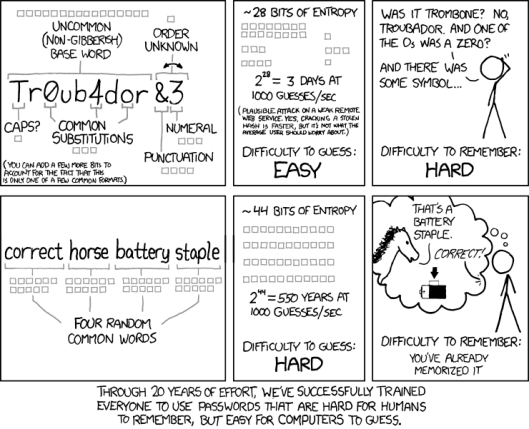
A good analysis of how to set a password comes from the xkcd comics:

password_strength.png

Source: https://xkcd.com/936/

Time to reset your passwords if yours is on the list and set a good habit of changing it at least every 30 days. Establish a strong password policy of uppercase alpha , lowercase alpha, numeric, special characters. Also a long password rather than a short password.


Share this:

  • Click to share on Facebook (Opens in new window) Facebook
  • Click to share on LinkedIn (Opens in new window) LinkedIn
  • Click to email a link to a friend (Opens in new window) Email
  • Click to share on Pinterest (Opens in new window) Pinterest
  • Click to share on Reddit (Opens in new window) Reddit
  • Click to share on Tumblr (Opens in new window) Tumblr
  • Click to share on Pocket (Opens in new window) Pocket
  • Click to share on Telegram (Opens in new window) Telegram
  • Click to share on Threads (Opens in new window) Threads
  • Click to share on WhatsApp (Opens in new window) WhatsApp
  • Click to share on Mastodon (Opens in new window) Mastodon
  • Click to share on X (Opens in new window) X
  • Click to share on Bluesky (Opens in new window) Bluesky
Like Loading...

8 Free “For Dummies” books you should read in 2016

12 Tuesday Jan 2016

Posted by Max Hemingway in Architecture, Cloud, Development, DevOps/OpsDev, Enterprise Architecture, Innovation, Programming, Security

≈ Leave a comment

Tags

Architecture, Development, DevOps, Knowledge, OpsDev, Productivity, Programming, Security, Tools

There has been a lot of the free smaller versions of the “For Dummies” books published recently. These are normally sponsored by a company to help promote a way of thinking/product/etc, however they do contain useful overviews and information on the subject that they are presenting on.

Here are my top 8 of these which should be on your reading list for the start of 2016. All are downloadable in PDF format*.

Agile for Dummies

API for Dummies

DevOps for Dummies

Micro-segmentation for Dummies

Next Generation Endpoint Security for Dummies

Software Defined Data Centres for Dummies

Software Defined Networking for Dummies

Software Defined Storage for Dummies

*You may need to sign up to receive some of these books.

Share this:

  • Click to share on Facebook (Opens in new window) Facebook
  • Click to share on LinkedIn (Opens in new window) LinkedIn
  • Click to email a link to a friend (Opens in new window) Email
  • Click to share on Pinterest (Opens in new window) Pinterest
  • Click to share on Reddit (Opens in new window) Reddit
  • Click to share on Tumblr (Opens in new window) Tumblr
  • Click to share on Pocket (Opens in new window) Pocket
  • Click to share on Telegram (Opens in new window) Telegram
  • Click to share on Threads (Opens in new window) Threads
  • Click to share on WhatsApp (Opens in new window) WhatsApp
  • Click to share on Mastodon (Opens in new window) Mastodon
  • Click to share on X (Opens in new window) X
  • Click to share on Bluesky (Opens in new window) Bluesky
Like Loading...

An A-Z Guide to being an Architect

07 Thursday Jan 2016

Posted by Max Hemingway in Architecture, Big Data, Cloud, Development, DevOps/OpsDev, Enterprise Architecture, Governance, Innovation, IoT, Open Source, Productivity, Programming, Security, Social Media, Tools

≈ Leave a comment

Tags

Architecture, Cloud, CPD, Data, Development, DevOps, Innovation, IoT, Knowledge, learning, Open Source, OpsDev, Productivity, Programming, Social Media

Back in 2008 Microsoft published An A-Z Guide to ABCBeing an Architect in their Architecture Journals.

Here is my take on an updated A to Z Guide to being an Architect. A couple of these may be similar.

A – Architect

Having the right level of skills as an Architect or engaging an Architect with the right level of skills will depend on the work needing to be undertaken. There are several types of Architect with some specialising in certain areas and others being multi domain skilled. The list below covers some of the different types of Architect- this is not an exhaustive list:

  • Enterprise Architect
  • Information Architect
  • Solutions Architect
  • Software Architect
  • Systems Architect

B – Blueprints

Following Blueprints and Patterns either published by vendors (such as the Microsoft Blueprints) or developed internally around your products and services will ensure repeat-ability and cost control around the design process.

Some examples showing different pattern types can be found at Architecture Patterns

C – Contextual Web Era

The up and coming 4th Platform area is the Contextual Web Era

  • 1st Platform – Mainframe Era
  • 2nd Platform – Client Server Era
  • 3rd Platform – Cloud Era
  • 4th Platform – Contextual Web Era

This is an up and coming era with lots of new innovation and developments. Keeping up with developments is key going forward for any architect to understand designs/solutions, art of the possible now and future, innovation and for developing roadmaps for solutions.

D – DevOps

To quote Wikipedia – “DevOps (a clipped compound of “development” and “operations”) is a culture, movement or practice that emphasizes the collaboration and communication of both software developers and other information-technology (IT) professionals while automating the process of software delivery and infrastructure changes”. Having knowledge of DevOps, OpsDev and Agile assist with Architecting a solution for a business understanding their practices and modes of interacting with technology to meet business requirements. A Good book on the subject of DevOps is “The Phoenix Project” by Gene Kim.

E – Enterprise Architecture

EA (Enterprise Architecture) is a blueprint that defines how a business can meet its objectives and strategy. This is achieved by conducting analysis, design, planning, recommendations and implementations through an Enterprise Architecture Framework

Enterprise Architecture Wikibook

F – Four Two Zero One Zero

42010 is the ISO Standard that most frameworks adhere to. Working to a Framework brings structure to your designs and life cycles.

There are a number of frame works available such as:

  • DoDAF
  • MoDAF
  • TOGAF
  • Zachman
  • Other Frameworks are available

Enterprise Architecture Wikipedia Book

G – Governance

Governance is an important part of architecture as it

  • Ensures Conformance
  • Controls Variance
  • Maintains Vitality
  • Enables Communication
  • Sets Direction
  • Issue Resolution
  • Provides Guidance and Prioritisation
  • Promotes Best Practise
  • Minimises Risk
  • Protects IT environments from tactical IT changes, project solutions, and strategic proposals that are not in an organisations global best interest
  • Controlling Technical Diversity, Over-Engineering and Unnecessary Complexity
  • Ensures projects can proceed quickly & efficiently
  • Control over IT spend
  • Quality Standards
  • Efficient and optimal use of resources and increase the effectiveness of IT processes

H – Hands On

It is important to be current and understand the technologies you are architecting. There are lots of options available to get your hands dirty using technology from using Cloud Servers to virtual machines on your compute device. There are other computing devices such as the Raspberry PI that provide a cheap alternative to standing up small farms to learn on.

I – IoT

IoT (Internet of Things) is where physical things are connected by the internet using embedded sensors, software, networks and electronics. This allows the items to be managed, controlled and reported on. My blog posts on IoT Device Security Considerations and Security Layers goes into more detail on this subject.

J – Juxtaposition

Juxtaposition is something an architect should be doing to compare things/items/artefacts etc.
noun;
1. an act or instance of placing close together or side by side, especially for comparison or contrast.
2.the state of being close together or side by side.

Source:http://dictionary.reference.com/browse/juxtaposition

K – Knowledge

I would class Skills with Knowledge. It is important as an Architect to ensure that your skills/knowledge are up to date and where you are unsure of a technology, you have a plan to address and skill up. Build a good CPD (Continuing Professional Development) plan and work towards completing it.

L – Language

With the move to cloud it is important to ensure your scripting skills are up to date as most cloud platforms use scripting to assist with the deployment of environments. This is also true of other DevOps/OpsDev applications. If you are unsure on what to learn this guide may help you – Learn a Programming Language – But which one?

M -Micro Segmentation

Micro Segmentation allows a business to use Networks, Compute and Storage to automate and deliver complex solutions by carving up and using the infrastructure. This segments part of the infrastructures to specific functions/tasks. It can also be used in a security context to segment networks, firewalls, compute and storage to increase security and reduce cyber attacks.  VMware have produced a book “Micro Segmentation for Dummies” that can be downloaded from here.

N – Next Generation

Next Generation refers to the next stage or development to something such as a new release of hardware or software. Next Generation is becoming a common term now to define products and artefacts, an example being Next Generation Firewalls.

O – Open Source

Open Source has been available for a long time with software such a Linux, however there is a bigger shift towards using Open Source and acceptance by businesses. Some examples of Open Source that is now mainstream within business include;

  • Ansible
  • Chef
  • Docker
  • Puppet

P – Performance

Performance can cover people as well as solutions / systems. Performance metrics should be set out at the inception of an engagement then monitored and reported on. This will be a factor in driving Continuous Improvement going forward as well as forecasting / planning for future upgrades and expansion.

Q – Quality

Quality is a huge subject and has a lot if standards governing it and how it affects all aspects of business and architecture. Knowing which standards and how they affect a solution will assist in the whole architecture lifecycle. There are also a number of tools available to help you;

  • Architecture Frameworks
  • ITIL
  • Six Sigma

There is also a level of pride and satisfaction in producing a quality solution and system achieving the objectives and requirements set out by the business.

R- Roadmap

Any architecture/solution should have a roadmap to set out its future. Roadmaps should include items such as:

  • Current state
  • Future state
  • Innovation
  • Upgrades / Releases
  • New Features / Functions
  • End of Life / Replacement

S – SMAC

SMAC stands for Social, Mobile, Analytics, Cloud. SMAC is an acronym that covers the areas and concepts when these four technologies are brought together to drive innovation in business. A good description of SMAC written by a colleague can be found here Acronyms SMAC.

T – Transformation

The majority, if not all systems will undergo a form of transformation. This may be in the form of a simple upgrade or to a complex redesign and migration to something else.

U – UX

UX (User eXperience) affects how people interact with your architecture / design and how they feel about it (emotions and attitudes). With the boom in apps and the nearing Contextual Web Era, UX is one of the most important factors to getting an architecture used. If your users don’t like the system they may find something else to use that they like.

V – Vision

Understanding the vision of your customer and their business is the driving factor for any architecture.

On working with your customer you should look to become a Trusted Advisor and also with your colleagues. A great book on the subject is The Trusted Advisor by David Maister. The book covers 3 main areas which discusses perspectives on trust, the structure of trust building and putting trust to work.

W – WWW

The internet is a key delivery mechanism for systems. Knowing how this works and key components to the internet should be understood such as:

  • IPV4 – IPV6
  • DNS
  • Routing
  • Connectivity
  • Security

X – X86

X86 – is a standard that every knows as its one of the most common platform types available.

Y – Year

Year is for the longevity of the solution you are designing. How many years are your expecting it to last What are the Business Requirements, statutory obligations, depreciation etc that need to be planned in. Consider things like End of Life, Maintenance and Upgrades on hardware and software from a solution point of view.

Z – Zero Defects

The best solution is the one with zero defects, but reaching this goal can be a challenge and can also consume a lot of expense. The best way to ensure Zero Defects is to use:

  • Best Practice
  • Reference Architectures
  • Blueprints/Patterns
  • Checklists
  • Reuse
  • Lessons Learnt

This is my current A to Z and some of the entries may be different in your version so “What is in your A to Z of being an Architect?”

I will look to write some further blog posts on the areas listed in this A to Z

Share this:

  • Click to share on Facebook (Opens in new window) Facebook
  • Click to share on LinkedIn (Opens in new window) LinkedIn
  • Click to email a link to a friend (Opens in new window) Email
  • Click to share on Pinterest (Opens in new window) Pinterest
  • Click to share on Reddit (Opens in new window) Reddit
  • Click to share on Tumblr (Opens in new window) Tumblr
  • Click to share on Pocket (Opens in new window) Pocket
  • Click to share on Telegram (Opens in new window) Telegram
  • Click to share on Threads (Opens in new window) Threads
  • Click to share on WhatsApp (Opens in new window) WhatsApp
  • Click to share on Mastodon (Opens in new window) Mastodon
  • Click to share on X (Opens in new window) X
  • Click to share on Bluesky (Opens in new window) Bluesky
Like Loading...

Is your being social data being mined?

04 Monday Jan 2016

Posted by Max Hemingway in Security, Social Media

≈ Leave a comment

Tags

Security, Social Media

Over the festive break I have seen many people letting their guard down on my Social Media feeds and responding to those quizzes and prediction sites that scan your data and come up with some random facts about you.

PhoneTalkThe lure of finding out “Which are your most used words on facebook?” or “Which friend will be your luck charm in 2016?” is too much for some to resist. These apps usually result is a few words or a match of pictures that appeases the user based on the mining of data in their social feeds and friends profiles.

Examples of these types of apps are:

  • Who is your craziest friend?
  • How will your 2016 be?
  • Which friend will be your luck charm in 2016?
  • Which are your most used words on facebook?
  • Who should you start a band with?

Whilst there are a number of innocent apps/sites that genuinely provide this type of tool to tell you who your best friend is, there is a darker side to some of these as well.

On the face of an app it may look genuine, but you are not aware of what the app is actually doing with your data and to what extent your data is being mined. Where the results are stored or to what purposes it will be used for afterwards.

Here are some basic actions to follow to secure your social data

  • Know your security settings and lock down
  • Kee
    p personal information personal
  • Think before you give an app permission to access your account/data
  • Do not use apps that you are unsure of
  • Think what this app will do with your data

Some useful links

  • Twitter – Safe Tweeting
  • Facebook – Basic Privacy Settings & Tools
  • Sophos – Best Practices for rogue facebook apps

Share this:

  • Click to share on Facebook (Opens in new window) Facebook
  • Click to share on LinkedIn (Opens in new window) LinkedIn
  • Click to email a link to a friend (Opens in new window) Email
  • Click to share on Pinterest (Opens in new window) Pinterest
  • Click to share on Reddit (Opens in new window) Reddit
  • Click to share on Tumblr (Opens in new window) Tumblr
  • Click to share on Pocket (Opens in new window) Pocket
  • Click to share on Telegram (Opens in new window) Telegram
  • Click to share on Threads (Opens in new window) Threads
  • Click to share on WhatsApp (Opens in new window) WhatsApp
  • Click to share on Mastodon (Opens in new window) Mastodon
  • Click to share on X (Opens in new window) X
  • Click to share on Bluesky (Opens in new window) Bluesky
Like Loading...

IoT Device Security Considerations and Security Layers – Encryption

25 Wednesday Nov 2015

Posted by Max Hemingway in IoT, Security

≈ 4 Comments

Tags

Encryption, IoT, Security

ThingsThe next layer to cover in my blog series on IoT Device Security Considerations and Security Layers is that of Encryption.

With the IoT expect to be collecting and storing masses of data, protecting the data is a key consideration for any system.

Encryption plays an important part on devices these days and it can be used/be part of a number of the layers in the IoT stack. End to end encryption should be considered in any IoT design.

There are numerous encryption standards currently available and product to help you secure your data. Some are now being tailored to IoT applications and solutions.

There are two main areas of consideration for encryption in an IoT design:

  • Data
  • Communication

Data is about encrypting the data at rest (data on a storage device) to secure the information.

Communication is about encoding data as it is sent over a network.

The main issue with encryption though is the overhead of encrypting & decrypting and the impact on resources on the IoT device/system.  This has been recognised by chip manufactures and application vendors as they work together to speed up this process. An example of this is Intel and McAfee. Other companies are doing the same.

In any case the use of encryption should be given considerable thought, especially on any network communications and back systems to protect the data. There have been many cases  in the news illustrating what can happen if your data is not encrypted.

Further Reading:

  • Lightweight Cryptography for the Internet of Things
  • Advanced Encryption Standard
  • Cryptography Standards
  • Data Encryption Standard


Share this:

  • Click to share on Facebook (Opens in new window) Facebook
  • Click to share on LinkedIn (Opens in new window) LinkedIn
  • Click to email a link to a friend (Opens in new window) Email
  • Click to share on Pinterest (Opens in new window) Pinterest
  • Click to share on Reddit (Opens in new window) Reddit
  • Click to share on Tumblr (Opens in new window) Tumblr
  • Click to share on Pocket (Opens in new window) Pocket
  • Click to share on Telegram (Opens in new window) Telegram
  • Click to share on Threads (Opens in new window) Threads
  • Click to share on WhatsApp (Opens in new window) WhatsApp
  • Click to share on Mastodon (Opens in new window) Mastodon
  • Click to share on X (Opens in new window) X
  • Click to share on Bluesky (Opens in new window) Bluesky
Like Loading...

IoT Device Security Considerations and Security Layers –Access Control & Authentication

18 Wednesday Nov 2015

Posted by Max Hemingway in IoT, Security

≈ 4 Comments

Tags

IoT, Security

ThingsThe next post in my IoT Series on IoT Device Security Considerations and Security Layers is on Access Control and Authentication.

Security around access is always a hot topic for people and systems and the IoT should be no different. From user interfaces to devices communicating with each other Access Control and Authentication are key to maintaining a secure solution/system.

There are lots of information and posts appearing about this subject, however in the larger stack its only one part of securing the IoT, so should be used in conjunction with other solutions to create and end to end secure stack. (See IoT Device Security Considerations and Security Layers  for the full stack).

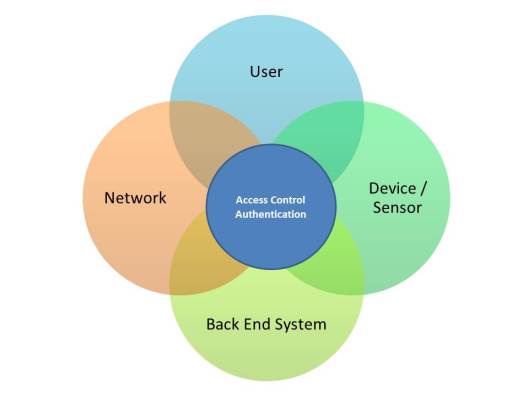
To keep this blog post simple I have outlined four main areas in IoT that will use Access Control and Authentication.

ACL

Each of these areas can leverage or use their own Access Control and Authentication solution.

The good news is that you don’t necessarily need a “New” thing to to achieve this and there are a number of good standards and best practices currently available to follow. If however you are developing something specialised this may need to be customised.

Most solutions will employ a central Access Control and Authentication solution that can be updated, patched and maintained rather than a point solution that will require more effort to look after properly.

Examples of a centralised solution are Azure IoT Hub and Active Directory for a Cloud or On-Premise solution. Other solutions are available.

Areas that you may consider when looking at Access Control and Authentication could include:

Access Control Considerations

  • Access Control Lists
  • Permissions (Add, Change, Delete)
  • Policies

Authentication Considerations

  • LDAP/Active Directory Authentication
  • Certificates
  • Trusted Platform Modules (TPM)
  • Two Factor Authentication
  • Biometrics
  • Tokens
  • PKI
  • Mobile Authentication
  • Username Policy
  • Password Policy


Further Reading:

  • Authorization Framework for the Internet-of-Things
  • The impact of the IoT on access control
  • Network Access Control for Mobile Devices and IoT
  • Identity Authentication and Capability Based Access Control (IACAC) for the Internet of Things
  • Azure IoT Hub developer guide


Share this:

  • Click to share on Facebook (Opens in new window) Facebook
  • Click to share on LinkedIn (Opens in new window) LinkedIn
  • Click to email a link to a friend (Opens in new window) Email
  • Click to share on Pinterest (Opens in new window) Pinterest
  • Click to share on Reddit (Opens in new window) Reddit
  • Click to share on Tumblr (Opens in new window) Tumblr
  • Click to share on Pocket (Opens in new window) Pocket
  • Click to share on Telegram (Opens in new window) Telegram
  • Click to share on Threads (Opens in new window) Threads
  • Click to share on WhatsApp (Opens in new window) WhatsApp
  • Click to share on Mastodon (Opens in new window) Mastodon
  • Click to share on X (Opens in new window) X
  • Click to share on Bluesky (Opens in new window) Bluesky
Like Loading...

IoT Device Security Considerations and Security Layers – User Interface

11 Wednesday Nov 2015

Posted by Max Hemingway in Architecture, IoT, Programming, Security

≈ 4 Comments

Tags

Architecture, IoT, Programming, Security

ThingsThe next area in my series on IoT Device Security Considerations and Security Layers is the User Interface.

Many IoT solutions may just have a standard Web interface to a back end system where IoT Devices and Sensors can be controlled. There is already a lot of documentation on good practices for the Web front end.

In some cases the User Interface may be on the IoT device or not delivered over a Web interface. In these cases many of the good practices for Web front ends can still be applied.

Here are a few of the main considerations:

User Interface

User experience is key to any system, however security is as well. When designing your User Interface you should consider the functionality needed to what the user requirements are, keeping the design slick reduces options for hackers to exploit.

Following good code practices and testing will help in this area.

Identification and Authentication

Most applications these days requires a form of log on and password to links into another system for identification such as AD, LDAP or SSO (Single Sign On).

Ensuring that a strong password policy is in place with rules such as:

  • At least 8 characters long
  • Includes alphanumeric characters
  • Different from previous password
  • No complete words
  • At least 1 upper case character
  • At least 1 lower case character
  • At least 1 number
  • At least 1 special character

Some of these rules will depend if you are authenticating against an existing directory system and its current policies. you should consider changing them if they are not secure.

This in turn allows for the authentication of users against other methods such as a 2 factor.

User Interface

Error Messages

Firstly ensuring that the application and interface have good error handling to reduce the number of messages that the user sees should something unexpected happen.

Secondly having simple well defined error messages reduces exposure of what systems you are running or the type of code that can appear in some errors.

Some further reading:

  • Guide to Authentication
  • Authentication cheat sheet
  • Basic Security Practices for Web Applications

Share this:

  • Click to share on Facebook (Opens in new window) Facebook
  • Click to share on LinkedIn (Opens in new window) LinkedIn
  • Click to email a link to a friend (Opens in new window) Email
  • Click to share on Pinterest (Opens in new window) Pinterest
  • Click to share on Reddit (Opens in new window) Reddit
  • Click to share on Tumblr (Opens in new window) Tumblr
  • Click to share on Pocket (Opens in new window) Pocket
  • Click to share on Telegram (Opens in new window) Telegram
  • Click to share on Threads (Opens in new window) Threads
  • Click to share on WhatsApp (Opens in new window) WhatsApp
  • Click to share on Mastodon (Opens in new window) Mastodon
  • Click to share on X (Opens in new window) X
  • Click to share on Bluesky (Opens in new window) Bluesky
Like Loading...

IoT Device Security Considerations and Security Layers – Device/Application API’s

09 Monday Nov 2015

Posted by Max Hemingway in Architecture, IoT, Programming, Security

≈ 4 Comments

Tags

Architecture, IoT, Programming, Security

ThingsFurthering my series on “IoT Device Security Considerations and Security Layers” next in the stack is the Device/Application API’s.

API’s (Application Programming Interface) provide a capability to easily interact with a system. This could be an API to an IoT Sensor that a server application could use to get information from through using a set of common libraries and functions.

IoT API

APIs often come in the form of a library that includes specifications for routines, data structures, object classes, and variables. In other cases, notably SOAP and REST services, an API is simply a specification of remote calls exposed to the API consumers.
-Wikipedia

There are a number of steps you can take to secure your API’s:

Standards

Follow any standards/security standards available for the systems you are working with. As discussed in previous blog posts standards for the IoT is one area that is still being defined.

Libraries

Installing only the API’s/libraries you need for your application/IoT Device/IoT Sensor (or un-installing any unused API’s/libraries) 

Secure Messaging

Where feasible using Secure Messaging using a level of authentication ensures that the API is communicating and operating with the right system. This ensures that the IoT Device/Sensor can only interface with the correct system and not accept any rogue requests.

Error Handling

An API should be able to understand what to do when it detects an error condition and what to do when it cant. This is important so false instructions/data cannot be sent to the API to make it fail and then be open to attack.

Patching

Using the most up to date version of the API’s/libraries will ensure any bugs or issues have been removed reducing any exposure to attacks that hit known issues. employing a regular patching capability where possible maintains a level of security. It may not be possible to update IoT Devices/Sensors that are embedded, however any server side API’s/libraries should be up to date. This will however increase compatibility testing with the IoT Devices/Sensors to ensure the interfaces still work.

Further Reading

OWASP REST Security Cheat Sheet

Share this:

  • Click to share on Facebook (Opens in new window) Facebook
  • Click to share on LinkedIn (Opens in new window) LinkedIn
  • Click to email a link to a friend (Opens in new window) Email
  • Click to share on Pinterest (Opens in new window) Pinterest
  • Click to share on Reddit (Opens in new window) Reddit
  • Click to share on Tumblr (Opens in new window) Tumblr
  • Click to share on Pocket (Opens in new window) Pocket
  • Click to share on Telegram (Opens in new window) Telegram
  • Click to share on Threads (Opens in new window) Threads
  • Click to share on WhatsApp (Opens in new window) WhatsApp
  • Click to share on Mastodon (Opens in new window) Mastodon
  • Click to share on X (Opens in new window) X
  • Click to share on Bluesky (Opens in new window) Bluesky
Like Loading...

IoT Device Security Considerations and Security Layers – Applications

02 Monday Nov 2015

Posted by Max Hemingway in IoT, Programming, Security

≈ 4 Comments

Tags

Development, IoT, Programming, Security

Continuing further my series on “IoT Device Security Considerations and Security Layers” next in the stack is the Application.

The level of Security that is put into the application on an IoT Device will depend upon several factors:

  • Hardware PlatformThings
  • Operating System
  • Programming Language
  • Standards followed
  • Level of Skill of developer
  • Security Testing

Hardware Platform

The hardware platform becomes a factor when the application makes use of any special features that are present on the device. This is ideal for applications that are written to use on bespoke devices such as sensors for specific tasks, but does not allow wider use without modification and different versions being developed.

There are a lot of modular kits available that utilise standard libraries of code that make it easier for those starting out, but the level of security will depend upon those used.

Operating System

In a similar way to the using specific hardware and programming for it, similar things can be accomplished using features of the operating system. Again ideal for bespoke platforms and devices, but not for generic apps.

So the first choice you need to make when looking to secure your application – Is it a Generic or Specific application and what elements of the Hardware and Operating System are you going to utilise.

Programming Language

There are lots of Programming Languages that can be used to create applications for the Internet of Things.

Redmonk carried out some research in June 2015 and ranked the most popular Programming Language’s. Some of the popular languages that are used current in IoT Development are:

  • JavaScript
  • Java
  • Python
  • C
  • C++
  • Go
  • Rust

There are lots of Languages available that can be used to programme for the IoT. The choice of Language used will vary based on the Hardware and Operating System used and the functionality required for the application provided by the Language.

Standards

There are a number of standards and frameworks are available for Application Security with general standard practices and some more specific depending upon the type of application being developed.  Others come down to good practice, experience and the Software Development Life-Cycle used.

Application Standards are well developed and defined. IoT Standards are being discussed and developed.

IoT Standards by Max Hemingway

Security Testing

Security Testing will be key to ensuring the developed application is secure. Applications and IoT Devices should be routinely security tested during development and after to ensure vulnerabilities are addressed.

OWASP (Open Web Application Security Project) lists the top 10 IoT Security vulnerabilities as:

  • I1 Insecure Web Interface
  • I2 Insufficient Authentication/Authorization
  • I3 Insecure Network Services
  • I4 Lack of Transport Encryption
  • I5 Privacy Concerns
  • I6 Insecure Cloud Interface
  • I7 Insecure Mobile Interface
  • I8 Insufficient Security Configurability
  • I9 Insecure Software/Firmware
  • I10 Poor Physical Security

The OWASP site also has a good set of Security Guidance for Manufacturers, Developers and Consumers setting out IoT Recommendations for each of the above areas.

If you want to learn a programming language but are not sure which one have a look at my blog on “Learn a Programming Language – But which one?“

Share this:

  • Click to share on Facebook (Opens in new window) Facebook
  • Click to share on LinkedIn (Opens in new window) LinkedIn
  • Click to email a link to a friend (Opens in new window) Email
  • Click to share on Pinterest (Opens in new window) Pinterest
  • Click to share on Reddit (Opens in new window) Reddit
  • Click to share on Tumblr (Opens in new window) Tumblr
  • Click to share on Pocket (Opens in new window) Pocket
  • Click to share on Telegram (Opens in new window) Telegram
  • Click to share on Threads (Opens in new window) Threads
  • Click to share on WhatsApp (Opens in new window) WhatsApp
  • Click to share on Mastodon (Opens in new window) Mastodon
  • Click to share on X (Opens in new window) X
  • Click to share on Bluesky (Opens in new window) Bluesky
Like Loading...

IoT Device Security Considerations and Security Layers – Operating System

21 Wednesday Oct 2015

Posted by Max Hemingway in Architecture, IoT, Security

≈ 4 Comments

Tags

Architecture, IoT, Security

ThingsAnother post in the series on “IoT Device Security Considerations and Security Layers“, this time looking at Operating Systems.

There are many Operating Systems available for use on IoT devices and there are more being developed all the time. These range from specific Operating Systems targeted at a specific IoT Chip set to ones that can be used across a number of devices. Some of the names in this field are well known by every day consumers and some not so well known but are strong in this area.

IoT Operating Systems

At this time there are not many standards agreed across the industry, but more group specific depending upon which platform you are developing on. The main standards that exist are around networking and connectivity. Groups and Communities currently discussing and creating IoT Standards). Some of these are around security and securing the IoT devices.

There are a number of standard practices that you can carry out to help secure your IoT device at the Operating System level:

Right Operating System

Choosing the right Operating System is key to ensuring your IoT Device will function as you require it to and support the applications you are using. You should look to only install the Operating Systems elements that are needed to reduce any future Security Issues through none used modules. Streamlining (or removing none used modules) also reduces the amount of space needed on the IoT device.

Upgrades

Upgrading to latest versions of the Operating System at regular intervals will ensure that you have the latest software and that additional space is not taken up with old patching files. This also ensures any known security holes in the Operating System are protected. This also has the added benefit of keeping up with any new features introduced into the Operating System.

Patching

Patching of both the hardware BIOS and Operating System should be considered. Ensuring that the BIOS is at the latest level makes any patching more effective as the Operating System and patches are normally created and tested on the latest hardware and releases.

Regular patching needs to be carried out in order to fix any known exploits or Security holes in the Operating System/ Some latest Operating Systems patch automatically at a regular interval which when configured allow this task to just be a monitored one to ensure devices are being updated.

Access

Only allowing the users or systems that need access to the device and removing all other accounts and access rights will secure the device. The levels of access control, user id’s and passwords will be dependent on the Operating System used. These can range from local settings to a centralised control such as Active Directory.

Below are some links to Operating Systems and their supported hardware platforms.

Brillo

  • https://developers.google.com/brillo/?hl=en

Contiki

  • http://www.contiki-os.org/
  • http://www.contiki-os.org/hardware.html

FreeRTOS

  • http://www.freertos.org/
  • http://www.freertos.org/RTOS_ports.html

Linux

http://www.linux.org/

mbedOS

  • https://www.mbed.com/en/development/software/mbed-os/

Microsoft

  • http://www.microsoft.com/en-gb/server-cloud/internet-of-things/overview.aspx

OpenWSN

  • https://openwsn.atlassian.net/wiki/pages/viewpage.action?pageId=688187
  • https://openwsn.atlassian.net/wiki/display/OW/Hardware

Riot

  • http://www.riot-os.org/
  • http://www.riot-os.org/#usage

Tiny OS

  • http://www.tinyos.net/
  • http://tinyos.stanford.edu/tinyos-wiki/index.php/FAQ

Share this:

  • Click to share on Facebook (Opens in new window) Facebook
  • Click to share on LinkedIn (Opens in new window) LinkedIn
  • Click to email a link to a friend (Opens in new window) Email
  • Click to share on Pinterest (Opens in new window) Pinterest
  • Click to share on Reddit (Opens in new window) Reddit
  • Click to share on Tumblr (Opens in new window) Tumblr
  • Click to share on Pocket (Opens in new window) Pocket
  • Click to share on Telegram (Opens in new window) Telegram
  • Click to share on Threads (Opens in new window) Threads
  • Click to share on WhatsApp (Opens in new window) WhatsApp
  • Click to share on Mastodon (Opens in new window) Mastodon
  • Click to share on X (Opens in new window) X
  • Click to share on Bluesky (Opens in new window) Bluesky
Like Loading...
← Older posts
Newer posts →

RSS Feed

RSS Feed RSS - Posts

Other Publications I contribute to

https://sparrowhawkbushcraft.com/

Recent Posts

  • Graceful Speech & Timeless Tales: Mastering the Art of Gesture
  • Graceful Speech & Timeless Tales: The Power of Pitch
  • Graceful Speech & Timeless Tales: Modulation
  • Graceful Speech & Timeless Tales: Harnessing Inflection
  • Adventure Games: Open Sourced Zork

Categories

  • 21st Century Human
  • 3D Printing
  • AI
  • Applications
  • ArchiMate
  • Architecture
  • Arduino
  • Automation
  • BCS
  • Big Data
  • Certification
  • Climate Change
  • Cloud
  • Cobotics
  • Connected Home
  • Data
  • Data Fellowship
  • Data Science
  • Development
  • DevOps/OpsDev
  • Digital
  • DigitalFit
  • Drone
  • Enterprise Architecture
  • F-TAG
  • Governance
  • Health
  • Innovation
  • IoT
  • Machine Learning
  • Metaverse
  • Micro:Bit
  • Mindset
  • Mobiles
  • Networks
  • Open Source
  • Podcasts
  • Productivity
  • Programming
  • Quantum
  • Raspberry Pi
  • Robotics
  • Scouting
  • Scouts
  • Security
  • Smart Home
  • Social Media
  • Space
  • STEM
  • Story Telling
  • Technologists Toolkit
  • Tools
  • Uncategorized
  • Wearable Tech
  • Windows
  • xR

Archives

Reading Shelf

Archives

Recent Posts

  • Graceful Speech & Timeless Tales: Mastering the Art of Gesture
  • Graceful Speech & Timeless Tales: The Power of Pitch
  • Graceful Speech & Timeless Tales: Modulation
  • Graceful Speech & Timeless Tales: Harnessing Inflection
  • Adventure Games: Open Sourced Zork

Top Posts & Pages

  • Graceful Speech & Timeless Tales: The Art of Articulation
  • 20 Informative Podcasts for 2025: Boost Your PKMS
  • Understanding ISO/IEC 42001: A Course Review
  • Building Cyber Resilience: Enterprise Architecture and ArchiMate for Strategic Security
  • Graceful Speech & Timeless Tales: Modulation
  • Graceful Speech & Timeless Tales: The Power of Pitch
  • Graceful Speech & Timeless Tales: Mastering the Art of Gesture
  • Mastering the CPD Cycle for Professional Growth
  • Adventure Games: Open Sourced Zork

Category Cloud

21st Century Human Architecture Automation Big Data Cloud Data Data Science Development DevOps/OpsDev Digital DigitalFit Enterprise Architecture Innovation IoT Machine Learning Mindset Open Source Podcasts Productivity Programming Raspberry Pi Robotics Security Social Media STEM Story Telling Technologists Toolkit Tools Uncategorized Wearable Tech

Tags

3D Printing 21st Century Human AI Applications Architecture artificial-intelligence Automation BCS Big Data Blockchain business Certification Cloud Cobot Cobotics Coding Communication Connected Home CPD creativity cybersecurity Data Data Fellowship Data Science Delivery Development DevOps Digital DigitalFit Digital Human Drone Email Enterprise Architecture GTD Infographic Information Theory Innovation IoT Journal Knowledge learning Machine Learning Metaverse MicroLearning Mindset Mixed Reality Networks Open Source OpsDev PKMS Podcasts Productivity Programming Proving It Quantum R RaspberryPI Robot Robotics Scouts Security Smart Home Social Media STEM Story Telling Technologists Toolkit technology Technology Couch Podcast Thinking Tools Training Visualisation Voice Wearable Tech xR

License

Creative Commons Licence
This work is licensed under a Creative Commons Attribution-NonCommercial-ShareAlike 4.0 International License.

Meta

  • Create account
  • Log in
  • Entries feed
  • Comments feed
  • WordPress.com

Blog at WordPress.com.

  • Subscribe Subscribed
    • Max Hemingway
    • Join 82 other subscribers
    • Already have a WordPress.com account? Log in now.
    • Max Hemingway
    • Subscribe Subscribed
    • Sign up
    • Log in
    • Report this content
    • View site in Reader
    • Manage subscriptions
    • Collapse this bar
 

Loading Comments...
 

    %d