• About Me Card

Max Hemingway

~ Musings as I work through life, career and everything.

Max Hemingway

Category Archives: STEM

Building a Quadruped

07 Friday Apr 2017

Posted by Max Hemingway in Arduino, Open Source, Programming, Robotics, STEM

≈ 4 Comments

Tags

Arduino, learning, Open Source, Programming, Robot, Robotics, STEM

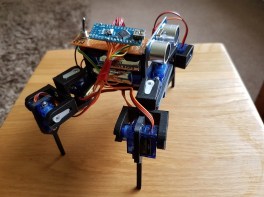
Robot3I decided to have a go at building a robot for a STEM session last weekend, to show the power of code and how it can be used to control something.  A moving robot is a great visualisation to demonstrate this.
After some searching I settled on a quadruped shown on thingverse (a 3d printing site). This is a build based on a robot called Chopstick Junior by Lumi.

Parts being printed, I set about thinking about the controls and motors. The parts are compatible with an SG90 servo. I needed 8 of these, for the knee and hip joints of the quadruped.

The assembly of the parts was a bit of a challenge as in the instructions it said you needed 3mm x 6mm screw/nuts to connect the shoulders together. You really need 3mm x 8mm screw/nuts as I have to countersink the holes a bit more to get the nuts to attach to the 6mm screw length.

Inserting the servos into the holes in the hips and legs required the unscrewing of the 4 small screws in each servo and temporarily removing the gear top. Once inserted this can be replaced and screwed down.

Once the servos were in place I centered the servos the best I could to allow backwards and forwards movement in each joint. I knew that later adjustment may be needed! This can easily be achieved removing the servo arm and hip/leg, then re-positioning and attaching the arm again.

The power is provided by 4 x AA batteries in a square battery holder. This was glued down onto the frame and fitted well into the build.

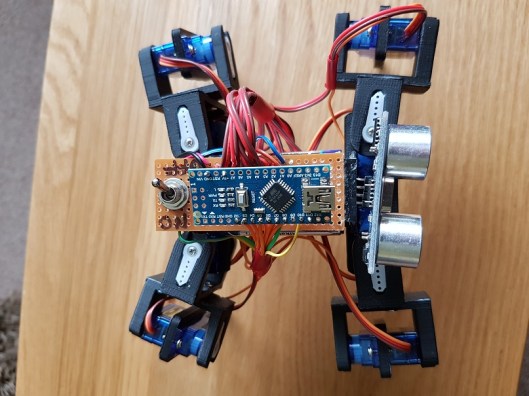
The power bus is provided by a small piece of circuit board. I used two lines for -v and +v. Each servo was then wired into the lines and the control wire to an Arduino Nano which is used as the brains of the robot.

The following pins were used on the Digital I/O on the Arduino Nano:

  • D2 – Hip 1
  • D3 – Knee1
  • D4 – Hip 2
  • D5 – Knee 2
  • D6 – Hip 3
  • D7 – Knee 3
  • D8 – Hip 4
  • D9 – Knee 4

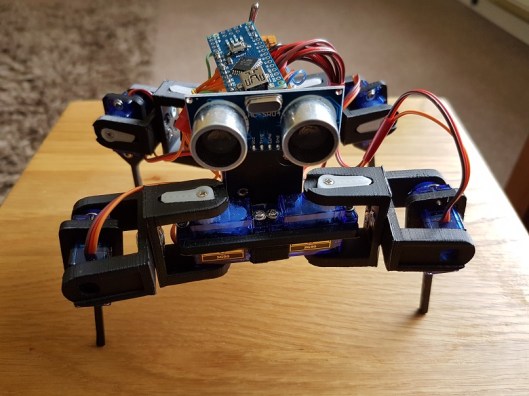
I also wired in a sensor on the front of the robot to D10 and D11.

Wiring is grouped together to allow movement, but cut to a length that reduces excess that could get in the way of the legs.

A toggle switch provides an on/off for the power fixed to the rear of the robot. Remember to break the lines on the circuit board so it does not join any of the lines.

Once assembled I then got round to coding. I decided to use the opensource code for the Chopstick Junior as a base and make alterations. The quadruped responded well to the code and several physical servo adjustments were needed. Its now in a reasonable state, however balance is an issue in terms of walking steadily, so need to work more on this.  I have not yet coded movement to respond to the sensors yet, this will be done later.

The code is available via my Github:  https://github.com/Cloudmage/Robots

The robot went down well at the STEM session. Now to tweek that code……

Top view

Robot2

Side View

Robot3

Front View

Robot1

Share this:

  • Click to share on Facebook (Opens in new window) Facebook
  • Click to share on LinkedIn (Opens in new window) LinkedIn
  • Click to email a link to a friend (Opens in new window) Email
  • Click to share on Pinterest (Opens in new window) Pinterest
  • Click to share on Reddit (Opens in new window) Reddit
  • Click to share on Tumblr (Opens in new window) Tumblr
  • Click to share on Pocket (Opens in new window) Pocket
  • Click to share on Telegram (Opens in new window) Telegram
  • Click to share on Threads (Opens in new window) Threads
  • Click to share on WhatsApp (Opens in new window) WhatsApp
  • Click to share on Mastodon (Opens in new window) Mastodon
  • Click to share on X (Opens in new window) X
  • Click to share on Bluesky (Opens in new window) Bluesky
Like Loading...

How you can begin to Code

06 Thursday Apr 2017

Posted by Max Hemingway in Programming, STEM, Tools

≈ 7 Comments

Tags

Coding, learning, Programming, STEM

code1With all the recent STEM activities I have been involved with and blogged about, I have been asked to write some posts around how someone can start learning to code.

The school curriculum covers an element of coding with some subjects and pupils may be lucky to get a BBC Micro:bit or Raspberry Pi, however you don’t have to wait until school before learning any coding.

You don’t have to be young to start coding either. Using the same methods and tools anyone can learn to code.

The phrase “Learning to code” may strike fear and thoughts of hundreds of lines text and numbers, but it doesn’t need to. There are lots of websites available to help people start to code and present a fresh way of learning to code.

So where to start…….. If your reading this blog then you have access to a computing device. All you need to get started is a computing device with a web browser and access to the internet.

At this stage, its not worth getting hung up on the choices of the many different languages out there such as Python, Java, C etc, but concentrating on some fundamentals of coding.

Depending if you like Minecraft, Star Wars, Dr Who or Frozen, you can learn basic commands through gaming and interaction. These games teach you some basics of coding and commands by getting you to move a character on a screen to complete a number of tasks. Each of the games work in a similar way, using someones favorite characters to help them learn. These also help keep focus and attention.

The first code that you will learn is through blocks.

Minecraft – https://code.org/minecraft

Dr Who – http://www.bbc.co.uk/cbbc/games/doctor-who-game

Frozen – https://studio.code.org/s/frozen/stage/1/puzzle/1

Star Wars – https://code.org/starwars

Moana – http://partners.disney.com/hour-of-code

Once you have completed the tasks in blocks, you could then also try using a different language with some of the games such as Java if you wish. Its a great way of experiencing some of the differences in the languages.


The main program behind blocks is Scratch. To see more on the block programming method have a look at Scratch itself.

https://scratch.mit.edu/

At the scratch site there are learning tools and lessons to help you learn as well as access to the full programming language. The Scratch site also hosts a lot of other peoples programs which you can run/play and look at how they have constructed their code.

Scratch is a free visual programming language developed by the MIT(Massachusetts Institute of Technology) Media Lab.[1] Scratch is used by students, scholars, teachers,and parents to easily create animations, games, etc. It provides a stepping stone to the more advanced world of computer programming. It can also be used for a range of educational and entertainment constructionist purposes from math and science projects, including simulations and visualizations of experiments, recording lectures with animated presentations, to social sciences animated stories, and interactive art and music.[2] Viewing the existing projects available on the Scratch website, or modifying and testing any modification without saving it requires no online registration.

Source:https://en.wikipedia.org/wiki/Scratch_(programming_language)

Scratch allows users to use event-driven programming with multiple active objects called sprites.[1] Sprites can be drawn, as vector or bitmap graphics, from scratch in a simple editor that is part of Scratch, or can be imported from external sources, including webcams.

Source:https://en.wikipedia.org/wiki/Scratch_(programming_language)

All you need now is to dedicate some time each week to learn to code.

Share this:

  • Click to share on Facebook (Opens in new window) Facebook
  • Click to share on LinkedIn (Opens in new window) LinkedIn
  • Click to email a link to a friend (Opens in new window) Email
  • Click to share on Pinterest (Opens in new window) Pinterest
  • Click to share on Reddit (Opens in new window) Reddit
  • Click to share on Tumblr (Opens in new window) Tumblr
  • Click to share on Pocket (Opens in new window) Pocket
  • Click to share on Telegram (Opens in new window) Telegram
  • Click to share on Threads (Opens in new window) Threads
  • Click to share on WhatsApp (Opens in new window) WhatsApp
  • Click to share on Mastodon (Opens in new window) Mastodon
  • Click to share on X (Opens in new window) X
  • Click to share on Bluesky (Opens in new window) Bluesky
Like Loading...
Newer posts →

RSS Feed

RSS Feed RSS - Posts

Other Publications I contribute to

https://sparrowhawkbushcraft.com/

Recent Posts

  • Pen based Productivity Tools: The Chronodex 2026
  • Understanding ETSI TS 104 223 and ISO/IEC 42006
  • Graceful Speech & Timeless Tales: Mastering the Art of Gesture
  • Graceful Speech & Timeless Tales: The Power of Pitch
  • Graceful Speech & Timeless Tales: Modulation

Categories

  • 21st Century Human
  • 3D Printing
  • AI
  • Applications
  • ArchiMate
  • Architecture
  • Arduino
  • Automation
  • BCS
  • Big Data
  • Certification
  • Climate Change
  • Cloud
  • Cobotics
  • Connected Home
  • Data
  • Data Fellowship
  • Data Science
  • Development
  • DevOps/OpsDev
  • Digital
  • DigitalFit
  • Drone
  • Enterprise Architecture
  • F-TAG
  • Governance
  • Health
  • Innovation
  • IoT
  • Machine Learning
  • Metaverse
  • Micro:Bit
  • Mindset
  • Mobiles
  • Networks
  • Open Source
  • Podcasts
  • Productivity
  • Programming
  • Quantum
  • Raspberry Pi
  • Robotics
  • Scouting
  • Scouts
  • Security
  • Smart Home
  • Social Media
  • Space
  • STEM
  • Story Telling
  • Technologists Toolkit
  • Tools
  • Uncategorized
  • Wearable Tech
  • Windows
  • xR

Archives

Reading Shelf

Archives

Recent Posts

  • Pen based Productivity Tools: The Chronodex 2026
  • Understanding ETSI TS 104 223 and ISO/IEC 42006
  • Graceful Speech & Timeless Tales: Mastering the Art of Gesture
  • Graceful Speech & Timeless Tales: The Power of Pitch
  • Graceful Speech & Timeless Tales: Modulation

Top Posts & Pages

  • Understanding ETSI TS 104 223 and ISO/IEC 42006
  • Understanding ISO/IEC 42001: A Course Review
  • Pen based Productivity Tools: The Chronodex 2026
  • Manual tasks of today should be the Automated tasks of tomorrow
  • Technology Couch Podcast – Episode 3
  • Pen based Productivity Tools – The Chronodex 2025
  • Race to the largest Raspberry Pi Cluster

Category Cloud

21st Century Human Architecture Automation Big Data Cloud Data Data Science Development DevOps/OpsDev Digital DigitalFit Enterprise Architecture Innovation IoT Machine Learning Mindset Open Source Podcasts Productivity Programming Raspberry Pi Robotics Security Social Media STEM Story Telling Technologists Toolkit Tools Uncategorized Wearable Tech

Tags

3D Printing 21st Century Human AI Applications Architecture artificial-intelligence Automation BCS Big Data Blockchain business Certification Cloud Cobot Cobotics Coding Communication Connected Home CPD creativity cybersecurity Data Data Fellowship Data Science Delivery Development DevOps Digital DigitalFit Digital Human Drone Email Enterprise Architecture GTD Infographic Information Theory Innovation IoT Journal Knowledge learning Machine Learning Metaverse MicroLearning Mindset Mixed Reality Networks Open Source OpsDev PKMS Podcasts Productivity Programming Proving It Quantum R RaspberryPI Robot Robotics Scouts Security Smart Home Social Media STEM Story Telling Technologists Toolkit technology Technology Couch Podcast Thinking Tools Training Visualisation Voice Wearable Tech xR

License

Creative Commons Licence
This work is licensed under a Creative Commons Attribution-NonCommercial-ShareAlike 4.0 International License.

Meta

  • Create account
  • Log in
  • Entries feed
  • Comments feed
  • WordPress.com

Blog at WordPress.com.

  • Subscribe Subscribed
    • Max Hemingway
    • Join 82 other subscribers
    • Already have a WordPress.com account? Log in now.
    • Max Hemingway
    • Subscribe Subscribed
    • Sign up
    • Log in
    • Report this content
    • View site in Reader
    • Manage subscriptions
    • Collapse this bar
 

Loading Comments...
 

    %d