
As 2026 begins, I am once again in the process of updating my Personal Knowledge Management System (PKMS). This update reflects the latest advancements in knowledge management, as well as my evolving personal priorities.
With an increase in walking I have been doing as part of my routine, my approach to learning has shifted towards podcasts and micro learning. Instead of spending time endlessly scrolling through information, I have leveraged AI to create podcasts and short, voiced snippets on various topics on interest. These concise audio segments help break down complex subjects into manageable, bite-sized chunks, making it easier to keep up with new ideas while on the move.
I am publishing these updates so that others may use this approach as a model for developing their own PKMS.
What is a PKMS?
The primary aim of a PKMS (Personal Knowledge Management System) is to enhance an individual’s capacity to learn, retain and apply knowledge efficiently in both their personal and professional life. By providing structure to the way information is handled, it supports ongoing development.
A well formed PKMS can help provide several benefits:
- Continuous Learning: With the right mindset, a PKMS offers a systematic approach to acquiring, organising and reviewing knowledge, thereby supporting lifelong learning.
- Increased Productivity: Having immediate access to relevant and organised information enables individuals to remain proactive and ahead of the curve.
- Knowledge Retention: The ability to store information in an organised repository facilitates easy retrieval as and when needed.
- Adaptability: As technology, information and data continue to evolve rapidly, a PKMS helps users stay informed and adaptable to change.
Maintaining a clear distinction between personal social and business social knowledge remains important, even though there are occasions when the two may overlap. While it is sometimes necessary for these areas to intersect, keeping them largely separate helps maintain clarity, focus and a layer of personal security.
Various tools are available that can be used to build a PKMS tailored to individual needs. The choice of tools may differ from person to person however, the underlying principle is to use resources that support the structured management of knowledge. The specific tools utilised can contribute greatly to the effectiveness of a PKMS.
Various tools are available that can be used to build a PKMS tailored to individual needs. The choice of tools may differ from person to person however, the underlying principle is to use resources that support the structured management of knowledge. The specific tools utilised can contribute greatly to the effectiveness of a PKMS.
Professional Life
Research
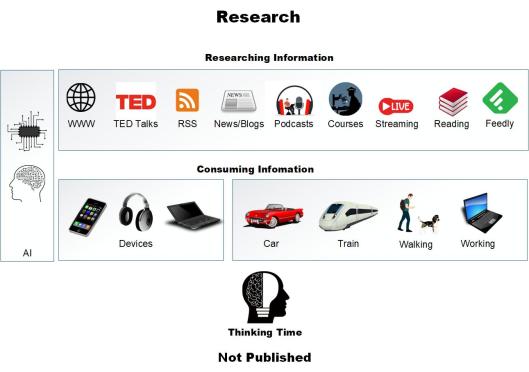
Research is an integral part of my Personal Knowledge Management System (PKMS). It involves gathering information that supports learning and integration into my work. Continuous learning is my key goal of my PKMS to stay ahead as a Technologist. Below is a high-level list of the types of content that I utilise for research and learning.
- AI
- Streaming Services
- RSS Feeds
- Podcasts
- TED Talks
- Web Searches
- Blog Posts
- Learning
- Micro Learning
- Reading
Some of these are fairly self explanatory as sources. I may expand on some of the sources I use in future posts.
AI (Artificial Intelligence)
Artificial Intelligence (AI) is growing in use and works well in my PKMS to enhance the way information is gathered, organised and retrieved.
AI is a good tool to ask as an assistant when researching, asking questions and can provide a reasonable summary of long documents and papers.
RSS
Some sites have an RSS feed which allows me to pull updates from sites directly into Feedly.
Podcasts
Podcasts cover both audio and video casts that I watch/stream online or download to my phone/media player to listen to when I am on journeys in the car or other transportation methods or out walking the dog. Daily walks with the dog provide a good time to listen to these acting as my daily comute to and from work (laptop).
Feedly
Feedly provides an aggregation tool that collects stories from various blogs and websites that I find useful for research and information . This generates a list of stories that can be quickly scanned on a single screen without having to visit multiple sites. Clicking on a story displays a snippet from the source site and provides a link to read the full article, if necessary. Using a series of keystrokes, it is possible to read the headlines, then move through the articles efficiently, stopping and opening them as needed.
Sources can be categorised to allow an all-view or just what’s new in a category.
Thinking Time
Thinking Time covers the time that I spend absorbing the PKMS information coming in from the different sources and then processing and applying it in different ways. It is also good to spend time reflecting on what I have learned and think of different and new ways to use the information and learnings.
Note Taking
I use two tools now for note-taking: OneNote and Obsidian. I favour Obsidian as it uses Markdown, which I use a lot for documentation and its ability to structure data in a logical way and allows you to query data in an interactive graph.
Being Social
I use several social channels to publish my thoughts as a Technologist. The main channel I use is this blog site.

Blog Site
www.maxhemingway.com is my main published site that I use to share my thoughts, leadership and updates through. From this I send out links to various social channels.
Podcast
My podcast “Technology Couch Podcast” has not had an update for a while (that said it does still get lots of downloads), but hopefully this will change soon. This can be found on my blog page and also normal podcast streaming sites.
Social Sites
I use social sites to publish my blog and podcast updates.
GitHub
I use GitHub to store any code or projects that I want to publish externally.
Personal Life

Personal Journal
My personal journals have always been Moleskine plain pocket books, be more recently I have made a switch to using Rhodia range of pocket books with dots. My main reason was on price as Moleskine has risen a fair bit for their products. I have used a couple of Rhodia pocket books since my switch and I actually find the paper a lot better and its slightly thicker which can support more inks without a bleed through to the pages below.
I still favour the Pilot ball ink pens as before in 0.5 or 0.7 size.
No batteries or charging needed for this type of personal journal.
Social Media
To keep my work life separate from my personal life, I use social platforms like Instagram and Facebook for friends and family, ensuring that two-factor authentication and appropriate security settings are in place.
Even with these precautions, it’s essential to remember that anything posted online could potentially become public in the future.
Further Reading
If you are looking for inspiration in creating your own PKMS, Reddit has a great list of PKMS tools that is worth a look and a discussion board on setting up a PKMS.
Previous related blog post:




 Max Hemingway
Leave a comment