• About Me Card

Max Hemingway

~ Musings as I work through life, career and everything.

Max Hemingway

Tag Archives: Programming

Adventure Games: Open Sourced Zork

21 Friday Nov 2025

Posted by Max Hemingway in Open Source, Programming

≈ Leave a comment

Tags

Open Source, Programming

Bit of a Friday Geek Out post – I have been a long time fan of adventure games and remember playing text based games in my early years such as “The Hobbit”, which I would play for many hours navigating the paths and challenges along the journey. A long way from todays computer games, but at the time was brilliant and this is probably what led me on my journey into D&D.

Another text based adventure game is Zork for which Microsoft have released the source code on GitHub for everyone to learn from, see how it was coded and hopefully inspire the next generation of coders.

Zork is a text adventure game first released in 1977 by developers Tim Anderson, Marc Blank, Bruce Daniels, and Dave Lebling for the PDP-10 mainframe computer. Source: Wikipedia

The Microsoft post gives instruction on how to run Zork should you fancy a step back in time and enjoy a text based adventure.

Other Historical Code

There are lots of other historical titles in the GitHub repo that have been made available – https://github.com/historicalsource such as:

  • Kings Quest
  • Hitchhikers Guide to the Galaxy
  • Millipede

I will let you discover the rest.

Zork GitHub Repos

Zork I: The Great Underground Empire

Zork II: The Wizard of Frobozz

Zork III: The Dungeon Master

Further Reading

Preserving code that shaped generations: Zork I, II, and III go Open Source

Share this:

  • Click to share on Facebook (Opens in new window) Facebook
  • Click to share on LinkedIn (Opens in new window) LinkedIn
  • Click to email a link to a friend (Opens in new window) Email
  • Click to share on Pinterest (Opens in new window) Pinterest
  • Click to share on Reddit (Opens in new window) Reddit
  • Click to share on Tumblr (Opens in new window) Tumblr
  • Click to share on Pocket (Opens in new window) Pocket
  • Click to share on Telegram (Opens in new window) Telegram
  • Click to share on Threads (Opens in new window) Threads
  • Click to share on WhatsApp (Opens in new window) WhatsApp
  • Click to share on Mastodon (Opens in new window) Mastodon
  • Click to share on X (Opens in new window) X
  • Click to share on Bluesky (Opens in new window) Bluesky
Like Loading...

Understanding the EU Cyber Resilience Act

24 Thursday Apr 2025

Posted by Max Hemingway in Applications, Certification, Programming

≈ Leave a comment

Tags

Applications, Certification, Programming

The EU Cyber Resilience Act (CRA) is a significant piece of legislation that establishes a common set of standards and requirements on various types of software, including open source, to ensure cybersecurity and resilience. Products will bear the CE marking  to indicate that they comply with the CRA requirements.

The CRA entered into force on the 10th December 2024 with parts of the act coming into place with the full act coming into force on 11 December 2027.

Key requirements of the act:

  • The Act mandates compliance strategies for digital products and outlines how to navigate uncertainties in the law, particularly for open source software
  • It includes provisions for ICT risk management, incident reporting, resilience testing, and third-party risk management 

To help gain and understanding of the CRA, The Linux Foundation and Open SSF have recently launched a course: The Linux Foundation – Understanding the EU Cyber Resilience Act (CRA) (LFEL1001)

I have to thank a former colleague for posting about it on LinkedIn which drew my attention to the course. Having taken the the course I found it to be very informative and provides a good overview. There are useful links and material that can be used for further research into the CRA.

The course is presented in 4 chapters which cover:

  • Course Introduction
  • CRA Overview and Key Concepts
  • Requirements and Conformity Assessments
  • Adapting to the CRA

Upon taking a final exam, a digital badge is awarded.

I would recommend the course to anyone wanting a greater understanding of CRA and looking to implement it. 

Share this:

  • Click to share on Facebook (Opens in new window) Facebook
  • Click to share on LinkedIn (Opens in new window) LinkedIn
  • Click to email a link to a friend (Opens in new window) Email
  • Click to share on Pinterest (Opens in new window) Pinterest
  • Click to share on Reddit (Opens in new window) Reddit
  • Click to share on Tumblr (Opens in new window) Tumblr
  • Click to share on Pocket (Opens in new window) Pocket
  • Click to share on Telegram (Opens in new window) Telegram
  • Click to share on Threads (Opens in new window) Threads
  • Click to share on WhatsApp (Opens in new window) WhatsApp
  • Click to share on Mastodon (Opens in new window) Mastodon
  • Click to share on X (Opens in new window) X
  • Click to share on Bluesky (Opens in new window) Bluesky
Like Loading...

Taking a Leap into Quantum – Hello World with Q#

28 Wednesday Mar 2018

Posted by Max Hemingway in Programming, Quantum

≈ Leave a comment

Tags

Programming, Quantum

Quantum.jpg

Back in December 2017, Microsoft announced a Quantum Development kit which uses Q # (Q Sharp) as its language. It is designed to be used with Visual Studio 2017.  Recently I decided to install the development kit and have a go at the usual “Hello World” example.

The development kit is explained as being capable of developing Quantum code using a Quantum Simulator on your device.

“The development kit contains the tools you’ll need to build your own quantum computing programs and experiments. Assuming some experience with Microsoft Visual Studio or Visual Studio Code, beginners can write their first quantum program, and experienced researchers can quickly and efficiently develop new quantum algorithms”

Source: Microsoft

Overall I found the tutorial well laid out, with lots of good explanations and shows how some functions are equivalent to others in C, C#, Java. If you are used to C#, then Q# will be immediately familiar as it uses semicolons and braces to indicate program structure.

With this demonstration the “Hello World” is in the form of qubit, so the output on the screen is in Zero and One. the example also takes you through changing the program to create Superposition and Entanglement.

We’ll start with the simplest program possible and build it up to demonstrate quantum superposition and quantum entanglement. We will start with a qubit in a basis state |0⟩
, perform some operations on it and then measure the result.

Output:

Init:Zero 0s=1000 1s=0
Init:One 0s=0 1s=1000

Creating Superposition

Output:

Init:Zero 0s=484 1s=516
Init:One 0s=522 1s=478

Creating Entanglement

Output:

Init:Zero 0s=499 1s=501 agree=1000
Init:One 0s=490 1s=510 agree=1000

Source: Q# Worked Example

Q#

A good introduction and first steps into programming Quantum Computing.

Resources

  • https://www.microsoft.com/en-us/quantum/development-kit
  • Microsoft Quantum GitHub
  • A-Z of Digital – Q is for Quantum Computing

Share this:

  • Click to share on Facebook (Opens in new window) Facebook
  • Click to share on LinkedIn (Opens in new window) LinkedIn
  • Click to email a link to a friend (Opens in new window) Email
  • Click to share on Pinterest (Opens in new window) Pinterest
  • Click to share on Reddit (Opens in new window) Reddit
  • Click to share on Tumblr (Opens in new window) Tumblr
  • Click to share on Pocket (Opens in new window) Pocket
  • Click to share on Telegram (Opens in new window) Telegram
  • Click to share on Threads (Opens in new window) Threads
  • Click to share on WhatsApp (Opens in new window) WhatsApp
  • Click to share on Mastodon (Opens in new window) Mastodon
  • Click to share on X (Opens in new window) X
  • Click to share on Bluesky (Opens in new window) Bluesky
Like Loading...

A-Z of Digital – P is for Programming

24 Thursday Aug 2017

Posted by Max Hemingway in Digital, Programming

≈ 1 Comment

Tags

Digital, Programming

code2Following on from my blog post outlining an A-Z of Digital, here is “P is for Programming”.

Programming or Coding is something that everyone should learn (How you can begin to code), even if its just to produce a simple programme to print  “Hello World” to the screen.

Why? Because programming/coding is becoming an integral part of businesses moving towards its Digital Transformation. Having an understanding of code or being able to write it, helps understand whats behind as code services, automation and connecting systems together with API’s. The manual tasks of today should be the Automated tasks of tomorrow.

The phrase “Learning to code” may strike fear and thoughts of hundreds of lines text and numbers, but it doesn’t need to. The ability to learn to code has grown with the availability of free resources, books and videos available on the internet that takes you through from a beginner upwards.

Choosing a language will depend on what you are looking to achieve, but if your starting out try Scratch (https://scratch.mit.edu/) as its based around blocks to create a programme. Alternatively there are lots of languages to try and below is a list of the current top 10 languages compiled by RedMonk.

Top 10 Programming Languages from RedMonk (June 2017)

1 JavaScript
2 Java
3 Python
4 PHP
5 C#
6 C++
7 CSS
8 Ruby
9 C
10 Objective-C

Source: http://redmonk.com/sogrady/2017/06/08/language-rankings-6-17/

What language will you try?

Further Reading:

  • A-Z of Digital – A is for Automation
  • How you can begin to Code
  • Taking your coding to the next level – Scratch to Python
  • Programming Nostalgia – Back to the 1980’s
  • Learning to Program


Share this:

  • Click to share on Facebook (Opens in new window) Facebook
  • Click to share on LinkedIn (Opens in new window) LinkedIn
  • Click to email a link to a friend (Opens in new window) Email
  • Click to share on Pinterest (Opens in new window) Pinterest
  • Click to share on Reddit (Opens in new window) Reddit
  • Click to share on Tumblr (Opens in new window) Tumblr
  • Click to share on Pocket (Opens in new window) Pocket
  • Click to share on Telegram (Opens in new window) Telegram
  • Click to share on Threads (Opens in new window) Threads
  • Click to share on WhatsApp (Opens in new window) WhatsApp
  • Click to share on Mastodon (Opens in new window) Mastodon
  • Click to share on X (Opens in new window) X
  • Click to share on Bluesky (Opens in new window) Bluesky
Like Loading...

Do It Yourself – AI Assistants

26 Friday May 2017

Posted by Max Hemingway in IoT, Programming, Raspberry Pi, Tools

≈ Leave a comment

Tags

IoT, Open Source, Programming, RaspberryPI, Tools

CyborgThe options available to consume voice activated assistants are increasing with recent releases within the market.

The availability of pre-built off the shelf Assistants is growing and so is the ability to build your own using the open sourced versions.

Google recently gave away AIY (Do It Yourself Artificial Intelligence) a maker kit, with Voice Hat and components to work with a Raspberry PI on the front of the Raspberry PI Magazine issue 57 – (MagPI) inline with the release of the https://aiyprojects.withgoogle.com/

The demand for this kit was very high and as a result unfortunately there are none left and not much information at the moment of the kit becoming available for sale. There is a waiting list available and it will probably be released depending upon demand.

This aside whilst we await the release of the sale kit for AIY, you can still take advantage of the AIY capabilities and a Raspberry Pi 3 in a similar way to installing Amazon Alexa onto the PI.

  • Google AIY Build
  • Raspberry Pi 3
  • Generic Aux Speaker
  • USB Microphone

You could go one better by running both Alexa and Google AIY on the same Raspberry PI, using a build from xtools called AssistantPi.

AssistantPi is basically a tweak of AlexaPi. It includes the Google Assistant SDK and uses AlexaPi’s hotword recognition to activate either Assistant or Alexa. The installer provides an easy way to get everything set up in just under an hour.

https://www.hackster.io/xtools/assistantpi-74b772

A great project to try out and learn from, giving you the power of both Alexa and Google.

Share this:

  • Click to share on Facebook (Opens in new window) Facebook
  • Click to share on LinkedIn (Opens in new window) LinkedIn
  • Click to email a link to a friend (Opens in new window) Email
  • Click to share on Pinterest (Opens in new window) Pinterest
  • Click to share on Reddit (Opens in new window) Reddit
  • Click to share on Tumblr (Opens in new window) Tumblr
  • Click to share on Pocket (Opens in new window) Pocket
  • Click to share on Telegram (Opens in new window) Telegram
  • Click to share on Threads (Opens in new window) Threads
  • Click to share on WhatsApp (Opens in new window) WhatsApp
  • Click to share on Mastodon (Opens in new window) Mastodon
  • Click to share on X (Opens in new window) X
  • Click to share on Bluesky (Opens in new window) Bluesky
Like Loading...

Attending GitHub Satellite 2017

23 Tuesday May 2017

Posted by Max Hemingway in Development, Open Source, Programming, Raspberry Pi, STEM, Tools

≈ Leave a comment

Tags

Coding, Development, Open Source, Programming, RaspberryPI, STEM, Tools

Yesterday I attended GitHub Satellite 2017 in LondonGithub

https://github.com/blog/2313-join-us-for-github-satellite-2017-may-22-23-in-london-uk

The event was well attended and there was a good buzz around the conference. GitHub Marketplace was launched at the conference and some of the initial vendors in the Marketplace demonstrated how their applications can be used in the lifecycle of coding. You could watch demos and chat to the companies at their vendor stalls to gain further information.

Below are my notes from the conference and Key Note opening speeches

Opening

The opening lead by Chris Wanstrath (Co-Founder & CEO, GitHub) and Kyle Daigle (Senior Engineering Manager, GitHub)

  • GitHub has 21 Million Developers
  • 59 Million Projects using the platform.
  • Expanding into gaming with Githib for Unity
  • Extentions for Visual Studio

ATOM

  • Help guide the approach with ATOM
  • 2.1 million active users of ATOM

Electron

  • GitHub desktop GUI new version based on electron. Open Source to allow it to be developed by community.
  • Electron platform for building desktop apps. Runs cross platforms.
  • Companies using electron to build internal apps.
  • Seeing big fortune 500 companies using electron for web, mobile and desktop apps.

GitHub as a platorm

  • Now 9 years old.
  • Today more API traffic than UI traffic
  • 5+ million users use integration
  • OAuth growing doubling each year
  • API ‘s have not been developed and remained static….. 9 years old.

World moving to a new world of API’s. Moving on from SOAP to REST to what’s next.What is the future of API’s:

GraphQL

  • Build queries on data you need.
    • Powering new features of GitHub
    • Suggested reviewers
    • Projects
    • Topics
  • 125 million GraphSQL internal queries a day.
  • GraphQL is open source.

GitHub Apps

  • Fine grain permissions
  • Choose how you want to give access to repositories
  • Using bots in Integrations

GitHub Marketplace (Launching today)

  • Find tools that meet your workflows best.
  • Pricing plans in marketplace
  • Marketplace has option to join and apply to be part of Marketplace.

Build and Grow Sessions

There were a number of sessions held in either the Build or Grow track which attendees could join.

I went to sessions in both tracks including the session on Building Interconnected Workflows which featured companies in the newly launched Market Place. Heard from these companies on how their products could be used in conjunction for a full code project lifecycle, which was interesting and good to hear.

Vitor Monteiro, GitHub
Andrew Homeyer, Waffle.io
Danielle Tomlinson, CircleCI
Jaime Jorge, Codacy
Cory Virok, Rollbar

There was a good session on Women in IT from Amy Dickens from the University of Nottingham which also covered topics of diversity and how workplaces and attitudes can change to make a difference.

Closing Session

The closing session was run by Marc Scott from the Raspberry PI Foundation who gave an overview of the Foundation, what it does and how the community can help review projects and sumbit projects for others to practice, learn from and enjoy. Also helping by joining local coding groups to pass on knowledge.

Sessions were streamed and Im hoping that replays are availble to catch up with the sessions I couldnt get to.

Unfortunately I could not get to todays workshop sessions but again hoping for streams of these following the event.

Share this:

  • Click to share on Facebook (Opens in new window) Facebook
  • Click to share on LinkedIn (Opens in new window) LinkedIn
  • Click to email a link to a friend (Opens in new window) Email
  • Click to share on Pinterest (Opens in new window) Pinterest
  • Click to share on Reddit (Opens in new window) Reddit
  • Click to share on Tumblr (Opens in new window) Tumblr
  • Click to share on Pocket (Opens in new window) Pocket
  • Click to share on Telegram (Opens in new window) Telegram
  • Click to share on Threads (Opens in new window) Threads
  • Click to share on WhatsApp (Opens in new window) WhatsApp
  • Click to share on Mastodon (Opens in new window) Mastodon
  • Click to share on X (Opens in new window) X
  • Click to share on Bluesky (Opens in new window) Bluesky
Like Loading...

Accepting automation – Do we need safeguards?

09 Tuesday May 2017

Posted by Max Hemingway in Automation, Open Source, Productivity, Programming, Security, Tools

≈ Leave a comment

Tags

Automation, Productivity, Programming, Security, Tools

CogsThere are many and apps available to help us automate basic tasks on our mobiles and computing devices. When choosing these tools, we often read reviews and then download the app, run and set up, then let it run its tasks accepting that it will carry out our requirements. But what happens when there is an issue.

I have a simple IFTTT (If This Then That) recipe running on my mobile phone that sends a test message when I leave an area set up in google maps using Geolocation and GPS to look at my location. A standard recipe for IFTTT.

Today whilst sitting at my desk the recipe triggered saying I had left the area, however I am sat in the middle of my geolocation fence which extends for about 1 mile around to allow some local area travel. The net result is the person who got the message thought I was on my way home, when in fact I was still at work.

Solution to my problem:

The issue with this recipe was caused by the Android operating system and the phone type causing some wonkiness with the location. I fixed this by ensuring all the packages are up to date, rebooting and using another app called GPS Status to assist with ensuring my GPS is working correctly and has the right the location. Also ensuring that the GPS is set to high dependency. The downside may be the drain on the battery with the extra services – I will monitor this going forward.

The main thing this points out is how we accept and then use an app/tool and expect it to work, but not consider the what ifs, such as what if the app triggers incorrectly. Should I have set any safeguards in the recipe or built a counter app.

No harm done in this case as it triggered a text message, but what if this had done something different such as put the heating on, turned on a kettle, opened the garage door, turned something else off? This could be reversed using another recipe to turn things off if I’m within the geolocation fence.

So, what can you do to ensure that your apps/tools and related apps/tools are reliable:

Research – review and research your app. Have there been any issues with running something similar.

Secure – Think about the security of the app and what you can do to protect yourself.

Update, Update, Update – keep the OS, Apps and related apps up to date. In this instance, Android, IFTTT, Google Maps.

Plan – for the what ifs. Allow a reverse control if needed such as turn off the kettle, close the garage, turn on the alarm.

Experiment – Dont be afraid to experiment to get the automation you require.

Safeguards – Think about any Safeguards you may need to build in such as a counter app.

Share this:

  • Click to share on Facebook (Opens in new window) Facebook
  • Click to share on LinkedIn (Opens in new window) LinkedIn
  • Click to email a link to a friend (Opens in new window) Email
  • Click to share on Pinterest (Opens in new window) Pinterest
  • Click to share on Reddit (Opens in new window) Reddit
  • Click to share on Tumblr (Opens in new window) Tumblr
  • Click to share on Pocket (Opens in new window) Pocket
  • Click to share on Telegram (Opens in new window) Telegram
  • Click to share on Threads (Opens in new window) Threads
  • Click to share on WhatsApp (Opens in new window) WhatsApp
  • Click to share on Mastodon (Opens in new window) Mastodon
  • Click to share on X (Opens in new window) X
  • Click to share on Bluesky (Opens in new window) Bluesky
Like Loading...

Taking your coding to the next level – Scratch to Python

15 Saturday Apr 2017

Posted by Max Hemingway in Programming, STEM

≈ 2 Comments

Tags

Programming, STEM

code2Following on from my last blog post “How you can begin to Code“, by now you should have been getting to grips with a good level of basic coding using games to help you learn to code.

So where do you go from here? Most of the initial links I listed used a scratch type of game to help you learn, but how can you transition over to another language such as Python.

At a STEM event I met up with the author of a programme called “edublocks” and got chatting to their team. I was impressed by this application and its capabilities that allow you to move from Scratch to Python easily using a block method similar to scratch.  This helps with the Python Syntax by presenting it as a set of drag and drop blocks.

edublocks can be found at edublocks.org and allaboutcode.co.uk

This makes the transition from Scratch to Python easier to understand and opens up the opportunity to start coding in Python quicker than using the standard Python language. This is achieved by dragging blocks from the Toolbar to the workspace to create the code. You can look at the code behind the blocks to see what the real Python code is and then run the code to see the project you have created.

You can follow the latest developments on the edublocks/allaboutcode twitter feeds:

  • https://twitter.com/all_about_code
  • https://twitter.com/edu_blocks

If you want to continue to learn using the gaming method then CodeCombat will present you with a next set of challenges, coding you way through various levels of dungeons using Python, JavaScript, CoffeeScript or Lua (Game Scripting Language). Choosing a hero and coding them through various scenarios and engaging with several monsters on the way.

Learning to code doesn’t have to be entirely game based. You can work through various online courses and videos that also have the benefit of forums an tutor help. Coursera run several courses from basic Python to using Python for Data Science:

https://www.coursera.org/courses?languages=en&query=python

The main thing to remember is that your not alone in trying to learn a language. There are lots of great places for help and reference available. If your stuck then there is always your favorite search engine. Entering in an error code or syntax question, should point you to an answer through the online manuals, or someone having that issue or requirement before.

One good source of information to book mark is “Stack Overflow” which is a site where programmers ask questions and help each other out. It contains a great search engine, so always remember to search a question before you ask one.

Keep practicing and coding. Set yourself simple challenges to code and then move to more complex challenges. The more you code, the more you learn.


Share this:

  • Click to share on Facebook (Opens in new window) Facebook
  • Click to share on LinkedIn (Opens in new window) LinkedIn
  • Click to email a link to a friend (Opens in new window) Email
  • Click to share on Pinterest (Opens in new window) Pinterest
  • Click to share on Reddit (Opens in new window) Reddit
  • Click to share on Tumblr (Opens in new window) Tumblr
  • Click to share on Pocket (Opens in new window) Pocket
  • Click to share on Telegram (Opens in new window) Telegram
  • Click to share on Threads (Opens in new window) Threads
  • Click to share on WhatsApp (Opens in new window) WhatsApp
  • Click to share on Mastodon (Opens in new window) Mastodon
  • Click to share on X (Opens in new window) X
  • Click to share on Bluesky (Opens in new window) Bluesky
Like Loading...

Building a Quadruped

07 Friday Apr 2017

Posted by Max Hemingway in Arduino, Open Source, Programming, Robotics, STEM

≈ 4 Comments

Tags

Arduino, learning, Open Source, Programming, Robot, Robotics, STEM

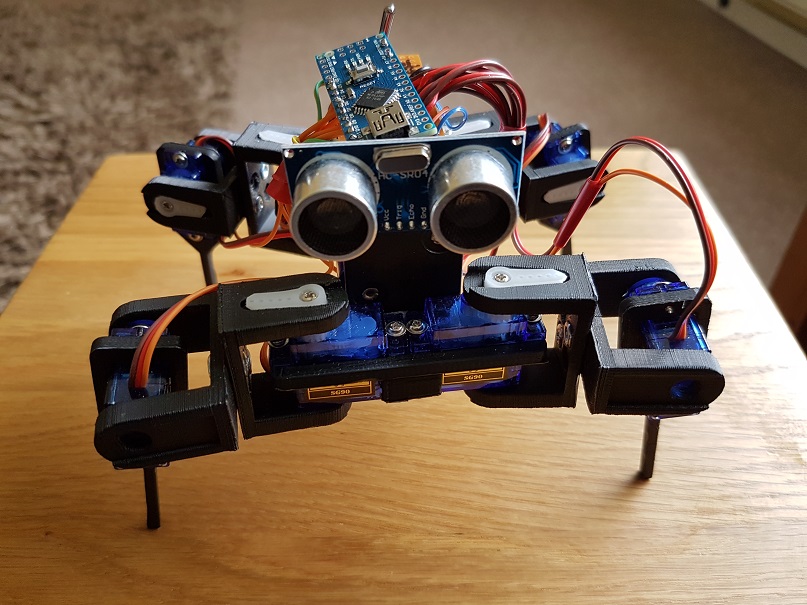
Robot3I decided to have a go at building a robot for a STEM session last weekend, to show the power of code and how it can be used to control something.  A moving robot is a great visualisation to demonstrate this.

After some searching I settled on a quadruped shown on thingverse (a 3d printing site). This is a build based on a robot called Chopstick Junior by Lumi.

Parts being printed, I set about thinking about the controls and motors. The parts are compatible with an SG90 servo. I needed 8 of these, for the knee and hip joints of the quadruped.

The assembly of the parts was a bit of a challenge as in the instructions it said you needed 3mm x 6mm screw/nuts to connect the shoulders together. You really need 3mm x 8mm screw/nuts as I have to countersink the holes a bit more to get the nuts to attach to the 6mm screw length.

Inserting the servos into the holes in the hips and legs required the unscrewing of the 4 small screws in each servo and temporarily removing the gear top. Once inserted this can be replaced and screwed down.

Once the servos were in place I centered the servos the best I could to allow backwards and forwards movement in each joint. I knew that later adjustment may be needed! This can easily be achieved removing the servo arm and hip/leg, then re-positioning and attaching the arm again.

The power is provided by 4 x AA batteries in a square battery holder. This was glued down onto the frame and fitted well into the build.

The power bus is provided by a small piece of circuit board. I used two lines for -v and +v. Each servo was then wired into the lines and the control wire to an Arduino Nano which is used as the brains of the robot.

The following pins were used on the Digital I/O on the Arduino Nano:

  • D2 – Hip 1
  • D3 – Knee1
  • D4 – Hip 2
  • D5 – Knee 2
  • D6 – Hip 3
  • D7 – Knee 3
  • D8 – Hip 4
  • D9 – Knee 4

I also wired in a sensor on the front of the robot to D10 and D11.

Wiring is grouped together to allow movement, but cut to a length that reduces excess that could get in the way of the legs.

A toggle switch provides an on/off for the power fixed to the rear of the robot. Remember to break the lines on the circuit board so it does not join any of the lines.

Once assembled I then got round to coding. I decided to use the opensource code for the Chopstick Junior as a base and make alterations. The quadruped responded well to the code and several physical servo adjustments were needed. Its now in a reasonable state, however balance is an issue in terms of walking steadily, so need to work more on this.  I have not yet coded movement to respond to the sensors yet, this will be done later.

The code is available via my Github:  https://github.com/Cloudmage/Robots

The robot went down well at the STEM session. Now to tweek that code……

Top view

Robot2

Side View

Robot3

Front View

Robot1

Share this:

  • Click to share on Facebook (Opens in new window) Facebook
  • Click to share on LinkedIn (Opens in new window) LinkedIn
  • Click to email a link to a friend (Opens in new window) Email
  • Click to share on Pinterest (Opens in new window) Pinterest
  • Click to share on Reddit (Opens in new window) Reddit
  • Click to share on Tumblr (Opens in new window) Tumblr
  • Click to share on Pocket (Opens in new window) Pocket
  • Click to share on Telegram (Opens in new window) Telegram
  • Click to share on Threads (Opens in new window) Threads
  • Click to share on WhatsApp (Opens in new window) WhatsApp
  • Click to share on Mastodon (Opens in new window) Mastodon
  • Click to share on X (Opens in new window) X
  • Click to share on Bluesky (Opens in new window) Bluesky
Like Loading...

How you can begin to Code

06 Thursday Apr 2017

Posted by Max Hemingway in Programming, STEM, Tools

≈ 7 Comments

Tags

Coding, learning, Programming, STEM

code1With all the recent STEM activities I have been involved with and blogged about, I have been asked to write some posts around how someone can start learning to code.

The school curriculum covers an element of coding with some subjects and pupils may be lucky to get a BBC Micro:bit or Raspberry Pi, however you don’t have to wait until school before learning any coding.

You don’t have to be young to start coding either. Using the same methods and tools anyone can learn to code.

The phrase “Learning to code” may strike fear and thoughts of hundreds of lines text and numbers, but it doesn’t need to. There are lots of websites available to help people start to code and present a fresh way of learning to code.

So where to start…….. If your reading this blog then you have access to a computing device. All you need to get started is a computing device with a web browser and access to the internet.

At this stage, its not worth getting hung up on the choices of the many different languages out there such as Python, Java, C etc, but concentrating on some fundamentals of coding.

Depending if you like Minecraft, Star Wars, Dr Who or Frozen, you can learn basic commands through gaming and interaction. These games teach you some basics of coding and commands by getting you to move a character on a screen to complete a number of tasks. Each of the games work in a similar way, using someones favorite characters to help them learn. These also help keep focus and attention.

The first code that you will learn is through blocks.

Minecraft – https://code.org/minecraft

Dr Who – http://www.bbc.co.uk/cbbc/games/doctor-who-game

Frozen – https://studio.code.org/s/frozen/stage/1/puzzle/1

Star Wars – https://code.org/starwars

Moana – http://partners.disney.com/hour-of-code

Once you have completed the tasks in blocks, you could then also try using a different language with some of the games such as Java if you wish. Its a great way of experiencing some of the differences in the languages.


The main program behind blocks is Scratch. To see more on the block programming method have a look at Scratch itself.

https://scratch.mit.edu/

At the scratch site there are learning tools and lessons to help you learn as well as access to the full programming language. The Scratch site also hosts a lot of other peoples programs which you can run/play and look at how they have constructed their code.

Scratch is a free visual programming language developed by the MIT(Massachusetts Institute of Technology) Media Lab.[1] Scratch is used by students, scholars, teachers,and parents to easily create animations, games, etc. It provides a stepping stone to the more advanced world of computer programming. It can also be used for a range of educational and entertainment constructionist purposes from math and science projects, including simulations and visualizations of experiments, recording lectures with animated presentations, to social sciences animated stories, and interactive art and music.[2] Viewing the existing projects available on the Scratch website, or modifying and testing any modification without saving it requires no online registration.

Source:https://en.wikipedia.org/wiki/Scratch_(programming_language)

Scratch allows users to use event-driven programming with multiple active objects called sprites.[1] Sprites can be drawn, as vector or bitmap graphics, from scratch in a simple editor that is part of Scratch, or can be imported from external sources, including webcams.

Source:https://en.wikipedia.org/wiki/Scratch_(programming_language)

All you need now is to dedicate some time each week to learn to code.

Share this:

  • Click to share on Facebook (Opens in new window) Facebook
  • Click to share on LinkedIn (Opens in new window) LinkedIn
  • Click to email a link to a friend (Opens in new window) Email
  • Click to share on Pinterest (Opens in new window) Pinterest
  • Click to share on Reddit (Opens in new window) Reddit
  • Click to share on Tumblr (Opens in new window) Tumblr
  • Click to share on Pocket (Opens in new window) Pocket
  • Click to share on Telegram (Opens in new window) Telegram
  • Click to share on Threads (Opens in new window) Threads
  • Click to share on WhatsApp (Opens in new window) WhatsApp
  • Click to share on Mastodon (Opens in new window) Mastodon
  • Click to share on X (Opens in new window) X
  • Click to share on Bluesky (Opens in new window) Bluesky
Like Loading...
← Older posts

RSS Feed

RSS Feed RSS - Posts

Other Publications I contribute to

https://sparrowhawkbushcraft.com/

Recent Posts

  • Understanding ETSI TS 104 223 and ISO/IEC 42006
  • Graceful Speech & Timeless Tales: Mastering the Art of Gesture
  • Graceful Speech & Timeless Tales: The Power of Pitch
  • Graceful Speech & Timeless Tales: Modulation
  • Graceful Speech & Timeless Tales: Harnessing Inflection

Categories

  • 21st Century Human
  • 3D Printing
  • AI
  • Applications
  • ArchiMate
  • Architecture
  • Arduino
  • Automation
  • BCS
  • Big Data
  • Certification
  • Climate Change
  • Cloud
  • Cobotics
  • Connected Home
  • Data
  • Data Fellowship
  • Data Science
  • Development
  • DevOps/OpsDev
  • Digital
  • DigitalFit
  • Drone
  • Enterprise Architecture
  • F-TAG
  • Governance
  • Health
  • Innovation
  • IoT
  • Machine Learning
  • Metaverse
  • Micro:Bit
  • Mindset
  • Mobiles
  • Networks
  • Open Source
  • Podcasts
  • Productivity
  • Programming
  • Quantum
  • Raspberry Pi
  • Robotics
  • Scouting
  • Scouts
  • Security
  • Smart Home
  • Social Media
  • Space
  • STEM
  • Story Telling
  • Technologists Toolkit
  • Tools
  • Uncategorized
  • Wearable Tech
  • Windows
  • xR

Archives

Reading Shelf

Archives

Recent Posts

  • Understanding ETSI TS 104 223 and ISO/IEC 42006
  • Graceful Speech & Timeless Tales: Mastering the Art of Gesture
  • Graceful Speech & Timeless Tales: The Power of Pitch
  • Graceful Speech & Timeless Tales: Modulation
  • Graceful Speech & Timeless Tales: Harnessing Inflection

Top Posts & Pages

  • Understanding ETSI TS 104 223 and ISO/IEC 42006
  • Graceful Speech & Timeless Tales: The Power of Pitch
  • Graceful Speech & Timeless Tales: Modulation
  • Graceful Speech & Timeless Tales: Mastering the Art of Gesture
  • Graceful Speech & Timeless Tales: The Art of Articulation
  • Pen based Productivity Tools – The Chronodex 2025
  • Race to the largest Raspberry Pi Cluster
  • Professional vs Personal Social Media
  • 10 Books I'd send to my younger self
  • The Impact of Enterprise Architecture on Innovation Culture

Category Cloud

21st Century Human Architecture Automation Big Data Cloud Data Data Science Development DevOps/OpsDev Digital DigitalFit Enterprise Architecture Innovation IoT Machine Learning Mindset Open Source Podcasts Productivity Programming Raspberry Pi Robotics Security Social Media STEM Story Telling Technologists Toolkit Tools Uncategorized Wearable Tech

Tags

3D Printing 21st Century Human AI Applications Architecture artificial-intelligence Automation BCS Big Data Blockchain business Certification Cloud Cobot Cobotics Coding Communication Connected Home CPD creativity cybersecurity Data Data Fellowship Data Science Delivery Development DevOps Digital DigitalFit Digital Human Drone Email Enterprise Architecture GTD Infographic Information Theory Innovation IoT Journal Knowledge learning Machine Learning Metaverse MicroLearning Mindset Mixed Reality Networks Open Source OpsDev PKMS Podcasts Productivity Programming Proving It Quantum R RaspberryPI Robot Robotics Scouts Security Smart Home Social Media STEM Story Telling Technologists Toolkit technology Technology Couch Podcast Thinking Tools Training Visualisation Voice Wearable Tech xR

License

Creative Commons Licence
This work is licensed under a Creative Commons Attribution-NonCommercial-ShareAlike 4.0 International License.

Meta

  • Create account
  • Log in
  • Entries feed
  • Comments feed
  • WordPress.com

Blog at WordPress.com.

  • Subscribe Subscribed
    • Max Hemingway
    • Join 82 other subscribers
    • Already have a WordPress.com account? Log in now.
    • Max Hemingway
    • Subscribe Subscribed
    • Sign up
    • Log in
    • Report this content
    • View site in Reader
    • Manage subscriptions
    • Collapse this bar
 

Loading Comments...
 

    %d