• About Me Card

Max Hemingway

~ Musings as I work through life, career and everything.

Max Hemingway

Tag Archives: learning

Mastering Performance Under Pressure: The Importance of Training

23 Thursday Jan 2025

Posted by Max Hemingway in 21st Century Human, Technologists Toolkit

≈ 3 Comments

Tags

21st Century Human, learning, Technologists Toolkit

Most of use are all busy people across all aspects of life and have lots of pressures at times whether from work or home life. In those moments of crisis and pressure, what determines our actions? Is it our grand aspirations to do things or something more foundational?

“Under duress, we do not rise to our expectations, but fall to our level of training.”

This quote, often attributed to Bruce Lee (Martial Artist) is also often attributed to Archilochus, an ancient Greek poet and soldier. The quote speaks volumes about human behaviour under stress and illustrates a crucial principle when we are faced with challenging and pressured situations. It’s not our high hopes, aspirations or lofty goals that guide us, but the habits and skills we have learnt and consistently practiced.

The Reality of Pressure Situations

To highlight this, lets look at an example of an IT security analyst responding to a cyberattack on their company’s network.

When under the immense pressure of a breach, there’s no time to sit back and hope for the best. Instead, the analyst relies on their extensive training and established protocols to navigate the situation.

The analyst will follow a series of pre-determined steps, such as identifying the type of attack, isolating affected systems, and initiating incident response procedures. These steps have been practiced through countless drills and simulations, ensuring the analyst can act quickly and effectively.

In this high-stress and pressured scenario to work quickly and effectively, the analyst’s ability to fall back on their training (rather than relying on expectations or hopeful thinking) ensures a swift and appropriate response, minimizing the potential damage from the attack.

Training as the foundations of Performance

The same principle applies across various fields, whether it’s in business, sports, military operations, or even everyday life.

  • Athletes spend countless hours perfecting their techniques so that when they’re in the heat of competition, their muscle memory takes over.
  • Soldiers engage in relentless training exercises, ensuring their reactions in combat are swift and precise.
  • In the corporate world, professionals rely on their training to handle high-stakes negotiations or crisis management.

The Myth of Rising to the Occasion

It’s a comforting notion to believe that we can rise to any occasion, summoning extraordinary abilities (your own superpowers of knowledge, wisdom and experience) in these critical moments. However, this is often a myth as under stress, our cognitive resources are fully engaged and taxed, and our decision-making abilities can falter. What you have learned (training) and practiced provides a reliable fallback, guiding your actions when the conscious mind is overwhelmed.

Building Resilience Through Preparation

Understanding this principle – “build resilience through preparation” – encourages a shift in focus. Rather than solely aiming for high expectations, you should prioritise consistent and thorough training. By doing so, we build a foundation that can support us even in the most trying times. This approach not only enhances performance but also fosters resilience, as we’re better equipped to handle stress and adversity.

It is important to identify your training needs and how you can practice these so when you face a pressured situations, your muscle memory kicks in and you can easily respond to the situation. The strength to get though lies in preparation, guided by a solid foundation of practiced skills. Make sure it’s robust, consistent, and reliable.

What are you going to learn and practice next?

Further reading

Mastering the CPD Cycle for Professional Growth
Boosting productivity with a Personal Knowledge Management System for 2024

Share this:

  • Click to share on Facebook (Opens in new window) Facebook
  • Click to share on LinkedIn (Opens in new window) LinkedIn
  • Click to email a link to a friend (Opens in new window) Email
  • Click to share on Pinterest (Opens in new window) Pinterest
  • Click to share on Reddit (Opens in new window) Reddit
  • Click to share on Tumblr (Opens in new window) Tumblr
  • Click to share on Pocket (Opens in new window) Pocket
  • Click to share on Telegram (Opens in new window) Telegram
  • Click to share on Threads (Opens in new window) Threads
  • Click to share on WhatsApp (Opens in new window) WhatsApp
  • Click to share on Mastodon (Opens in new window) Mastodon
  • Click to share on X (Opens in new window) X
  • Click to share on Bluesky (Opens in new window) Bluesky
Like Loading...

20 Informative Podcasts for 2025: Boost Your PKMS

13 Monday Jan 2025

Posted by Max Hemingway in 21st Century Human, Technologists Toolkit, Tools

≈ 2 Comments

Tags

21st Century Human, Knowledge, learning, MicroLearning, PKMS, Technologists Toolkit, technology, Tools

Following on from my recent post on PKMS (Personal Knowledge Management System), I thought I would share what is on my Podcast list for 2025 and what I am currently listening to. These are not listed in any particular order, other than how they appeared in my podcast library when I wrote this blog post.

I find my best time to listen and consume podcasts is walking the dog morning and evening (acts as my commute whilst working at home) or travelling. Hopefully this list will help inspire you and I would welcome any suggestions you have for other podcasts I should be listening to!

I have linked these on Spotify, but they should be available where you normally consume you podcasts. I have used AI to help write a summary of each podcast.

Impulse to Innovation – IMechE I2I

The Impulse to Innovation podcast by the Institution of Mechanical Engineers (IMechE) is a series that explores various topics related to engineering and innovation. Each episode features interviews with experts and thought leaders who share their insights and experiences on how technological advancements and innovative thinking can drive progress in different fields.

Spotify Link – Impulse to Innovation

The Innovation Engine Podcast – 3Pillar Global

The Innovation Engine Podcast by 3Pillar Global features interviews with best-selling authors and innovation experts from around the world. The podcast focuses on innovation in software and product engineering, corporate leadership, and emerging technologies. Each episode delves into how companies and individuals drive innovation, tackle challenges, and leverage new technologies to stay competitive.

Spotify Link – The Innovation Engine Podcast

The Pitch – Josh Muccio

The Pitch is a podcast hosted by Josh Muccio that gives listeners an inside look into the world of start up funding. Each episode features real start up founders pitching their businesses to a panel of investors, similar to the TV show “Shark Tank”. The podcast aims to capture the essence of what happens behind closed doors during these pitches, providing an engaging and educational experience for listeners.

Spotify Link – The Pitch

Pivot – New York Magazine

Pivot is a podcast hosted by tech journalist Kara Swisher and NYU Professor Scott Galloway. Released every Tuesday and Friday, the podcast offers sharp, unfiltered insights into the biggest stories in tech, business, and politics. The hosts make bold predictions, pick winners and losers, and engage in lively banter, providing listeners with thought-provoking discussions and analysis.

Spotify Link – Pivot

a16z Podcast – Andreessen Horowitz

The a16z Podcast by Andreessen Horowitz covers a wide range of topics related to technology, business, and culture. Each episode features conversations with industry experts, business leaders, and thought-provoking voices from around the world. The podcast aims to help listeners understand how technology is changing everything—from Silicon Valley to traditional industries, and how it impacts the way we work, live, eat, learn, and play.

Spotify Link – a16z Podcast

Entrepreneurial Thought Leaders – Stanford e-Corner

summarise Entrepreneurial Thought Leaders – Stanford e-Corner

Entrepreneurial Thought Leaders is a podcast series produced by Stanford eCorner. Each week, experienced entrepreneurs and innovators come to Stanford University to share candid lessons they’ve learned while developing, launching, and scaling disruptive ideas. The series provides valuable insights into the entrepreneurial journey, highlighting both the secrets and setbacks behind real success.

Spotify Link – Entrepreneurial Thought Leaders

One Business Book per Day – Palonio.com

One Business Book per Day is a dynamic podcast designed to provide busy entrepreneurs and professionals with bite-sized summaries of the most popular and influential business books. Each episode distils the key concepts, strategies, and insights from a best-selling business book into an easily digestible format, allowing listeners to quickly grasp and apply valuable lessons in their own lives and careers.

Spotify Link – One Business Book per Day

Disruptive Innovators – Disruptive Innovations

Disruptive Innovators: Champions of Digital Business is a podcast hosted by David Wright, Founder & CEO of Disruptive Innovations. The podcast features weekly interviews with CIOs and IT/Digital leaders from around the world. Each episode dives into their personal backstories, career journeys, current roles, trends they’ve observed, and their visions for the future.

Spotify Link – Disruptive Innovators

The Future of Everything – Stanford Engineering

The Future of Everything is a podcast hosted by Stanford bioengineering professor Russ Altman. The podcast explores how technology, science, and medicine are shaping our lives. Each episode features discussions with experts on a wide range of topics, including stretchable electronics, ecological surveillance, foldable microscopes, and video editing with artificial intelligence. Altman engages his guests in conversations about their role in creating the future across various domains.

Spotify Link – The Future of Everything

ReThinking – Adam Grant

ReThinking with Adam Grant is a podcast where the organizational psychologist explores new thoughts and ways of thinking by having lively discussions and debates with some of the world’s most interesting thinkers, creators, achievers, and leaders. Adam challenges conventional wisdom and encourages listeners to rethink their assumptions and embrace new ideas.

Spotify Link – ReThinking

HBR on Strategy – Harvard Business Review

HBR on Strategy is a podcast by Harvard Business Review that provides hand-curated insights and inspiration to help unlock new ways of doing business. Hosted by Alison Beard and Curt Nickisch, the podcast features conversations with top business and management experts, focusing on strategy, adaptive leadership, organizational transformation, and collaboration.

Spotify Link – HBR on Strategy

HBR on Leadership – Harvard Business Review

HBR on Leadership is a podcast by Harvard Business Review that provides a series of discussions that feature experts, scholars, and experienced leaders offering insights on a variety of leadership topics.

Spotify Link – HBR on Leadership

HBR IdeaCast – Harvard Business Review

HBR IdeaCast is a weekly podcast by Harvard Business Review that features conversations with leading thinkers in business and management. Hosted by Alison Beard and Curt Nickisch, the podcast covers a wide range of topics, including strategy, leadership, innovation, and organizational transformation. Each episode provides valuable insights and practical advice, helping listeners navigate complex business challenges and stay ahead in their careers.

Spotify Link – HBR IdeaCast

The CTO Advisor – Keith Townsend

The CTO Advisor podcast, hosted by Keith Townsend, is a valuable resource for technology leaders and CTOs. Each episode features conversations with industry experts on a wide range of topics, including application development, IT governance, infrastructure architecture, and emerging technologies. The podcast aims to provide insights into technology trends, best practices, and leadership strategies to help CTOs navigate the complexities of their roles and stay ahead in the industry.

Spotify Link – The CTO Advisor

CTOTalk: Leadership, AI and the Digital Economy – Michael Krigsman

CTOTalk: Leadership, AI and the Digital Economy is a podcast hosted by Michael Krigsman that features in-depth conversations with senior leaders from top global companies. The podcast covers topics such as leadership, enterprise AI, and the digital economy, providing insights into how technology is transforming business and society.

Spotify Link – CTOTalk: Leadership, AI and the Digital Economy

The CTO Playbook – Adam Horner

The CTO Playbook is a podcast hosted by Adam Horner, a CTO with over 30 years of experience in the tech industry. The podcast is dedicated to helping CTOs and tech leaders excel in their roles by providing clear insights, innovative strategies, and practical advice from top leaders in tech1. Each episode covers essential topics such as tackling complex projects, fostering innovation, leading teams, and shaping tech strategy

Spotify Link – The CTO Playbook

TED Talks Daily – TED

TED Talks Daily is a podcast hosted by journalist Elise Hu that brings you the latest TED Talks in audio format every weekday. The podcast covers a wide range of thought-provoking topics, from artificial intelligence to zoology, and everything in between. Each episode features talks by world-renowned thinkers and creators, offering listeners new perspectives, igniting curiosity, and providing opportunities to learn something new every day.

Spotify Link – Ted Talks Daily

TED Tech – TED

TED Tech is a podcast hosted by Sherrell Dorsey that explores how technology is rapidly changing our world. Each episode delves into the latest ideas from TED Speakers, addressing the intersection of technology, society, science, design, business, and innovation. Sherrell guides listeners through riveting questions and thought-provoking discussions, helping to uncover the potential and challenges of technological advancements

Spotify Link – TED Tech

TED Business – TED

TED Business is a podcast hosted by Modupe Akinola, a professor at Columbia Business School. Every Monday, Modupe presents powerful and surprising ideas that illuminate the business world. Each episode features a TED Talk followed by a mini-lesson from Modupe on how to apply the ideas discussed in the talk to your own life. The podcast covers a wide range of business topics, from leadership and diversity to innovation and personal development.

Spotify Link – TED Business

The Infinite Monkey Cage – BBC 4 Radio

The Infinite Monkey Cage is a BBC Radio 4 podcast hosted by physicist Brian Cox and comedian Robin Ince. The show takes an irreverent and witty look at science and the world through the eyes of scientists and science enthusiasts. Each episode features a panel of experts, including scientists, comedians, and celebrities, who discuss a wide range of topics, from the latest scientific discoveries to quirky and thought-provoking questions about the universe.

Spotify Link – The Infinite Monkey Cage

Share this:

  • Click to share on Facebook (Opens in new window) Facebook
  • Click to share on LinkedIn (Opens in new window) LinkedIn
  • Click to email a link to a friend (Opens in new window) Email
  • Click to share on Pinterest (Opens in new window) Pinterest
  • Click to share on Reddit (Opens in new window) Reddit
  • Click to share on Tumblr (Opens in new window) Tumblr
  • Click to share on Pocket (Opens in new window) Pocket
  • Click to share on Telegram (Opens in new window) Telegram
  • Click to share on Threads (Opens in new window) Threads
  • Click to share on WhatsApp (Opens in new window) WhatsApp
  • Click to share on Mastodon (Opens in new window) Mastodon
  • Click to share on X (Opens in new window) X
  • Click to share on Bluesky (Opens in new window) Bluesky
Like Loading...

Mastering the CPD Cycle for Professional Growth

06 Monday Jan 2025

Posted by Max Hemingway in 21st Century Human, Mindset

≈ 5 Comments

Tags

21st Century Human, CPD, learning, Mindset

The Continuous Professional Development (CPD) cycle is a systematic process of identifying, planning, and evaluating your learning and development needs. While traditional models usually focus on a few key stages, this approach includes a crucial step around communication, amplifying the impact of your learning.

I last blogged about the CPD Cycle back in 2015. About time it had a refresh and more detail added as it is an important topic for todays working climate and those wanting to excel in their careers.

I maintain a CPD as a Chartered IT Professional, which is an important aspect of the accreditation is to maintain evidence of what I have been learning to keep current. This is best achieved through the use of a CPD Plan or log.

The BCS has a good guide to CPD and why you should consider it. https://www.bcs.org/it-careers/continuing-professional-development-cpd/.

There are many methods for recording your CPD (Continuous Professional Development) plans available on the internet and through various professional bodies. The CPD Cycle allows you to review your learning and CPD and see what is working and is beneficial and has impact to your work and what is not.

CPD Cycle

The CPD Cycle can be illustrated as:

Each of these steps could be a set of columns in your CPD record in which you record the results of the analysis. This guide suggests some possible data to record to help maintain you CPD. How much you add will always be down to your needs.

Identify

The first step in the CPD cycle is to identify your learning needs. This process is crucial as it sets the foundation for your professional development journey by assessing your current skills, knowledge, and any gaps that may exist. This step involves self-assessment and feedback from peers, leaders or supervisors. Once identified, document these needs in your CPD Plan.

One key aspect on identifying your learning is to pick the top 1 or 2 that will have the biggest impact and concentrate on those. Once you have achieved these goals you can reassess and add to your plan from your identification analysis.

Self-Assessment

Start by evaluating your current skills, knowledge, and competencies. This can be achieved using a SWOT (Strength, Weakness, Opportunities and Threats) Analysis to help.

  • Strengths: What are you good at? Identify areas where you excel and can leverage these strengths.
  • Weaknesses: Where do you need improvement? Identify gaps in your knowledge or skills that need addressing.
  • Opportunities: Are there emerging trends or technologies in your field that you should learn about?
  • Threats: Are there any external factors that could impact your job performance or career progression?

Feedback from Others

Seek input from colleagues, peers, supervisors, leaders or mentors. They can provide valuable perspectives on your performance and areas for growth. This can be done through:

  • Performance reviews: Regular performance evaluations provide structured feedback on your work.
  • One-on-one meetings: Informal conversations with your manager or peers can highlight areas for improvement.
  • 360-degree feedback: Gathering feedback from multiple sources (e.g. peers, subordinates, supervisors and leaders) gives a comprehensive view of your skills and behaviours.

It is key to see and use this feedback as a positive view on where you need to learn and grow.

Professional Goals

You may already have a forward plan on where you want to head professionally and where you want your career journey to go, or wanting to create one. Align your learning needs with your career aspirations.

Reflecting on your career aspirations involves asking yourself deep, meaningful questions to uncover your true interests, strengths, and goals. Here are some self-reflective questions to get you started:

Understanding Your Interests and Passions

  • What activities or tasks do I enjoy most at work?
  • What topics or industries am I naturally drawn to?
  • Which projects have I found most fulfilling and why?

Assessing Your Skills and Strengths

  • What are my core strengths and talents?
  • Which skills do I excel in, and which do I need to improve?
  • How can I leverage my strengths in my career?

Defining Your Values and Motivations

  • What are my core values and how do they align with my work?
  • What motivates me to perform at my best? (e.g., recognition, achievement, helping others)
  • What kind of work environment do I thrive in?

Envisioning Your Future

  • Where do I see myself in 5, 10, or 20 years?
  • What roles or positions do I aspire to reach?
  • What impact do I want to make in my field or industry?

Setting Goals and Milestones

  • What specific career goals do I want to achieve?
  • What milestones or achievements do I want to reach along the way?
  • How can I break down my long-term goals into smaller, actionable steps?

Evaluating Opportunities and Challenges

  • What opportunities are available for growth in my current role?
  • What challenges or obstacles might I face, and how can I overcome them?
  • Are there any skills or experiences I need to acquire to reach my aspirations?

Seeking Feedback and Guidance

  • What feedback have I received from colleagues, mentors, or supervisors?
  • How can I use this feedback to guide my career development?
  • Who can I seek advice or mentorship from to help me achieve my goals?

Job Requirements

Consider the specific requirements of your current role. What are your main job duties and what learning do you need in order to achieve success in the role?

Main Role

  • Daily Tasks: What are the core tasks you handle regularly? Identify areas where you perform well and areas that could benefit from more training. This might include technical skills, soft skills, or specialised knowledge.
  • Performance Metrics: How is your performance measured? Understanding the criteria used for your evaluations can highlight areas for improvement.
  • Feedback & Self-Assessment: Reflect on feedback from supervisors and colleagues, and conduct a self-assessment. This can provide insights into specific skills or knowledge gaps.

Organisational Goals

Are there any organisational goals that need to be considered when creating your learning plan?

  • Strategic Priorities: What are the strategic goals of your organisation? Identify how your role contributes to these goals.
  • Skill Gaps: Determine what skills are necessary to support these objectives. Focus on acquiring or enhancing these skills through training and development.
  • Cross-Departmental Insights: Understanding the broader organisational context can help identify interdisciplinary skills that are valuable.

Industry Standards

Are there any industry or regulatory standards that you need to abide, be certified or learn?

  • Regulations & Compliance: Are there any legal or regulatory requirements specific to your industry? Ensure that you stay compliant by keeping your knowledge up to date through continuous learning.
  • Certification & Accreditation: Consider obtaining industry-recognised certifications that could enhance your professional credibility and opportunities.
  • Trends & Innovations: Keep an eye on the latest trends and innovations in your field. This can help you stay competitive and bring new ideas to your role.

Documenting Your Plan

Once you have identified your learning needs, it’s essential to document them in your CPD Plan. This should include:

  • A clear statement of each learning need
  • The rationale for why it is important
  • Specific learning objectives you aim to achieve
  • Potential learning activities or resources to address each need
  • A timeline for completing these activities

Learn

Engage in learning activities that address the identified needs. This could include formal training, online courses, workshops, seminars, or self-directed study. Record each learning event in your CPD Plan, noting the date, type of activity, and key takeaways.

Engaging in learning activities that address your identified needs is a vital part of the CPD cycle. This section involves selecting, participating in, and documenting various learning experiences to ensure your continuous professional growth. Here’s a more detailed exploration of this step:

Selecting Learning Activities

Choose learning activities that are relevant to your identified needs. These can vary widely depending on your field, interests, and learning preferences.

  • Formal Training: Enroll in courses, workshops, seminars, or degree programs offered by educational institutions.
  • Online Learning: Utilise online platforms for courses, webinars, and virtual workshops. Websites like Coursera, Udemy, and LinkedIn Learning offer a wide range of subjects.
  • Self-Directed Study: Read books, articles, research papers, or industry publications. Stay updated with the latest trends and developments in your field.
  • Conferences and Networking Events: Attend industry conferences, trade shows, and networking events to learn from experts and peers.
  • Professional Organisations: Join professional associations or societies that offer resources, certifications, and learning opportunities.

Participating in Learning Activities

When engaging in learning activities, actively participate and immerse yourself in the experience to maximise your learning.

  • Set Clear Objectives: Before starting, define what you want to achieve from the activity. Having clear objectives will help you stay focused and motivated.
  • Take Notes: Document key points, insights, and questions during the learning process. This will aid in reflection and future reference.
  • Engage Actively: Participate in discussions, ask questions, and seek clarification on any unclear topics. Engaging actively enhances understanding and retention.
  • Apply Learning: Whenever possible, try to apply what you’ve learned to real-life situations or work tasks. This practical application reinforces learning and demonstrates its relevance.

Documenting Learning Activities

Keep a detailed record of your learning activities in your CPD Plan. Documenting helps track your progress and ensures that you’re meeting your learning goals.

  • Activity Details: Record the date, title, and type of learning activity (e.g., workshop, online course, conference).
  • Provider Information: Note the name of the institution or organisation providing the learning activity.
  • Objectives and Outcomes: Outline your objectives for the activity and any key outcomes or takeaways.
  • Reflections: Include your reflections on the learning experience. What you found valuable, any challenges you faced, and how you plan to use the new knowledge or skills.

Continuous Improvement

Learning is an ongoing process. Regularly review and update your CPD Plan to reflect new learning needs and opportunities. Seek feedback from peers, mentors, or supervisors to identify areas for further development. By continuously engaging in learning activities, you ensure that you remain up-to-date with industry trends and maintain a high level of professional competence.

Reflect

Take time to reflect on what you have learned. Consider how the new knowledge or skills can be applied to your job. Ask yourself questions such as:

  • Was the learning experience valuable?
  • How can I integrate this learning into my daily tasks? Document your reflections and any potential applications in your CPD Plan.

Reflecting on your learning is a crucial step in the CPD cycle. It allows you to critically assess your experiences, draw valuable insights, and plan how to apply new knowledge and skills.

Reflection Process

Reflecting involves thoughtful consideration of your learning experiences. This process helps you understand the relevance and impact of what you’ve learned.

  • Immediate Reflection: After each learning activity, take some time to jot down your initial thoughts and reactions. What did you find interesting or challenging? How do you feel about the new information or skills?
  • In-Depth Analysis: Dive deeper into your learning experience. Evaluate the quality and relevance of the content. Think about how it aligns with your learning objectives and professional goals.

Key Questions for Reflection

Ask yourself reflective questions to guide your thinking.

  • What did I learn?: Summarise the main points and key takeaways from the learning activity.
  • Why is it important?: Consider the significance of the new knowledge or skills. How does it relate to your job or career?
  • How can I apply this?: Think about practical ways to integrate the learning into your daily work. Are there specific tasks or projects where you can apply these insights?
  • What challenges did I face?: Reflect on any difficulties you encountered during the learning process. How did you overcome them, and what could you do differently next time?
  • What feedback did I receive?: If you received feedback from peers or instructors, consider how it aligns with your own reflections and how it can inform your future learning.

Documenting Reflections

Recording your reflections is essential for tracking your progress and planning future learning activities.

  • Summary: Write a brief summary of the learning activity and its key points.
  • Personal Insights: Document your thoughts and feelings about the experience. What did you find most valuable or challenging?
  • Applications: Outline specific ways you plan to apply the new knowledge or skills in your job.
  • Future Actions: Identify any additional learning needs or actions you need to take based on your reflections.

Sharing Reflections

Consider sharing your reflections with others. This can enhance your understanding and provide additional perspectives.

  • Discuss with Peers: Share your insights with colleagues during meetings or informal discussions. This can lead to collaborative learning and knowledge exchange.
  • Seek Feedback: Ask for feedback on your reflections from mentors, supervisors, or peers. Their input can help you refine your thoughts and identify areas for further development.
  • Write a Blog Post: If you have a professional blog, share your reflections and how you plan to apply your learning. This not only reinforces your understanding but also contributes to your professional reputation.

Continuous Improvement

Reflection is not a one-time activity. Make it a regular part of your professional practice. Continuously evaluate your learning experiences, document your insights, and use them to inform your future CPD activities. This ongoing reflection ensures that your professional development is dynamic, relevant, and aligned with your evolving goals.

Communicate

After reflecting on your learning, think about how you can share this knowledge with others. Communication is a crucial step that enhances the overall impact of CPD. This stage amplifies the impact of your learning by disseminating valuable insights and fostering a culture of continuous improvement.

Importance of Communication

Sharing your learning benefits both you and your community.

  • Reinforces Learning: Articulating your knowledge helps solidify your understanding and identify areas for further improvement.
  • Encourages Collaboration: Engaging with others fosters a collaborative environment where ideas can be exchanged and built upon.
  • Enhances Reputation: Demonstrating your commitment to professional development can enhance your reputation and career prospects.
  • Supports Others: By sharing your insights, you help colleagues and peers improve their skills and knowledge.

Methods of Communication

There are various ways to communicate your learning experiences, each with its own advantages.

  • Team Meetings: Share your insights during team or department meetings. This allows for immediate feedback and discussion.
  • Company Newsletters: Write articles or summaries of your learning experiences for your company’s internal newsletter. This reaches a wider audience within your organisation.
  • Social Media: Use platforms like LinkedIn, Twitter, or professional forums to share your learning journey and recommendations. This not only spreads knowledge but also builds your personal brand.
  • Presentations and Workshops: Conduct presentations or workshops to teach others what you’ve learned. This interactive method encourages engagement and questions.
  • Mentorship: Mentor colleagues or new employees by sharing your expertise and guiding their professional development.
  • Blog Posts: Write blog posts or articles about your learning experiences, insights, and how they can be applied in practice. This can be shared on your professional blog, company website, or external publications.

Effective Communication Strategies

To communicate your learning effectively.

  • Be Clear and Concise: Clearly articulate the key points and takeaways from your learning experience. Avoid jargon and ensure your message is easy to understand.
  • Use Visual Aids: Incorporate visuals such as charts, graphs, or slides to enhance your message and make it more engaging.
  • Provide Examples: Use real-life examples or case studies to illustrate how your new knowledge or skills can be applied.
  • Encourage Interaction: Invite questions and discussions to encourage active participation and deeper understanding.
  • Tailor Your Message: Adapt your communication style to suit your audience. Consider their level of knowledge, interests, and preferences.

Measuring the Impact of Communication

Evaluate the effectiveness of your communication efforts.

  • Feedback: Gather feedback from your audience to understand how well your message was received and whether it was helpful.
  • Engagement: Monitor the level of engagement during and after your communication. Are people asking questions, sharing insights, or applying what you’ve shared?
  • Outcomes: Assess any changes or improvements resulting from your communication. Has it led to better performance, increased collaboration, or enhanced understanding?

Documenting Communication Activities

Record your communication efforts in your CPD Plan to track your progress and ensure you are consistently sharing your learning.

  • Date: When the communication activity took place.
  • Method: The method used to communicate (e.g., meeting, presentation, social media post).
  • Audience: The target audience for your communication.
  • Key Points: The main points or takeaways shared.
  • Feedback and Outcomes: Any feedback received and the outcomes of the communication effort.

Impact

Measuring the impact of your learning is vital for understanding its effectiveness. Evaluate how the new knowledge or skills have influenced your work. Consider both immediate changes and long-term benefits.

  • Monitoring performance improvements
  • Gathering feedback from peers and supervisors
  • Analysing metrics related to your job performance Document the impact in your CPD Plan and reflect on the outcomes to guide future learning.

Evaluating the impact of your learning is a crucial part of the CPD cycle. This step helps you understand how effectively you’ve applied new knowledge or skills and the tangible benefits it has brought to your professional practice.

Immediate Impact

Assess the immediate effects of your learning activities.

  • Performance Improvement: Have you noticed an improvement in your job performance or efficiency? For example, if you learned a new software tool, are you now able to complete tasks faster or with better quality?
  • Skill Application: Have you successfully applied the new skills or knowledge in your daily tasks? Consider specific instances where you’ve used what you learned.
  • Feedback: Seek feedback from peers, supervisors, or clients. Their perspectives can provide valuable insights into how well you’ve integrated your learning into your work.

Long-Term Impact

Evaluate the longer-term benefits and outcomes of your learning.

  • Career Advancement: Has your learning contributed to career progression, such as promotions, new responsibilities, or recognition within your organisation?
  • Professional Growth: Have you gained a deeper understanding of your field or developed new areas of expertise? This can enhance your overall professional competence and confidence.
  • Organisational Benefits: Consider how your learning has benefited your organisation. This could include increased productivity, improved quality of work, or enhanced team collaboration.

Measuring Impact

Use various methods to measure the impact of your learning.

  • Key Performance Indicators (KPIs): Identify specific KPIs relevant to your role and track changes over time. For example, if you learned project management skills, monitor project completion rates or budget adherence.
  • Quantitative Metrics: Use data and statistics to evaluate changes in performance. This could include metrics like sales figures, customer satisfaction scores, or error rates.
  • Qualitative Feedback: Collect qualitative feedback from colleagues, supervisors, or clients. This can provide a more nuanced understanding of the impact of your learning.

Reflecting on Impact

Reflect on the outcomes of your learning and its impact on your professional practice.

  • Successes and Challenges: Identify what went well and any challenges you faced in applying your new knowledge or skills.
  • Lessons Learned: Consider what you’ve learned from the process of integrating your learning into your work. This can inform future learning activities and continuous improvement.
  • Future Goals: Based on the impact of your learning, set new goals for your professional development. This ensures that your CPD cycle is ongoing and dynamic.

Documenting Impact

Keep a detailed record of the impact of your learning activities in your CPD Plan. This helps you track your progress and provides evidence of your professional development.

  • Learning Activity: Describe the learning activity and its objectives.
  • Immediate Impact: Note any immediate changes in performance or skill application.
  • Long-Term Impact: Document longer-term benefits and outcomes.
  • Metrics and Feedback: Include any relevant KPIs, quantitative metrics, and qualitative feedback.
  • Reflections: Record your reflections on the impact and any lessons learned.

Plan for the Future

The final step in the CPD cycle is to plan for your future professional development. This step ensures that your learning journey is continuous, strategic, and aligned with both your personal and professional goals.

Reviewing Your CPD Plan

Regularly review and update your CPD Plan to ensure it reflects your current learning needs and objectives. Is your CPD plan meeting what you set out to do. This is a good time to add any additional learning requirements and remove any that are no longer needed.

  • Evaluate Past Activities: Look back at the learning activities you’ve completed. Assess their effectiveness and the impact they had on your job performance.
  • Identify New Needs: Based on your reflections and measured impact, identify any new learning needs that have emerged. This could be due to changes in your role, industry advancements, or feedback from peers, leaders and supervisors.

Setting New Goals

Define clear, achievable goals for your future learning. Utilise the SMART method for helping set your goals.

  • Specific: Clearly outline what you want to achieve.
  • Measurable: Identify how you will measure your progress and success.
  • Achievable: Ensure your goals are realistic and attainable within your resources and timeframe.
  • Relevant: Align your goals with your career aspirations and job requirements.
  • Time-bound: Set deadlines for achieving your goals to stay motivated and focused.

Identifying Learning Resources

Research and select appropriate resources and activities to achieve your new learning goals.

  • Formal Education: Enroll in degree programs, certifications, or professional courses offered by accredited institutions.
  • Professional Development Programs: Participate in industry-specific training programs, workshops, or seminars.
  • Online Learning Platforms: Utilise online resources such as webinars, tutorials, and e-courses.
  • Mentorship and Coaching: Seek guidance from mentors or coaches who can provide personalised advice and support.
  • Networking Opportunities: Engage with professional networks, attend conferences, and join industry associations to stay updated with trends and best practices.

Creating an Action Plan

Develop a detailed action plan that outlines the steps you need to take to achieve your new learning goals.

  • Activities and Resources: List the specific learning activities and resources you will use.
  • Timeline: Set deadlines for each activity to keep yourself on track.
  • Milestones: Identify key milestones to celebrate your progress and stay motivated.
  • Support Systems: Identify any support you may need from colleagues, mentors, or supervisors.

Monitoring and Adjusting

Continuously monitor your progress and make adjustments as needed.

  • Regular Check-ins: Schedule regular check-ins to review your progress and make any necessary adjustments to your action plan.
  • Flexibility: Be flexible and open to adapting your plan based on new opportunities, challenges, or feedback.
  • Documenting Progress: Keep detailed records of your activities, reflections, and outcomes in your CPD Plan. This documentation provides valuable insights for future planning and demonstrates your commitment to continuous improvement.

Celebrating Achievements

Acknowledge and celebrate your achievements along the way. Recognising your accomplishments boosts motivation and reinforces the value of your efforts. Share your successes with colleagues, mentors, or your professional network to inspire and encourage others.

Further Reading

https://www.bcs.org/it-careers/continuing-professional-development-cpd/.

Share this:

  • Click to share on Facebook (Opens in new window) Facebook
  • Click to share on LinkedIn (Opens in new window) LinkedIn
  • Click to email a link to a friend (Opens in new window) Email
  • Click to share on Pinterest (Opens in new window) Pinterest
  • Click to share on Reddit (Opens in new window) Reddit
  • Click to share on Tumblr (Opens in new window) Tumblr
  • Click to share on Pocket (Opens in new window) Pocket
  • Click to share on Telegram (Opens in new window) Telegram
  • Click to share on Threads (Opens in new window) Threads
  • Click to share on WhatsApp (Opens in new window) WhatsApp
  • Click to share on Mastodon (Opens in new window) Mastodon
  • Click to share on X (Opens in new window) X
  • Click to share on Bluesky (Opens in new window) Bluesky
Like Loading...

Boosting productivity with a Personal Knowledge Management System for 2024

02 Tuesday Jan 2024

Posted by Max Hemingway in 21st Century Human, Mindset, Productivity, Tools

≈ 2 Comments

Tags

21st Century Human, learning, Productivity, Tools

As 2024 begins I have updated my PKMS (Personal Knowledge Management System) to keep up with the latest developments in knowledge management and my own priorities. You can use this as a pattern to help create your own PKMS and stay informed and ahead of the curve.

A PKMS is a system that can help you manage and organise personal knowledge, which includes information that is relevant to your personal and professional life.

A well crafted and maintained PKMS can provide a capability for:

  1. Continuous Learning:
    • Together with a growth mindset a PKMS facilitates a structured approach to acquiring, organising, and reviewing knowledge.
  2. Increased Productivity:
    • Access to relevant organised information as you need it, keeping you ahead of the curve.
  3. Knowledge Retention:
    • Ability to store and retrieve information as required in an organised repository.
  4. Adaptability:
    • Technology, Information and Data evolves on a daily basis and it is important to stay informed.

I still believe strongly in separating my personal social and business social, although there is the occasional need for the two to cross. These are the tools that I use. There are lots of other tools available that you could use to build a PKMS yourself.

Personal Life

Personal Journal

My go to notebook of choice for Journaling is still the Moleskine plain pocket book and I am on journal number 37, soon to be no 38. Its quality and paper is good enough for my needs and archival quality. I still favour the Pilot ball ink pens (0.5 or 0.7) as they flow nicely on the page. See my blog post No batteries required for further details.

Social Media

In keeping my work life separate from my personal life, I use platforms such as Instagram and Facebook for friends and family with appropriate two factory and security settings in place. Even with those settings you still need to consider that once something is online, it could be public in the future.

Professional Life

Research

This is split into several areas and these are a few of the inputs that I use to grab information, feeds, data from:

  • Streaming Services
  • RSS Feeds
  • Podcasts
  • TED Talks
  • Web Searches
  • Blog Posts
  • Courses
  • Reading

This is a high level list of the types of content that I gain information from for research and learning.

Streaming Services covers platforms such as YouTube. The availability of cameras and online streaming platforms, more content is being made available and recorded by people to pass on their knowledge.

RSS Feeds low my to pull updates from sites into Feedly.

Podcasts cover both Audio and Video casts that I watch/stream online or download to my Phone / Media Player (Audio and Videos) to listen to when I am on journeys in the car or other transportation methods or out walking the dog. Daily walks with the dog provide a good time to listen to these.

The amount of online learning available today is huge from free MOOC’s (Massive Open Online Courses) to paid for course such as Udemy and LinkedIn. Lots of vendors now provide a good level of free training for their products and solutions. This category also covers courses that I can take through work.

Feedly

Feedly provides an aggregation tool which I use to collect the stories from blogs and web sites.  This provides a list of stories that can be scanned tin a few minutes on a single screen without going via multiple sites. Clicking on a story will bring up a snippet from the source site and provide the link to read the source article if required. Using a series of key strokes you can read the headlines, then move down the articles at a reasonable speed, stopping and opening when needed.

Sources can be categorised to allow an all view or just whats new in a category.

Thinking Time

Thinking Time covers the time that I spend absorbing the PKMS information coming in from the different sources and then also process and apply in different ways. It is also good to spend time reflecting on what I have learnt and think of different and new way to use the information and learnings.

Note Taking

I use two tools now for note taking, OneNote and Obsidian. I favour obsidian as it uses markdown which I use a lot in GitHub for documentation, and its ability to structure data in a logical way and allows you to query data in an interactive graph.

Blogging and Being Social

Following my Thinking Time I gather my thoughts and research and write these down through my blogs and podcasts and publish these on Social Media, WordPress and GitHub.

AI

I have not yet introduced any AI to my PKMS, but hopefully in 2024 I will find the right tool to help automate and filter the information I am consuming and keep me on top of my learning.

Further Reading

If you are looking for inspiration in creating your own PKMS, Reddit has a great list of PKMS tools that is worth a look and a discussion board on setting up a PKMS.

Share this:

  • Click to share on Facebook (Opens in new window) Facebook
  • Click to share on LinkedIn (Opens in new window) LinkedIn
  • Click to email a link to a friend (Opens in new window) Email
  • Click to share on Pinterest (Opens in new window) Pinterest
  • Click to share on Reddit (Opens in new window) Reddit
  • Click to share on Tumblr (Opens in new window) Tumblr
  • Click to share on Pocket (Opens in new window) Pocket
  • Click to share on Telegram (Opens in new window) Telegram
  • Click to share on Threads (Opens in new window) Threads
  • Click to share on WhatsApp (Opens in new window) WhatsApp
  • Click to share on Mastodon (Opens in new window) Mastodon
  • Click to share on X (Opens in new window) X
  • Click to share on Bluesky (Opens in new window) Bluesky
Like Loading...

Knowledge Fit for 2020

01 Wednesday Jan 2020

Posted by Max Hemingway in 21st Century Human

≈ 1 Comment

Tags

21st Century Human, learning

learnHere we are at the start of 2020 and the time of many New Years resolutions and good intentions. A good proportion of these will be about dieting and getting fit, but what about getting a learning plan for the new year and boosting your knowledge.

Depending on your life, career path this can be something simple as reading more books on a topic or taking some courses to learn a new skill. This is something you dont have to set at the start of the new year and could be set at anytime, however we normally feel more motivated at the start of a year to set these goals.

Keeping to them can be challenging as when we fall back into our normal cycles, however this is something in your control that can be changed so you can have time to do some learning and boost your knowledge.

“Some things are in our control and others not. Things in our control are opinion, pursuit, desire, aversion, and, in a word, whatever are our own actions. Things not in our control are body, property, reputation, command, and, in one word, whatever are not our actions. The things in our control are by nature free, unrestrained, unhindered; but those not in our control are weak, slavish, restrained, belonging to others. Remember, then, that if you suppose that things which are slavish by nature are also free, and that what belongs to others is your own, then you will be hindered. You will lament, you will be disturbed, and you will find fault both with gods and men. But if you suppose that only to be your own which is your own, and what belongs to others such as it really is, then no one will ever compel you or restrain you. Further, you will find fault with no one or accuse no one. You will do nothing against your will. No one will hurt you, you will have no enemies, and you not be harmed.”

― Epictetus, Enchiridion and Selections from the Discourses

I have written about having a growth mindset in a previous blog which may help you with planning your 2020 learning plan and the infographic helps understand the concept.

The term Growth Mindset comes from the study and theory of Dr Carol Dweck that intelligence can be developed. This can be applied to every person young and old to reach higher levels of achievement.

Adopting a Growth Mindset by taking every opportunity to experiment, embrace failure, learn, change and seek challenges will enable yourself to realise potential and success.

Below is an info-graphic from Dr Carol Dwecks work and theory:

Carol-Dweck-Two-Mindsets


Set a schedule of learning for a few hours a week and stick to it by putting time in your diary and blocking it out.

What will you plan to learn for 2020?


Some further reading from previous blogs

  • Pack Learning
  • Having the Right Digital Mindset
  • K is for Knowledge
  • How you can begin to Code

Further Reading

  • The Power of Habit: Why We Do What We Do, and How to Change
  • Mindset – Changing The Way You think To Fulfil Your Potential

Share this:

  • Click to share on Facebook (Opens in new window) Facebook
  • Click to share on LinkedIn (Opens in new window) LinkedIn
  • Click to email a link to a friend (Opens in new window) Email
  • Click to share on Pinterest (Opens in new window) Pinterest
  • Click to share on Reddit (Opens in new window) Reddit
  • Click to share on Tumblr (Opens in new window) Tumblr
  • Click to share on Pocket (Opens in new window) Pocket
  • Click to share on Telegram (Opens in new window) Telegram
  • Click to share on Threads (Opens in new window) Threads
  • Click to share on WhatsApp (Opens in new window) WhatsApp
  • Click to share on Mastodon (Opens in new window) Mastodon
  • Click to share on X (Opens in new window) X
  • Click to share on Bluesky (Opens in new window) Bluesky
Like Loading...

Digital Fit in 2018: Pack Learning

12 Thursday Jul 2018

Posted by Max Hemingway in Digital, Productivity

≈ 5 Comments

Tags

Digital, Digital Human, learning, Productivity

Pack LearningHaving been involved with code clubs, STEM and learning in the workplace over many years, I have interacted with different types of learning. Each style has its place and different styles, suit different people.

Since our birth we have been learning and have done so every day since. The subjects and topics change but our ability to take in information is vast.

We have learnt as a pack at School and gained benefit from each others insight. As we move onward’s in our life, we loose some of opportunities to learn in a pack. The days of going on a classroom based course have been few and far between as these day’s the use of the internet and online courses makes solo learning an easy option, but how many of us actually go further and interact with the message boards behind the courses to help others out, perhaps only venturing there when you have a problem that you don’t understand.

Adopting the habit of checking the forums behind a course and helping others learn, does help re-enforce the subjects and topics that we learn and brings in different points of view. Interacting with others in these forums helps drive the Pack Learning mentality and increases the strength of the Pack.

Remember there are no silly questions. It’s just a level of understanding of the subject or topic. Next time you take a course, help someone and re-enforce your own learning. Be part of the Pack!


Share this:

  • Click to share on Facebook (Opens in new window) Facebook
  • Click to share on LinkedIn (Opens in new window) LinkedIn
  • Click to email a link to a friend (Opens in new window) Email
  • Click to share on Pinterest (Opens in new window) Pinterest
  • Click to share on Reddit (Opens in new window) Reddit
  • Click to share on Tumblr (Opens in new window) Tumblr
  • Click to share on Pocket (Opens in new window) Pocket
  • Click to share on Telegram (Opens in new window) Telegram
  • Click to share on Threads (Opens in new window) Threads
  • Click to share on WhatsApp (Opens in new window) WhatsApp
  • Click to share on Mastodon (Opens in new window) Mastodon
  • Click to share on X (Opens in new window) X
  • Click to share on Bluesky (Opens in new window) Bluesky
Like Loading...

Cardboard & Electronics Education

30 Monday Apr 2018

Posted by Max Hemingway in Innovation, Programming, STEM, Tools

≈ Leave a comment

Tags

Coding, Innovation, learning, STEM, Tools

cardboardCardboard has been a part of childhood learning for a very long time, however its use has evolved from building things, making dens or sliding down grassy hills on it. The evolution on how this material is being used in learning is changing at a fast rate.

Google have been leading the way with the Google Cardboard Viewer that you can put your phone in and experience Virtual Reality at a low cost (phone excluded). There is now an increase of  cardboard kits available and coming on to the market, especially with kits like the Raspberry PI.

Here are some of the kits:

Google Cardboard

A cardboard viewer that allows you to use your mobile phone as a VR device.

https://vr.google.com/cardboard/

Google Voice

A cardboard kit incorporating a Raspberry PI and speaker that uses Google Home as a Voice Assistant. The kit contains a Google Bonnet board that provides functionality to the Raspberry PI and components.

https://aiyprojects.withgoogle.com/voice/

Google Vision

A cardboard kit incorporating a Raspberry PI and camera that uses Machine Learning to recognise objects. The kit contains a Google Bonnet board that provides functionality to the Raspberry PI and components.

https://aiyprojects.withgoogle.com/vision

IBM TJ Bot

A cardboard robot that you can build and incorporate a Raspberry PI to experience AI using IBM Watson.

https://www.ibm.com/ibm/responsibility/initiatives/activitykits/tjbot/

Nintendo Labo

A set of cardboard modules that can be used with a Nintendo Switch

https://www.nintendo.co.uk/Nintendo-Labo/Nintendo-Labo-1328637.html

These kits provide a great platform to build on existing skills and learn new skills using reasonably priced components.

Move over Plastics – Cardboard is here (again) !!!

Do you know of any other cardboard kits not listed above?

Share this:

  • Click to share on Facebook (Opens in new window) Facebook
  • Click to share on LinkedIn (Opens in new window) LinkedIn
  • Click to email a link to a friend (Opens in new window) Email
  • Click to share on Pinterest (Opens in new window) Pinterest
  • Click to share on Reddit (Opens in new window) Reddit
  • Click to share on Tumblr (Opens in new window) Tumblr
  • Click to share on Pocket (Opens in new window) Pocket
  • Click to share on Telegram (Opens in new window) Telegram
  • Click to share on Threads (Opens in new window) Threads
  • Click to share on WhatsApp (Opens in new window) WhatsApp
  • Click to share on Mastodon (Opens in new window) Mastodon
  • Click to share on X (Opens in new window) X
  • Click to share on Bluesky (Opens in new window) Bluesky
Like Loading...

Having the Right Digital Mindset

04 Monday Dec 2017

Posted by Max Hemingway in 21st Century Human, Digital, Innovation, Mindset, Productivity, Social Media

≈ 18 Comments

Tags

21st Century Human, Coding, Digital, Digital Human, Innovation, Knowledge, learning, Mindset, Productivity, Social Media, Thinking

Digital BrainDigital is used as a title to cover the current business and computing era. Being Digital is about having the right mindset. There is no magic course or exam that you can take that will pronounce you as being “Digital”. Its how you apply yourself against the changing landscape of business and technology.

There area many areas that could be included to help shape your Digital Mindset, however for me these fit into six main areas:

  • Business
  • Technology
  • Social
  • Personal
  • Application
  • Learning

The Digital Era is enabling “A Growth Mindset in the Age of Abundance”.

Business

The business area covers the skills and thinking that are needed in your workplace and what you need to succeed. Businesses are being constantly challenged in the way that they operate today and look forward to tomorrow against what their customers demand, the market wants and competition are doing.

There may be a number of business processes that are in place that have been there for a while and are expensive to change constrained by a number of factors. This has meant that the processes haven’t grown. The changes that the digital era is bringing helps to remove these constraints and costs, allowing business to rethink how they achieve these processes. With the constraints being removed through innovation and advancements, with costs coming down, how can you change/transform these processes to meet the market challenges of today. What can you change/transform/automate?

Technology

The technology area covers existing, new and emerging technologies in your life. What you use in everyday life and what you could use or imagine that would help you complete tasks and achieve goals quickly and efficiently. Defining which technologies you should be using and learning will depend partly on what your job role is and the road maps and trends for the industry/sector. The aaS (as a Service)  economy is providing the ability to consume technology at a faster easier route with an abundance of choice of service to go with. The need for a growth mindset is key to navigating a direction and path through this and making decisions on which technologies best meet your needs. The key is to understand and keep up with the trends and technologies.

Social

The social area covers how you interact with the rest of the world, including your work and family life. Reading everything that is going on Social Media is literally “drinking from the fire hose” – so much happening you can get easily swamped with noise.  Building a Personal Knowledge Management System is one way of keeping in touch with what is happening and trending on topics that you are interested in on Social Media. Setting yourself a series of Social Media Rules will help define when and what you should put in the public domain and when not to.

Personal

The personal area covers yourself. Ensuring that your health is good and you are living life to the full or best you can helps. Eating well and keeping fit help keep the mind fresh and positive.

Understanding that change is happening everyday and we need to embrace this with a positive attitude and work through the ambiguity that it presents. A blog post by Richard Branson recently wraps this up nicely “You can’t control what happens to you but you can control how you react”

Fear of failure is another area that often lets us down and stops us from trying things, however we can learn from our mistakes so it is important to experiment and innovate. Doing small things and trying them – Theory of small bets – allows you to fail fast if things don’t work and keep any cost/consequences small. “Successful entrepreneurs don’t begin with brilliant ideas — they discover them.” ~ Peter Sims

Application

The application area covers how you apply these mindset areas into your everyday life using method that are well documented such as Agile and Design Thinking. The key is choosing the right method for the situation you are in. Using aids to help you may be one way of doing this – Playing a game with innovation and thinking.

Learning

One of the biggest areas is learning. Keeping your skills up to date with the latest advancements in all the areas above. You should be looking to do 50 to 60 hours learning a year as a minimum (some professions require higher number of hours). Learning is easier with the internet through online courses, videos and podcasts allowing it to be undertaken at anytime. Re-enforcing your learning through explaining it to someone else or blogging about it is part of  The Nature and Cycle of CPD.

There are arguments for and against learning to code, however having an understanding of what is going on in the coding world helps with today’s advancing technology.


Further Reading

Twenty First Century Digital

Having the Right Digital Mindset: Business (Change, Agility and a Growth Mindset)

** (Blog post updated with links to latest series of blogs on Having the Right Digital Mindset)


Share this:

  • Click to share on Facebook (Opens in new window) Facebook
  • Click to share on LinkedIn (Opens in new window) LinkedIn
  • Click to email a link to a friend (Opens in new window) Email
  • Click to share on Pinterest (Opens in new window) Pinterest
  • Click to share on Reddit (Opens in new window) Reddit
  • Click to share on Tumblr (Opens in new window) Tumblr
  • Click to share on Pocket (Opens in new window) Pocket
  • Click to share on Telegram (Opens in new window) Telegram
  • Click to share on Threads (Opens in new window) Threads
  • Click to share on WhatsApp (Opens in new window) WhatsApp
  • Click to share on Mastodon (Opens in new window) Mastodon
  • Click to share on X (Opens in new window) X
  • Click to share on Bluesky (Opens in new window) Bluesky
Like Loading...

A-Z of Digital – K is for Knowledge

02 Wednesday Aug 2017

Posted by Max Hemingway in Tools

≈ 15 Comments

Tags

Digital, Journal, Knowledge, learning, Tools

books-2158737_1920Following on from my blog post outlining an A-Z of Digital, here is “K is for Knowledge”.

Understanding what is going on in your streams, market places and industries is a big task. We can be deluged with information, news and articles coming in on a daily basis through many streams/channels (as well as all the work emails you get in a day)  means that we tend to drink from the fire hose and not be able to assimilate all of the data coming in.

One way of helping is to create your own Personal Knowledge Management System, that will help navigate the sea of information and pick out what is key to your requirements and what can be dropped.

Here is my updated Personal Knowledge Management System that I use to sort and store useful artefacts, blogs, information, inspiration, articles and bits that get in a day.

Personal Knowledge Management System

Personal Life

Personal Journal

Journalling in both a Personal and Work life is a useful tool to keep notes on your thoughts and ideas. In my personal life I opt for recording these in a Moleskine – See my blog post No batteries required for further details.

Social Media

I separate from my work life from my personal life using things like Instagram and Facebook for friends and family with appropriate security settings in place. Even with those settings you still need to consider that once something is online, it could be public in the future.

Work Life

Research

This is split into several areas and these are a few of the inputs that I use to grab information, feeds, data from:

  • Podcasts
  • Audio subscriptions
  • RSS Feeds
  • Web Searches
  • Blog Posts

Podcasts cover both Audio and Video casts that I watch/stream online or download to my Media Player (Audio and Videos) to listen to on journeys (Audio)

Flipboard

Flipboard provides another stream of data that I consume bringing in news feeds from many sources around a series of topics. It does work well on a mobile device allowing you to flip the pages through the articles.

Feedly

Feedly provides an aggregation tool which I use to collect the stories from blogs and web sites I regularly pull information from.  This provides a list of stories that can be scanned tin a few minutes on a single screen without going via multiple sites. Clicking on a story will bring up a snippet from the source site and provide the link to read the source article if required. Using a series of key strokes you can read the headlines, then move down the articles at a reasonable speed, stopping and opening when needed.

Sources can be categorised to allow an all view or just whats new in a category.  There is a new noise filter to take out articles that are not relevant which I will be looking at shortly (paid for version).

Instapaper

Instapaper is one of several tools I use to store the articles I need to keep to refer back to and want to save. There is a link from Feedly to provide this (paid for version) which saves the articles. Instapaper then tweets the link out on a separate @Hemingwayreads Twitter Account when I want it to.

IFTTT

IFTTT (If This Then That) provides a level of automation to my lists from saving articles to creating alerts on topics and triggering different actions as needed to my devices.

Thinking Time

This is where view the data streams through the tools and assimilate and think about what has been reported/said.

Blogging and Being Social

From thoughts and research I will write about things through my blogs and publish these into Social Media streams such as Twitter, Linkedin and G+/

Future Tools

Future additions to my tools will probably include some machine learning and further automation to bring out more of the articles I am interested in and filter out the noise. Then bringing in a voice based capability to read out targeted articles to me when I am mobile and travelling.

Do you have a Personal Knowledge Management System or using tools not mentioned above?

Further Inspiration from others

Some other good Personal Knowledge Management Systems from colleagues:

  • Chris Swan – I read tech news so you don’t have to
  • Graham Chastney – How I process information
  • Stuart Downes – My Personal Knowledge Management Systems
  • Steve Richards – My personal work style

Share this:

  • Click to share on Facebook (Opens in new window) Facebook
  • Click to share on LinkedIn (Opens in new window) LinkedIn
  • Click to email a link to a friend (Opens in new window) Email
  • Click to share on Pinterest (Opens in new window) Pinterest
  • Click to share on Reddit (Opens in new window) Reddit
  • Click to share on Tumblr (Opens in new window) Tumblr
  • Click to share on Pocket (Opens in new window) Pocket
  • Click to share on Telegram (Opens in new window) Telegram
  • Click to share on Threads (Opens in new window) Threads
  • Click to share on WhatsApp (Opens in new window) WhatsApp
  • Click to share on Mastodon (Opens in new window) Mastodon
  • Click to share on X (Opens in new window) X
  • Click to share on Bluesky (Opens in new window) Bluesky
Like Loading...

Building a Quadruped

07 Friday Apr 2017

Posted by Max Hemingway in Arduino, Open Source, Programming, Robotics, STEM

≈ 4 Comments

Tags

Arduino, learning, Open Source, Programming, Robot, Robotics, STEM

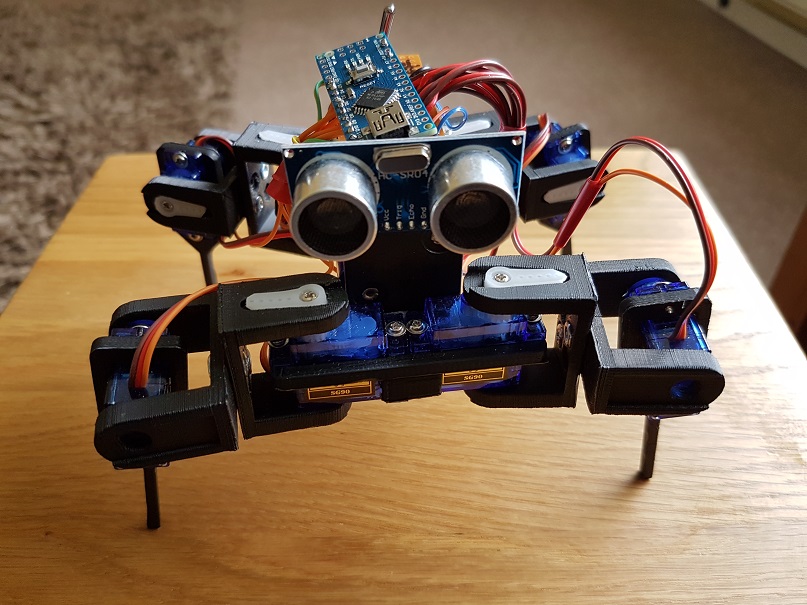
Robot3I decided to have a go at building a robot for a STEM session last weekend, to show the power of code and how it can be used to control something.  A moving robot is a great visualisation to demonstrate this.

After some searching I settled on a quadruped shown on thingverse (a 3d printing site). This is a build based on a robot called Chopstick Junior by Lumi.

Parts being printed, I set about thinking about the controls and motors. The parts are compatible with an SG90 servo. I needed 8 of these, for the knee and hip joints of the quadruped.

The assembly of the parts was a bit of a challenge as in the instructions it said you needed 3mm x 6mm screw/nuts to connect the shoulders together. You really need 3mm x 8mm screw/nuts as I have to countersink the holes a bit more to get the nuts to attach to the 6mm screw length.

Inserting the servos into the holes in the hips and legs required the unscrewing of the 4 small screws in each servo and temporarily removing the gear top. Once inserted this can be replaced and screwed down.

Once the servos were in place I centered the servos the best I could to allow backwards and forwards movement in each joint. I knew that later adjustment may be needed! This can easily be achieved removing the servo arm and hip/leg, then re-positioning and attaching the arm again.

The power is provided by 4 x AA batteries in a square battery holder. This was glued down onto the frame and fitted well into the build.

The power bus is provided by a small piece of circuit board. I used two lines for -v and +v. Each servo was then wired into the lines and the control wire to an Arduino Nano which is used as the brains of the robot.

The following pins were used on the Digital I/O on the Arduino Nano:

  • D2 – Hip 1
  • D3 – Knee1
  • D4 – Hip 2
  • D5 – Knee 2
  • D6 – Hip 3
  • D7 – Knee 3
  • D8 – Hip 4
  • D9 – Knee 4

I also wired in a sensor on the front of the robot to D10 and D11.

Wiring is grouped together to allow movement, but cut to a length that reduces excess that could get in the way of the legs.

A toggle switch provides an on/off for the power fixed to the rear of the robot. Remember to break the lines on the circuit board so it does not join any of the lines.

Once assembled I then got round to coding. I decided to use the opensource code for the Chopstick Junior as a base and make alterations. The quadruped responded well to the code and several physical servo adjustments were needed. Its now in a reasonable state, however balance is an issue in terms of walking steadily, so need to work more on this.  I have not yet coded movement to respond to the sensors yet, this will be done later.

The code is available via my Github:  https://github.com/Cloudmage/Robots

The robot went down well at the STEM session. Now to tweek that code……

Top view

Robot2

Side View

Robot3

Front View

Robot1

Share this:

  • Click to share on Facebook (Opens in new window) Facebook
  • Click to share on LinkedIn (Opens in new window) LinkedIn
  • Click to email a link to a friend (Opens in new window) Email
  • Click to share on Pinterest (Opens in new window) Pinterest
  • Click to share on Reddit (Opens in new window) Reddit
  • Click to share on Tumblr (Opens in new window) Tumblr
  • Click to share on Pocket (Opens in new window) Pocket
  • Click to share on Telegram (Opens in new window) Telegram
  • Click to share on Threads (Opens in new window) Threads
  • Click to share on WhatsApp (Opens in new window) WhatsApp
  • Click to share on Mastodon (Opens in new window) Mastodon
  • Click to share on X (Opens in new window) X
  • Click to share on Bluesky (Opens in new window) Bluesky
Like Loading...
← Older posts

RSS Feed

RSS Feed RSS - Posts

Other Publications I contribute to

https://sparrowhawkbushcraft.com/

Recent Posts

  • Graceful Speech & Timeless Tales: Mastering the Art of Gesture
  • Graceful Speech & Timeless Tales: The Power of Pitch
  • Graceful Speech & Timeless Tales: Modulation
  • Graceful Speech & Timeless Tales: Harnessing Inflection
  • Adventure Games: Open Sourced Zork

Categories

  • 21st Century Human
  • 3D Printing
  • AI
  • Applications
  • ArchiMate
  • Architecture
  • Arduino
  • Automation
  • BCS
  • Big Data
  • Certification
  • Climate Change
  • Cloud
  • Cobotics
  • Connected Home
  • Data
  • Data Fellowship
  • Data Science
  • Development
  • DevOps/OpsDev
  • Digital
  • DigitalFit
  • Drone
  • Enterprise Architecture
  • F-TAG
  • Governance
  • Health
  • Innovation
  • IoT
  • Machine Learning
  • Metaverse
  • Micro:Bit
  • Mindset
  • Mobiles
  • Networks
  • Open Source
  • Podcasts
  • Productivity
  • Programming
  • Quantum
  • Raspberry Pi
  • Robotics
  • Scouting
  • Scouts
  • Security
  • Smart Home
  • Social Media
  • Space
  • STEM
  • Story Telling
  • Technologists Toolkit
  • Tools
  • Uncategorized
  • Wearable Tech
  • Windows
  • xR

Archives

Reading Shelf

Archives

Recent Posts

  • Graceful Speech & Timeless Tales: Mastering the Art of Gesture
  • Graceful Speech & Timeless Tales: The Power of Pitch
  • Graceful Speech & Timeless Tales: Modulation
  • Graceful Speech & Timeless Tales: Harnessing Inflection
  • Adventure Games: Open Sourced Zork

Top Posts & Pages

  • Graceful Speech & Timeless Tales: The Art of Articulation
  • Graceful Speech & Timeless Tales: Mastering the Art of Gesture
  • Mastering the CPD Cycle for Professional Growth
  • Adventure Games: Open Sourced Zork
  • 20 Informative Podcasts for 2025: Boost Your PKMS
  • Understanding ISO/IEC 42001: A Course Review
  • Building Cyber Resilience: Enterprise Architecture and ArchiMate for Strategic Security
  • Graceful Speech & Timeless Tales: Modulation
  • Graceful Speech & Timeless Tales: The Power of Pitch

Category Cloud

21st Century Human Architecture Automation Big Data Cloud Data Data Science Development DevOps/OpsDev Digital DigitalFit Enterprise Architecture Innovation IoT Machine Learning Mindset Open Source Podcasts Productivity Programming Raspberry Pi Robotics Security Social Media STEM Story Telling Technologists Toolkit Tools Uncategorized Wearable Tech

Tags

3D Printing 21st Century Human AI Applications Architecture artificial-intelligence Automation BCS Big Data Blockchain business Certification Cloud Cobot Cobotics Coding Communication Connected Home CPD creativity cybersecurity Data Data Fellowship Data Science Delivery Development DevOps Digital DigitalFit Digital Human Drone Email Enterprise Architecture GTD Infographic Information Theory Innovation IoT Journal Knowledge learning Machine Learning Metaverse MicroLearning Mindset Mixed Reality Networks Open Source OpsDev PKMS Podcasts Productivity Programming Proving It Quantum R RaspberryPI Robot Robotics Scouts Security Smart Home Social Media STEM Story Telling Technologists Toolkit technology Technology Couch Podcast Thinking Tools Training Visualisation Voice Wearable Tech xR

License

Creative Commons Licence
This work is licensed under a Creative Commons Attribution-NonCommercial-ShareAlike 4.0 International License.

Meta

  • Create account
  • Log in
  • Entries feed
  • Comments feed
  • WordPress.com

Blog at WordPress.com.

  • Subscribe Subscribed
    • Max Hemingway
    • Join 82 other subscribers
    • Already have a WordPress.com account? Log in now.
    • Max Hemingway
    • Subscribe Subscribed
    • Sign up
    • Log in
    • Report this content
    • View site in Reader
    • Manage subscriptions
    • Collapse this bar
 

Loading Comments...
 

    %d